This time we’re going bigger than ever. Fabric, Power BI, SQL, AI and more. We're covering it all. You won't want to miss it.
Learn moreLevel up your Power BI skills this month - build one visual each week and tell better stories with data! Get started
Hi All,
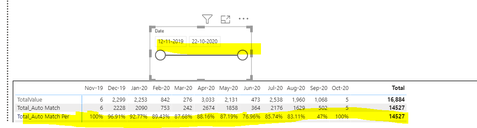
I have been trying to create a matrix with some data. I want to show data with respect to year and month.
I want to show the Total sum Infront of percentage row in the total column.
Please find below image. 3rd row. Total_Auto Match Per.
I am able to achieve this by using Dax but only if I Select Date range for more than one month.
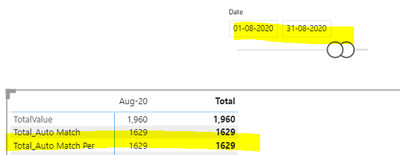
If I select One month range like 1st-Aug- to 31st Aug then in the Aug-20 Month column and Total column both are showing same values.
But I want month column shows percentage and total column show total sum,
Dax Formula
Total Value=CALCULATE(COUNT('Fact'[id]) )+0
Total_Auto Match =CALCULATE(COUNT('Fact'[id]),'Fact'[isauto] =1)+0
Total_Auto Match Per=
var totalRequests =CALCULATE(COUNT('Fact' [id]),ALLSELECTED('Fact'))
//Precentage calculation
var Automatch=Divide( Total_Auto Match ,Total Value)
return
IF([Total Value]>=totalRequests ,[Total_Auto Match] ,Automatch)
How should I go about it. Any help is appreciated.
Thanks
Hi @sbg94 ,
It is needed to change the calculation logic of "Total_Auto Match Per" measure.
Total_Auto Match Per=
var totalRequests =CALCULATE(COUNT('Fact' [id]),ALLSELECTED('Fact'))
var Automatch=Divide( Total_Auto Match ,Total Value)
return
IF([Total Value]>=totalRequests ,[Total_Auto Match] ,Automatch)
Best Regards,
Icey
If this post helps, then please consider Accept it as the solution to help the other members find it more quickly.
@sbg94 , Not able to get your issue. Can you explain with example ?
Also for your % measure use % , 2 decimal from measure tool
Create it like
var Automatch= Divide( Total_Auto Match ,Total Value)
return
IF([Total Value]>=totalRequests ,[Total_Auto Match] ,Automatch)
Check out the April 2026 Power BI update to learn about new features.
Sign up to receive a private message when registration opens and key events begin.
If you have recently started exploring Fabric, we'd love to hear how it's going. Your feedback can help with product improvements.
| User | Count |
|---|---|
| 36 | |
| 33 | |
| 31 | |
| 24 | |
| 18 |
| User | Count |
|---|---|
| 68 | |
| 50 | |
| 33 | |
| 24 | |
| 24 |