cancel
Showing results for 
Search instead for 
Did you mean: 

We've captured the moments from FabCon & SQLCon that everyone is talking about, and we are bringing them to the community, live and on-demand. Starts on April 14th. Register now

Reply
gpillai99
Frequent Visitor

AddColumns with Summarize

Hi all

Newbie here looking for some guidance. I'm trying to figure out what is the best DAX approach in solving the following problem. Any help from experts in this community is much appreciated. 


I have a table with that has timesheet data submitted by employees to record their time spent on customers. My goal is to proportionally allocate each employees cost to the respective customer accounts they worked on. The output will simply show two columns Customers and Allocated labour cost. Here is an snapshot of how I'm doing it in excel now. I tried using SummarizeColumns with AddColumns but could not figure out the DAX code. Thanks


gpillai99_0-1630848195051.png


2 ACCEPTED SOLUTIONS
DataInsights
Super User
Super User

@gpillai99,


Try this solution.


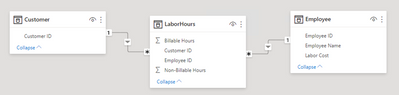
1. Data model:


DataInsights_0-1630862101316.png


2. Measures:


Billable Hours = SUM ( LaborHours[Billable Hours] )

Non-Billable Hours = SUM ( LaborHours[Non-Billable Hours] )

Allocated Labor Cost = 
VAR vBaseTable =
    ADDCOLUMNS (
        SUMMARIZE (
            LaborHours,
            Customer[Customer ID],
            Employee[Employee ID],
            Employee[Labor Cost]
        ),
        "@CustomerHours", [Billable Hours] + [Non-Billable Hours]
    )
VAR vEmpHoursTable =
    ADDCOLUMNS (
        vBaseTable,
        "@EmployeeHoursTotal", CALCULATE ( [Billable Hours] + [Non-Billable Hours], ALL ( Customer ) )
    )
VAR vPercentTable =
    ADDCOLUMNS (
        vEmpHoursTable,
        "@Percent", DIVIDE ( [@CustomerHours], [@EmployeeHoursTotal] )
    )
VAR vAllocationTable =
    ADDCOLUMNS ( vPercentTable, "@Allocation", [@Percent] * Employee[Labor Cost] )
VAR vResult =
    SUMX ( vAllocationTable, [@Allocation] )
RETURN
    vResult


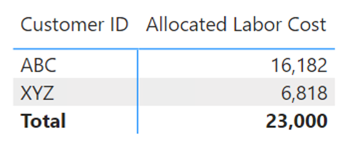
3. Create visual using Customer[Customer ID]:


DataInsights_1-1630862153174.png


Did I answer your question? Mark my post as a solution!

Proud to be a Super User!


View solution in original post

Yes, this is very clear and works perfectly. Thanks!

View solution in original post

2 REPLIES 2
DataInsights
Super User
Super User

@gpillai99,


Try this solution.


1. Data model:


DataInsights_0-1630862101316.png


2. Measures:


Billable Hours = SUM ( LaborHours[Billable Hours] )

Non-Billable Hours = SUM ( LaborHours[Non-Billable Hours] )

Allocated Labor Cost = 
VAR vBaseTable =
    ADDCOLUMNS (
        SUMMARIZE (
            LaborHours,
            Customer[Customer ID],
            Employee[Employee ID],
            Employee[Labor Cost]
        ),
        "@CustomerHours", [Billable Hours] + [Non-Billable Hours]
    )
VAR vEmpHoursTable =
    ADDCOLUMNS (
        vBaseTable,
        "@EmployeeHoursTotal", CALCULATE ( [Billable Hours] + [Non-Billable Hours], ALL ( Customer ) )
    )
VAR vPercentTable =
    ADDCOLUMNS (
        vEmpHoursTable,
        "@Percent", DIVIDE ( [@CustomerHours], [@EmployeeHoursTotal] )
    )
VAR vAllocationTable =
    ADDCOLUMNS ( vPercentTable, "@Allocation", [@Percent] * Employee[Labor Cost] )
VAR vResult =
    SUMX ( vAllocationTable, [@Allocation] )
RETURN
    vResult


3. Create visual using Customer[Customer ID]:


DataInsights_1-1630862153174.png


Did I answer your question? Mark my post as a solution!

Proud to be a Super User!


Yes, this is very clear and works perfectly. Thanks!

Helpful resources

Announcements
New to Fabric survey Carousel

New to Fabric Survey

If you have recently started exploring Fabric, we'd love to hear how it's going. Your feedback can help with product improvements.

Power BI DataViz World Championships carousel

Power BI DataViz World Championships - June 2026

A new Power BI DataViz World Championship is coming this June! Don't miss out on submitting your entry.

Join our Fabric User Panel

Join our Fabric User Panel

Share feedback directly with Fabric product managers, participate in targeted research studies and influence the Fabric roadmap.

March Power BI Update Carousel

Power BI Community Update - March 2026

Check out the March 2026 Power BI update to learn about new features.