Join us at FabCon Atlanta from March 16 - 20, 2026, for the ultimate Fabric, Power BI, AI and SQL community-led event. Save $200 with code FABCOMM.
Register now!The Power BI Data Visualization World Championships is back! Get ahead of the game and start preparing now! Learn more
Hi everyone,
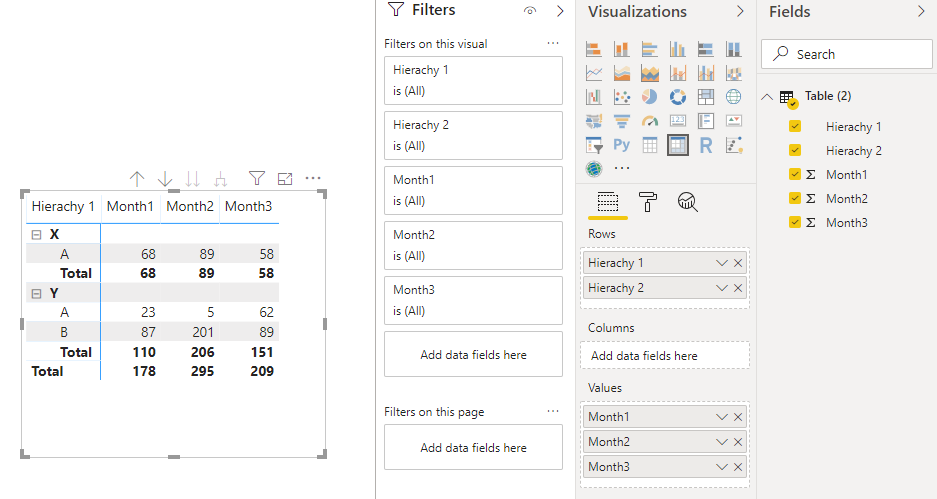
I'm new to PowerBI and I want to create a summary table that has subtotal for each group and a grand total as well (like in the example below). How can I do this in PowerBI?
Thank you!
Origin table:
| Hierachy 1 | Hierachy 2 | Month1 | Month2 | Month3 |
| X | A | 22 | 31 | 32 |
| X | A | 23 | 4 | 5 |
| X | A | 23 | 54 | 21 |
| Y | A | 23 | 5 | 62 |
| Y | B | 23 | 4 | 5 |
| Y | B | 23 | 54 | 21 |
| Y | B | 29 | 98 | 45 |
| Y | B | 12 | 45 | 18 |
Target:
| Hierachy 1 | Hierachy 2 | Month1 | Month2 | Month3 |
| X | A | 68 | 89 | 58 |
| Total | 68 | 89 | 58 | |
| Y | A | 23 | 5 | 62 |
| B | 87 | 201 | 89 | |
| Total | 110 | 206 | 151 | |
| Total | 178 | 295 | 209 |
Solved! Go to Solution.
Hi @LinhNguyen
let me know if you'd like to get this one:
Pbix attached.
Hi @LinhNguyen
let me know if you'd like to get this one:
Pbix attached.
Thank you!
Please try Matrix visual
https://docs.microsoft.com/en-us/power-bi/visuals/desktop-matrix-visual
The Power BI Data Visualization World Championships is back! Get ahead of the game and start preparing now!
| User | Count |
|---|---|
| 37 | |
| 37 | |
| 33 | |
| 32 | |
| 29 |
| User | Count |
|---|---|
| 130 | |
| 88 | |
| 82 | |
| 68 | |
| 64 |