FabCon is coming to Atlanta
Join us at FabCon Atlanta from March 16 - 20, 2026, for the ultimate Fabric, Power BI, AI and SQL community-led event. Save $200 with code FABCOMM.
Register now!- Power BI forums
- Get Help with Power BI
- Desktop
- Service
- Report Server
- Power Query
- Mobile Apps
- Developer
- DAX Commands and Tips
- Custom Visuals Development Discussion
- Health and Life Sciences
- Power BI Spanish forums
- Translated Spanish Desktop
- Training and Consulting
- Instructor Led Training
- Dashboard in a Day for Women, by Women
- Galleries
- Data Stories Gallery
- Themes Gallery
- Contests Gallery
- QuickViz Gallery
- Quick Measures Gallery
- Visual Calculations Gallery
- Notebook Gallery
- Translytical Task Flow Gallery
- TMDL Gallery
- R Script Showcase
- Webinars and Video Gallery
- Ideas
- Custom Visuals Ideas (read-only)
- Issues
- Issues
- Events
- Upcoming Events
The Power BI Data Visualization World Championships is back! Get ahead of the game and start preparing now! Learn more
- Power BI forums
- Forums
- Get Help with Power BI
- Desktop
- Re: Add time to my calender table
- Subscribe to RSS Feed
- Mark Topic as New
- Mark Topic as Read
- Float this Topic for Current User
- Bookmark
- Subscribe
- Printer Friendly Page


- Mark as New
- Bookmark
- Subscribe
- Mute
- Subscribe to RSS Feed
- Permalink
- Report Inappropriate Content
Add time (clock, aka hours and minutes) to my calender table
I've got a calender table with a bunch of DAX foruma's...like date, year, quarter, month, monrht sort, etc.
I'd like to make a new column for "time", specifically hours and minutes. Can anyone help me with a DAX forula so I can have a Time column with hour and minute??
Thanks!
- Mark as New
- Bookmark
- Subscribe
- Mute
- Subscribe to RSS Feed
- Permalink
- Report Inappropriate Content
Example, my first DAX in my calender table is
Calendar = CALENDAR(MIN(Invoice[NvDate]),max(Invoice[NvDate]))
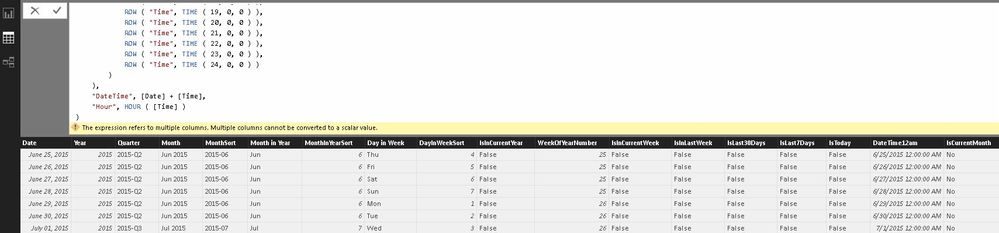
Here is a screenshot of the other columns. Would like to have one for time, and if possible hours and minutes in their own column.

- Mark as New
- Bookmark
- Subscribe
- Mute
- Subscribe to RSS Feed
- Permalink
- Report Inappropriate Content
Anyone??? Please 🙂
- Mark as New
- Bookmark
- Subscribe
- Mute
- Subscribe to RSS Feed
- Permalink
- Report Inappropriate Content
Is this a crazy complicated thing to do or am I the first one to ever ask such a thing???!?!?!
Help :-)!!!


- Mark as New
- Bookmark
- Subscribe
- Mute
- Subscribe to RSS Feed
- Permalink
- Report Inappropriate Content
- Mark as New
- Bookmark
- Subscribe
- Mute
- Subscribe to RSS Feed
- Permalink
- Report Inappropriate Content
Almost. I tried the formula but get this error...
"The expression refers to multyiple columns. Multiple columns cannot be converted to a scalar value"
Any idea's?
DateTime =
ADDCOLUMNS (
    CROSSJOIN (
        CALENDAR ( DATE ( 2000, 1, 1 ), DATE ( 2025, 12, 31 ) ),
        UNION (
            ROW ( "Time", TIME ( 1, 0, 0 ) ),
            ROW ( "Time", TIME ( 2, 0, 0 ) ),
            ROW ( "Time", TIME ( 3, 0, 0 ) ),
            ROW ( "Time", TIME ( 4, 0, 0 ) ),
            ROW ( "Time", TIME ( 5, 0, 0 ) ),
            ROW ( "Time", TIME ( 6, 0, 0 ) ),
            ROW ( "Time", TIME ( 7, 0, 0 ) ),
            ROW ( "Time", TIME ( 9, 0, 0 ) ),
            ROW ( "Time", TIME ( 10, 0, 0 ) ),
            ROW ( "Time", TIME ( 11, 0, 0 ) ),
            ROW ( "Time", TIME ( 12, 0, 0 ) ),
            ROW ( "Time", TIME ( 13, 0, 0 ) ),
            ROW ( "Time", TIME ( 14, 0, 0 ) ),
            ROW ( "Time", TIME ( 15, 0, 0 ) ),
            ROW ( "Time", TIME ( 16, 0, 0 ) ),
            ROW ( "Time", TIME ( 17, 0, 0 ) ),
            ROW ( "Time", TIME ( 18, 0, 0 ) ),
            ROW ( "Time", TIME ( 19, 0, 0 ) ),
            ROW ( "Time", TIME ( 20, 0, 0 ) ),
            ROW ( "Time", TIME ( 21, 0, 0 ) ),
            ROW ( "Time", TIME ( 22, 0, 0 ) ),
            ROW ( "Time", TIME ( 23, 0, 0 ) ),
            ROW ( "Time", TIME ( 24, 0, 0 ) )
        )
    ),
    "DateTime", [Date] + [Time],
    "Hour", HOUR ( [Time] )
)
- Mark as New
- Bookmark
- Subscribe
- Mute
- Subscribe to RSS Feed
- Permalink
- Report Inappropriate Content
Here is a snip of the error...not sure if looking at the other columns I have might help ID the issue?
- Mark as New
- Bookmark
- Subscribe
- Mute
- Subscribe to RSS Feed
- Permalink
- Report Inappropriate Content
Anyone? I'm really trying to get this solved and keep hitting road blocks.
Am I supposed to paste the formula in the advanced editor, not the column/dax formula bar???
- Mark as New
- Bookmark
- Subscribe
- Mute
- Subscribe to RSS Feed
- Permalink
- Report Inappropriate Content
I think the problem might be how I do my date...my date is made instead of a preset date range, it goes from the minimum date in the table, to the max date based on invoice number. Like so...
Calendar = CALENDAR(MIN(Invoice[NvDate]),max(Invoice[NvDate]))
then I modded the code suggested to so...
DateTime =
ADDCOLUMNS (
    CROSSJOIN (
        CALENDAR(MIN(Invoice[NvDate]),max(Invoice[NvDate])),
        UNION (
            ROW ( "Time", TIME ( 1, 0, 0 ) ),
            ROW ( "Time", TIME ( 2, 0, 0 ) ),
            ROW ( "Time", TIME ( 3, 0, 0 ) ),
            ROW ( "Time", TIME ( 4, 0, 0 ) ),
            ROW ( "Time", TIME ( 5, 0, 0 ) ),
            ROW ( "Time", TIME ( 6, 0, 0 ) ),
            ROW ( "Time", TIME ( 7, 0, 0 ) ),
            ROW ( "Time", TIME ( 9, 0, 0 ) ),
            ROW ( "Time", TIME ( 10, 0, 0 ) ),
            ROW ( "Time", TIME ( 11, 0, 0 ) ),
            ROW ( "Time", TIME ( 12, 0, 0 ) ),
            ROW ( "Time", TIME ( 13, 0, 0 ) ),
            ROW ( "Time", TIME ( 14, 0, 0 ) ),
            ROW ( "Time", TIME ( 15, 0, 0 ) ),
            ROW ( "Time", TIME ( 16, 0, 0 ) ),
            ROW ( "Time", TIME ( 17, 0, 0 ) ),
            ROW ( "Time", TIME ( 18, 0, 0 ) ),
            ROW ( "Time", TIME ( 19, 0, 0 ) ),
            ROW ( "Time", TIME ( 20, 0, 0 ) ),
            ROW ( "Time", TIME ( 21, 0, 0 ) ),
            ROW ( "Time", TIME ( 22, 0, 0 ) ),
            ROW ( "Time", TIME ( 23, 0, 0 ) ),
            ROW ( "Time", TIME ( 24, 0, 0 ) )
        )
    ),
    "DateTime", [Date] + [Time],)
But i'm still getting an error...now "Function ADDCOLUMNS expects a column name as argument number 4.
Please help 🙂

Helpful resources

Power BI Dataviz World Championships
The Power BI Data Visualization World Championships is back! Get ahead of the game and start preparing now!

Power BI Monthly Update - December 2025
Check out the December 2025 Power BI Holiday Recap!

FabCon Atlanta 2026
Join us at FabCon Atlanta, March 16-20, for the ultimate Fabric, Power BI, AI and SQL community-led event. Save $200 with code FABCOMM.

| User | Count |
|---|---|
| 38 | |
| 38 | |
| 37 | |
| 28 | |
| 28 |


| User | Count |
|---|---|
| 124 | |
| 89 | |
| 73 | |
| 66 | |
| 65 |


