cancel
Showing results for 
Search instead for 
Did you mean: 

Get Fabric Certified for FREE during Fabric Data Days. Don't miss your chance! Request now

Reply
Anonymous
Not applicable

Add the contents of the data onto the Bar Chart

Hi!


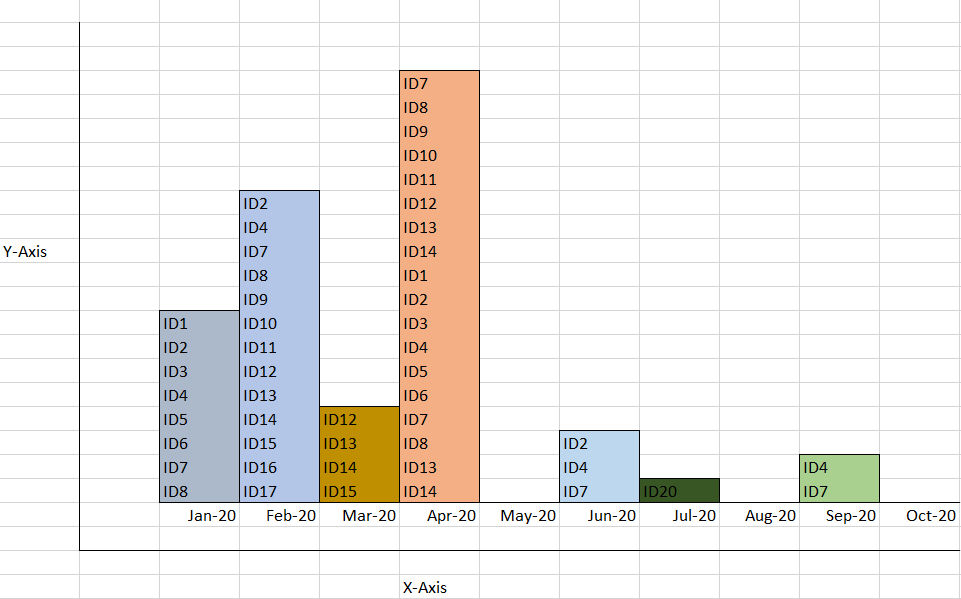
I am looking to add the IDs itself to the bar chart that I am creating. Say the Y axis gives us a count of the ID;s and X axis the Months. I want to display the IDs list as well on the bar.

Capture344.PNG


Is this something possible to do so using a bar chart?

I know I can provide a table below the chart but that is not what is the requirement for the user.


Kind Regards

3 REPLIES 3
AllisonKennedy
Super User
Super User

I can't think of an exact solution in Power BI - have you check the custom visuals to see if it can be done there? 


My workarounds are: 


Option A) 

Put ID in legend so you can see the ID in the tooltip when you hover. This will make your colors go funny though, so not exactly what you want. It also only puts the IDin tooltip, it won't print them on the bar.


Option B)

Again, only a tooltip solution: 


Create a new measure:
ID List = CONCATENATEX(FactTable, FactTable[ID], ", ")
Add that measure to Tooltips
AllisonKennedy_0-1600488914151.png


Option B.5)

Use report page tooltips to display the entire table on hover: https://docs.microsoft.com/en-us/power-bi/create-reports/desktop-tooltips


Please @mention me in your reply if you want a response.

Copying DAX from this post? Click here for a hack to quickly replace it with your own table names

Has this post solved your problem? Please Accept as Solution so that others can find it quickly and to let the community know your problem has been solved.
If you found this post helpful, please give Kudos C

I work as a Microsoft trainer and consultant, specialising in Power BI and Power Query.
www.excelwithallison.com

Anonymous
Not applicable

So I assume there is no way to show the ID as the part of the stacked bar , ony tooltip is the otion ....is that so?

For the native Power BI visuals that is correct. You could vote for the idea here: https://ideas.powerbi.com/ideas/

Please @mention me in your reply if you want a response.

Copying DAX from this post? Click here for a hack to quickly replace it with your own table names

Has this post solved your problem? Please Accept as Solution so that others can find it quickly and to let the community know your problem has been solved.
If you found this post helpful, please give Kudos C

I work as a Microsoft trainer and consultant, specialising in Power BI and Power Query.
www.excelwithallison.com

Helpful resources

Announcements
November Power BI Update Carousel

Power BI Monthly Update - November 2025

Check out the November 2025 Power BI update to learn about new features.

Fabric Data Days Carousel

Fabric Data Days

Advance your Data & AI career with 50 days of live learning, contests, hands-on challenges, study groups & certifications and more!

FabCon Atlanta 2026 carousel

FabCon Atlanta 2026

Join us at FabCon Atlanta, March 16-20, for the ultimate Fabric, Power BI, AI and SQL community-led event. Save $200 with code FABCOMM.

Top Solution Authors
Top Kudoed Authors