cancel
Showing results for 
Search instead for 
Did you mean: 

Data Days is here! Join us now for 60+ days of learning, challenges, and connection. Learn more

Reply
Anonymous
Not applicable

Add rows for missing months

Hi everyone, i hope you can help me.


I have some evaluations for a group of countries, but this evaluations aren't made for every month. 

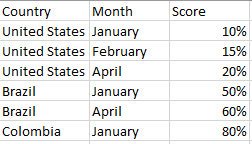
The data looks like this:

Mariapiedr15_0-1625778871735.png


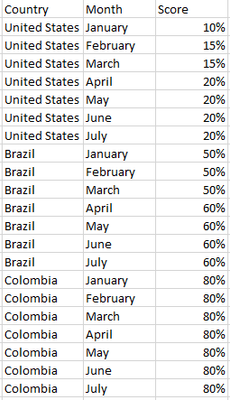
But i need score for every month, if there is a month without evaluation the score should be the last one. Therefore i need yo add the missing months in new rows and take the previous score.

The data should look like this:

Mariapiedr15_1-1625779036436.png

Another issue is that the data is in a calculated table so i can't do a merge in edit query 😞

1 ACCEPTED SOLUTION
AlexisOlson
Super User
Super User

Without a date dimension table, this is quite a bit of work since the months are not numbered or ordered.


You can still do it like this though:

Cross =
VAR Cartesian =
    ADDCOLUMNS (
        CROSSJOIN (
            VALUES ( Table1[Country] ),
            SELECTCOLUMNS ( GENERATESERIES ( 1, 12 ), "MonthNo", [Value] )
        ),
        "Month", FORMAT ( DATE ( 2000, [MonthNo], 1 ), "mmmm" )
    )
VAR AddScore =
    ADDCOLUMNS (
        Cartesian,
        "ScoreLookup",
            LOOKUPVALUE (
                Table1[Score],
                Table1[Country], [Country],
                Table1[Month], [Month]
            )
    )
VAR FillScore =
    ADDCOLUMNS (
        AddScore,
        "Score",
            VAR CountryRow = [Country]
            VAR MonthNoRow = [MonthNo]
            VAR LastScoreMonth =
                MAXX (
                    FILTER (
                        AddScore,
                        [Country] = CountryRow
                            && [MonthNo] <= MonthNoRow
                            && NOT ISBLANK ( [ScoreLookup] )
                    ),
                    [MonthNo]
                )
            RETURN
                MAXX (
                    FILTER ( AddScore, [Country] = CountryRow && [MonthNo] = LastScoreMonth ),
                    [ScoreLookup]
                )
    )
RETURN
    SELECTCOLUMNS (
        FillScore,
        "Country", [Country],
        "Month", [Month],
        "Score", [Score]
    )


Here's what this looks like with the helper columns included:
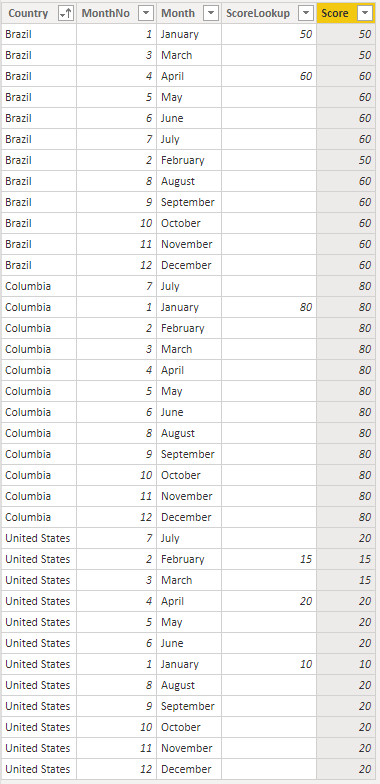
AlexisOlson_0-1625781990321.png


View solution in original post

4 REPLIES 4
v-henryk-mstf
Community Support
Community Support

Hi @Anonymous ,


According to your needs, I agree with the method provided by @AlexisOlson . But I think it may be a bit complicated to create by dax formula.

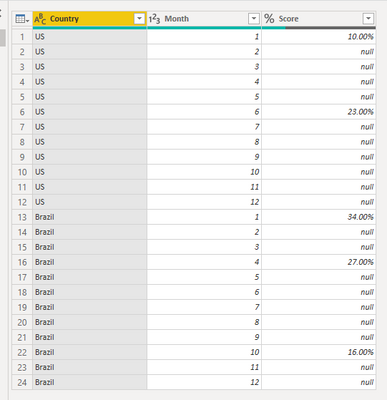
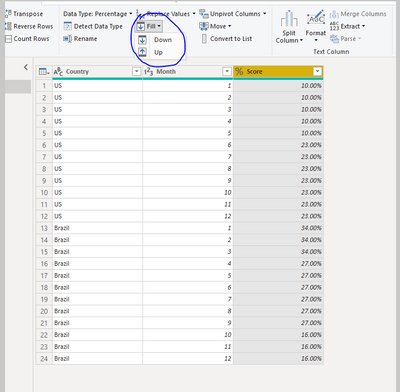
My suggestion is that you can create a data model with a complete month, and then use the fill down function in the power query to meet your needs. The reference is as follows:

vhenrykmstf_0-1626079516192.png

vhenrykmstf_1-1626079567704.png


Best Regards,
Henry


If this post helps, then please consider Accept it as the solution to help the other members find it more quickly.

AlexisOlson
Super User
Super User

Without a date dimension table, this is quite a bit of work since the months are not numbered or ordered.


You can still do it like this though:

Cross =
VAR Cartesian =
    ADDCOLUMNS (
        CROSSJOIN (
            VALUES ( Table1[Country] ),
            SELECTCOLUMNS ( GENERATESERIES ( 1, 12 ), "MonthNo", [Value] )
        ),
        "Month", FORMAT ( DATE ( 2000, [MonthNo], 1 ), "mmmm" )
    )
VAR AddScore =
    ADDCOLUMNS (
        Cartesian,
        "ScoreLookup",
            LOOKUPVALUE (
                Table1[Score],
                Table1[Country], [Country],
                Table1[Month], [Month]
            )
    )
VAR FillScore =
    ADDCOLUMNS (
        AddScore,
        "Score",
            VAR CountryRow = [Country]
            VAR MonthNoRow = [MonthNo]
            VAR LastScoreMonth =
                MAXX (
                    FILTER (
                        AddScore,
                        [Country] = CountryRow
                            && [MonthNo] <= MonthNoRow
                            && NOT ISBLANK ( [ScoreLookup] )
                    ),
                    [MonthNo]
                )
            RETURN
                MAXX (
                    FILTER ( AddScore, [Country] = CountryRow && [MonthNo] = LastScoreMonth ),
                    [ScoreLookup]
                )
    )
RETURN
    SELECTCOLUMNS (
        FillScore,
        "Country", [Country],
        "Month", [Month],
        "Score", [Score]
    )


Here's what this looks like with the helper columns included:

AlexisOlson_0-1625781990321.png


Anonymous
Not applicable

Thank youuuuuuuuu ❤️

AllisonKennedy
Community Champion
Community Champion

@Anonymous  this can be done easily if you have a DimDate table: https://excelwithallison.blogspot.com/2020/04/dimdate-what-why-and-how.html


What does your data model look like?


Please @mention me in your reply if you want a response.

Copying DAX from this post? Click here for a hack to quickly replace it with your own table names

Has this post solved your problem? Please Accept as Solution so that others can find it quickly and to let the community know your problem has been solved.
If you found this post helpful, please give Kudos C

I work as a Microsoft trainer and consultant, specialising in Power BI and Power Query.
www.excelwithallison.com

Helpful resources

Announcements
Fabric Data Days is here Carousel

Fabric Data Days 2026

Don't miss out on Data Days, June 15 through August 7. Learn Fabric, Power BI, SQL, AI and more.

May Power BI Update Carousel

Power BI Monthly Update - May 2026

Check out the May 2026 Power BI update to learn about new features.

Power BI DataViz World Championships carousel

Power BI DataViz World Championships - June 2026

A new Power BI DataViz World Championship is coming this June! Don't miss out on submitting your entry.