Join us at FabCon Atlanta from March 16 - 20, 2026, for the ultimate Fabric, Power BI, AI and SQL community-led event. Save $200 with code FABCOMM.
Register now!Get Fabric Certified for FREE during Fabric Data Days. Don't miss your chance! Request now
hi PBI experts,
i have the following case:
We have a KPI for the production time of our products (A, B, C) and regions (Europe, North America, Asia). The production time of product A in region Europe may take 2 working days, weekend days not included. we have a KPI file and a production file:
KPI file:
| Production type | Region | KPI working days | Key |
| A | Europe | 2 | A/Europe |
| A | North America | 4 | A/North America |
| A | Asia | 3 | A/Asia |
| B | Europe | 7 | B/Europe |
| B | North America | 11 | B/North America |
| B | Asia | 9 | B/Asia |
| C | Europe | 20 | C/Europe |
| C | North America | 30 | C/North America |
| C | Asia | 27 | C/Asia |
Production file:
| Product type | Region | Date Start Production | Weekday | KPI | Date End Production |
| A | Europe | 3-1-2020 | Friday | 2 | 6-1-2020 |
| A | North America | 1-1-2020 | Wednesday | 4 | 6-1-2020 |
| A | Asia | 7-1-2020 | Tuesday | 3 | 9-1-2020 |
| B | Europe | 9-1-2020 | Thirsday | 3 | 13-1-2020 |
| B | North America | 5-1-2020 | Sunday | 5 | 10-1-2020 |
| B | Asia | 5-3-2020 | Thirsday | 4 | 10-3-2020 |
| C | Europe | 27-2-2020 | Thirsday | 4 | 3-3-2020 |
| C | North America | 1-4-2020 | Wednesday | 6 | 8-4-2020 |
| C | Asia | 3-4-2020 | Friday | 5 | 9-4-2020 |
| A | Europe | 10-4-2020 | Friday | 2 | 13-4-2020 |
| A | North America | 20-4-2020 | Monday | 4 | 23-4-2020 |
| A | Asia | 3-5-2020 | Sunday | 3 | 6-5-2020 |
| B | Europe | 7-5-2020 | Thirsday | 3 | 11-5-2020 |
| B | North America | 13-5-2020 | Wednesday | 5 | 19-5-2020 |
| B | Asia | 5-6-2020 | Friday | 4 | 10-6-2020 |
| C | Europe | 11-6-2020 | Thirsday | 4 | 16-6-2020 |
| C | North America | 20-6-2020 | Saturday | 6 | 29-6-2020 |
| C | Asia | 30-6-2020 | Tuesday | 5 | 6-7-2020 |
| A | Europe | 1-7-2020 | Wednesday | 2 | 2-7-2020 |
| A | North America | 10-7-2020 | Friday | 4 | 15-7-2020 |
| A | Asia | 13-7-2020 | Monday | 3 | 15-7-2020 |
| B | Europe | 15-6-2020 | Monday | 3 | 17-6-2020 |
| B | North America | 1-7-2020 | Wednesday | 5 | 7-7-2020 |
| B | Asia | 1-8-2020 | Saturday | 3 | 5-8-2020 |
| C | Europe | 10-8-2020 | Monday | 4 | 13-8-2020 |
| C | North America | 20-8-2020 | Thirsday | 6 | 27-8-2020 |
| C | Asia | 3-8-2020 | Monday | 5 | 7-8-2020 |
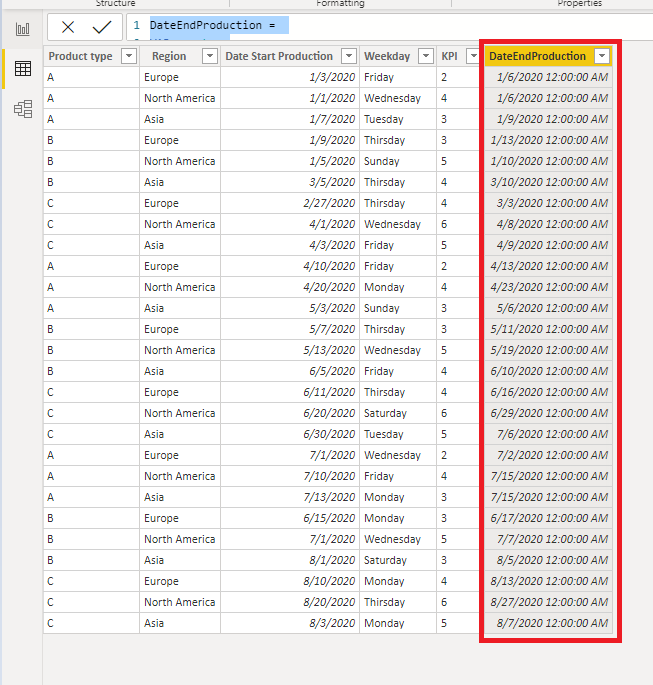
The column date end production is the needed outcome (start date + KPI working days). If the production of type A in Europa starts on monday, the production has to be finished on tuesday. If the production starts on saturday, the production also has to be finished on tuesday.
I hope someone can help me with this problem.
Thanks in advance,
Regards, Frank
Solved! Go to Solution.
Hi @frankhofmans ,
I referred to the link posted by @amitchandak .
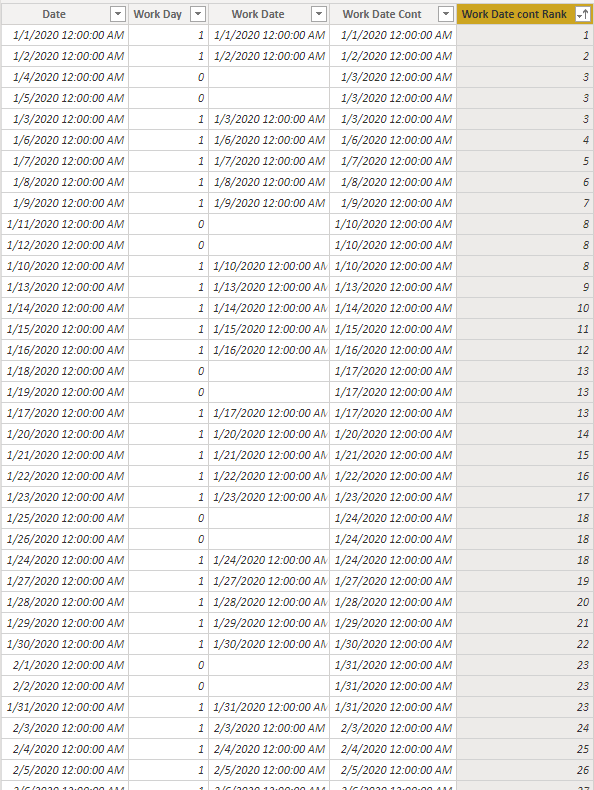
1.Create a calendar table.
Date =
ADDCOLUMNS (
CALENDAR ( DATE ( 2020, 1, 1 ), DATE ( 2020, 8, 28 ) ),
"Work Day", IF ( WEEKDAY ( [Date], 2 ) >= 6, 0, 1 ),
"Work Date", IF ( WEEKDAY ( [Date], 2 ) >= 6, BLANK (), [Date] )
)Work Date Cont =
IF (
[Work Day] = 0,
MAXX (
FILTER (
'Date',
[Date] < EARLIER ( [Date] )
&& [Work Day] <> EARLIER ( [Work Day] )
),
[Date]
),
[Date]
)Work Date cont Rank =
RANKX ( ALL ( 'Date' ), [Work Date Cont],, ASC, DENSE )
2.Create a calculated column.
DateEndProduction =
VAR _rank =
RELATED ( 'Date'[Work Date cont Rank])
VAR _kpi = 'Production'[KPI]
RETURN
SWITCH (
TRUE (),
WEEKDAY ( 'Production'[Date Start Production], 2 ) = 6
|| WEEKDAY ( 'Production'[Date Start Production], 2 ) = 7,
CALCULATE (
MIN ( 'Date'[Date] ),
FILTER ( ALL ( 'Date' ), 'Date'[Work Date cont Rank] = _rank + _kpi )
),
WEEKDAY ( 'Production'[Date Start Production], 2 ) <= 5,
CALCULATE (
MIN ( 'Date'[Date] ),
FILTER ( ALL ( 'Date' ), 'Date'[Work Date cont Rank] = _rank + _kpi - 1 )
)
)
You can check more details from here.
Best Regards,
Stephen Tao
If this post helps, then please consider Accept it as the solution to help the other members find it more quickly.
Hi @frankhofmans ,
I referred to the link posted by @amitchandak .
1.Create a calendar table.
Date =
ADDCOLUMNS (
CALENDAR ( DATE ( 2020, 1, 1 ), DATE ( 2020, 8, 28 ) ),
"Work Day", IF ( WEEKDAY ( [Date], 2 ) >= 6, 0, 1 ),
"Work Date", IF ( WEEKDAY ( [Date], 2 ) >= 6, BLANK (), [Date] )
)Work Date Cont =
IF (
[Work Day] = 0,
MAXX (
FILTER (
'Date',
[Date] < EARLIER ( [Date] )
&& [Work Day] <> EARLIER ( [Work Day] )
),
[Date]
),
[Date]
)Work Date cont Rank =
RANKX ( ALL ( 'Date' ), [Work Date Cont],, ASC, DENSE )
2.Create a calculated column.
DateEndProduction =
VAR _rank =
RELATED ( 'Date'[Work Date cont Rank])
VAR _kpi = 'Production'[KPI]
RETURN
SWITCH (
TRUE (),
WEEKDAY ( 'Production'[Date Start Production], 2 ) = 6
|| WEEKDAY ( 'Production'[Date Start Production], 2 ) = 7,
CALCULATE (
MIN ( 'Date'[Date] ),
FILTER ( ALL ( 'Date' ), 'Date'[Work Date cont Rank] = _rank + _kpi )
),
WEEKDAY ( 'Production'[Date Start Production], 2 ) <= 5,
CALCULATE (
MIN ( 'Date'[Date] ),
FILTER ( ALL ( 'Date' ), 'Date'[Work Date cont Rank] = _rank + _kpi - 1 )
)
)
You can check more details from here.
Best Regards,
Stephen Tao
If this post helps, then please consider Accept it as the solution to help the other members find it more quickly.
Many thanks Stephen! This works perfect.
Regards,
Frank
Check out the November 2025 Power BI update to learn about new features.
Advance your Data & AI career with 50 days of live learning, contests, hands-on challenges, study groups & certifications and more!