Get certified for free when you join Fabric Data Days 2026 and dive into Fabric, Power BI, SQL, AI, and other essential data skills.
Join nowData Days is here! Join us now for 60+ days of learning, challenges, and connection. Learn more
Hello,
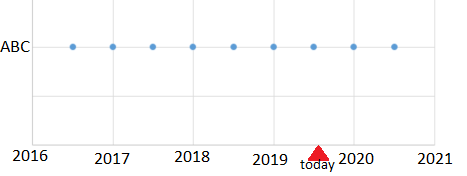
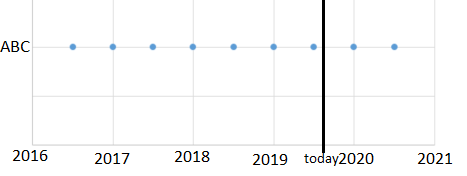
I'm using the dot plot by MAQ Software to plot dates and I'd like to add a reference line or a marker to indicate the current date. Is this possible to do in this chart type? Here are some examples to clarify.
Solved! Go to Solution.
Hi @Anonymous ,
Your demand is a good idea, while it is not supported to implement vertical reference line in Power BI currently. You can post your new idea here https://ideas.powerbi.com/forums/265200-power-bi-ideas , to improve the Power BI.
It is a place for customers provide feedback about Microsoft Office products . What’s more, if a feedback is high voted there by other customers, it will be promising that Microsoft Product Team will take it into consideration when designing the next version in the future.
To work around the issue, you can try to use "line and stacked column chart" visual, and create measure Reference line like DAX below.
Reference line= IF(SELECTEDVALUE(Table1[Date])=TODAY(),MAXX (ALL(Table1[Date]), MAX(Table1[Sales] ))
Best Regards,
Amy
If this post helps, then please consider Accept it as the solution to help the other members find it more quickly.
Hi @Anonymous ,
Your demand is a good idea, while it is not supported to implement vertical reference line in Power BI currently. You can post your new idea here https://ideas.powerbi.com/forums/265200-power-bi-ideas , to improve the Power BI.
It is a place for customers provide feedback about Microsoft Office products . What’s more, if a feedback is high voted there by other customers, it will be promising that Microsoft Product Team will take it into consideration when designing the next version in the future.
To work around the issue, you can try to use "line and stacked column chart" visual, and create measure Reference line like DAX below.
Reference line= IF(SELECTEDVALUE(Table1[Date])=TODAY(),MAXX (ALL(Table1[Date]), MAX(Table1[Sales] ))
Best Regards,
Amy
If this post helps, then please consider Accept it as the solution to help the other members find it more quickly.
Don't miss out on Data Days, June 15 through August 7. Learn Fabric, Power BI, SQL, AI and more.
Check out the May 2026 Power BI update to learn about new features.
| User | Count |
|---|---|
| 23 | |
| 23 | |
| 21 | |
| 17 | |
| 14 |
| User | Count |
|---|---|
| 58 | |
| 50 | |
| 37 | |
| 29 | |
| 24 |