Get certified for free when you join Fabric Data Days 2026 and dive into Fabric, Power BI, SQL, AI, and other essential data skills.
Join nowData Days is here! Join us now for 60+ days of learning, challenges, and connection. Learn more
The report I am currently working on is bringing in data from a SharePoint site. One of the columns is "Project Title". What I am trying to do is create a link from the "Project Title" values in the Power BI table back to the corresponding item in the SharePoint list. Is this possible? Thank you in advance for any help or advice.
Hi,
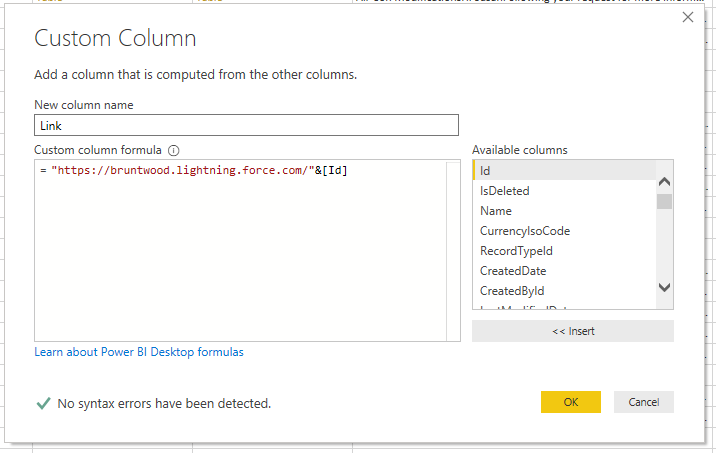
I use this in nearly all my reports so people can go back to the source. I'm not sure how sharepoint works as I use salesforce but I just create a new column and have the base URL mixed with the unquie ID.
This then directs users to a specific record in salesforce
Hope it works out for you
Rob
That would work perfectly, but the URL for the SharePoint item does not include the project title and there isn't any discernable pattern to the URLs.
Depending on how you are trying to link them,
You could try by naming the columns you want to link from both of your sources the same name,
and in the edit queries page and append the two tables.
I'm not sure you understood what I am trying to do. I want to be able to click on a value in the "Project Title" column and have it open the corresponding item in the SharePoint list which is the data source for the Power BI report. I am not trying to link two tables within Power BI.
Don't miss out on Data Days, June 15 through August 7. Learn Fabric, Power BI, SQL, AI and more.
Check out the May 2026 Power BI update to learn about new features.
| User | Count |
|---|---|
| 23 | |
| 23 | |
| 21 | |
| 17 | |
| 13 |
| User | Count |
|---|---|
| 58 | |
| 51 | |
| 39 | |
| 29 | |
| 24 |