cancel
Showing results for 
Search instead for 
Did you mean: 

The Power BI Data Visualization World Championships is back! Get ahead of the game and start preparing now! Learn more

Reply
Giadev
Frequent Visitor

Add hidden fixed value to a filter

Hi,

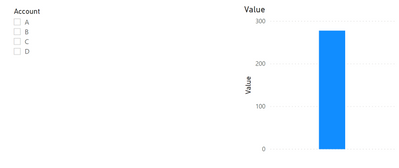
I need to add some hidden fixed values to a filtered selection.


This s my table:

AccountValue
A10
B22
C23
D44
Z45
Z56
Z78


Slicer with hidden Account eq to "Z", but I need to sum all Accounts Z values plus values of other selected accounts.


Power BIPower BI


I hope it is harder to explain than to do it...


Thanks

1 ACCEPTED SOLUTION
v-luwang-msft
Community Support
Community Support

H@Giadev ,

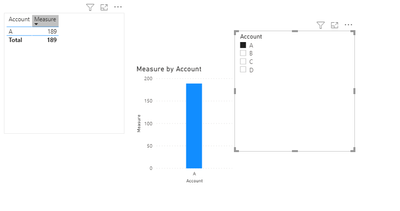
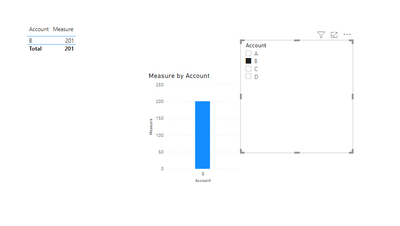
Is this what you want to get, when you select A at the slicer, you get the data of A plus the data sum of Z. If you select B at the slicer, you get the data of B plus the data sum of Z.If soYou could try the following dax to create a measure:

measure =
VAR sumz =
    CALCULATE (
        SUM ( 'Table'[Value] ),
        FILTER ( ALL ( 'Table' ), 'Table'[Account] = "Z" )
    )
VAR TABLE2 =
    CALCULATETABLE (
        VALUES ( 'Table'[Account] ),
        FILTER (
            ALL ( 'Table' ),
            'Table'[Account] = SELECTEDVALUE ( 'Table'[Account] )
        )
    )
VAR last =
    IF ( MAX ( 'Table'[Account] ) IN TABLE2SUM ( 'Table'[Value] ) + sumz"" )
RETURN
    last


final you will get the below:

v-luwang-msft_0-1614332635928.png


v-luwang-msft_1-1614332635930.png


Wish  it is helpful for you!


Best Regard

Lucien Wang


View solution in original post

3 REPLIES 3
v-luwang-msft
Community Support
Community Support

H@Giadev ,

Is this what you want to get, when you select A at the slicer, you get the data of A plus the data sum of Z. If you select B at the slicer, you get the data of B plus the data sum of Z.If soYou could try the following dax to create a measure:

measure =
VAR sumz =
    CALCULATE (
        SUM ( 'Table'[Value] ),
        FILTER ( ALL ( 'Table' ), 'Table'[Account] = "Z" )
    )
VAR TABLE2 =
    CALCULATETABLE (
        VALUES ( 'Table'[Account] ),
        FILTER (
            ALL ( 'Table' ),
            'Table'[Account] = SELECTEDVALUE ( 'Table'[Account] )
        )
    )
VAR last =
    IF ( MAX ( 'Table'[Account] ) IN TABLE2SUM ( 'Table'[Value] ) + sumz"" )
RETURN
    last


final you will get the below:

v-luwang-msft_0-1614332635928.png


v-luwang-msft_1-1614332635930.png


Wish  it is helpful for you!


Best Regard

Lucien Wang


CNENFRNL
Community Champion
Community Champion

@Giadev , as you mentioned, you can add a fixed sum up of Z to the selected account this way,

Hidden Z =
CALCULATE ( SUM ( Table1[Value] ), Table1[Account] = "Z" ) + SUM ( Table1[Value] )

Thanks to the great efforts by MS engineers to simplify syntax of DAX! Most beginners are SUCCESSFULLY MISLED to think that they could easily master DAX; but it turns out that the intricacy of the most frequently used RANKX() is still way beyond their comprehension!

DAX is simple, but NOT EASY!

amitchandak
Super User
Super User

@Giadev , better you create an independent Account table without values of Z


summarize(filter(Table, Table[Account] <>"Z"),Table[Account])

now you can create a new measure


Measure =

var _sel = allselected([Account])

return

calculate(sum(Table[Value]), filter(Table, Table[Account] = "Z" || Table[Account] in _sel))

Share with Power BI Enthusiasts: Full Power BI Video (20 Hours) YouTube
Microsoft Fabric Series 60+ Videos YouTube
Microsoft Fabric Hindi End to End YouTube

Helpful resources

Announcements
Power BI DataViz World Championships

Power BI Dataviz World Championships

The Power BI Data Visualization World Championships is back! Get ahead of the game and start preparing now!

December 2025 Power BI Update Carousel

Power BI Monthly Update - December 2025

Check out the December 2025 Power BI Holiday Recap!

FabCon Atlanta 2026 carousel

FabCon Atlanta 2026

Join us at FabCon Atlanta, March 16-20, for the ultimate Fabric, Power BI, AI and SQL community-led event. Save $200 with code FABCOMM.