Join us at FabCon Atlanta from March 16 - 20, 2026, for the ultimate Fabric, Power BI, AI and SQL community-led event. Save $200 with code FABCOMM.
Register now!Learn from the best! Meet the four finalists headed to the FINALS of the Power BI Dataviz World Championships! Register now
Hi all,
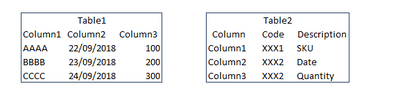
I have uploaded a CSV file into my PBI project. As the CSV file has no headers, column names in Table1 are shown as Column1, Column2, Column3, ......, Column100.
How can I replace those names for the ones that I have defined in Table2.
Many thaks for your help
Solved! Go to Solution.
HI @underkar,
Based on double check on your snapshot, it seems like your columns are stored in table 2 with original column name and real column name.
For your scenario, I modify my formula to use table 2 columns to generate name parameter list which need to be use in table 1.
#"Renamed Columns" = Table.RenameColumns(#"Source",List.Zip({Table2[Column],Table2[Description]}))
Regards,
Xiaoxin Sheng
HI @underkar,
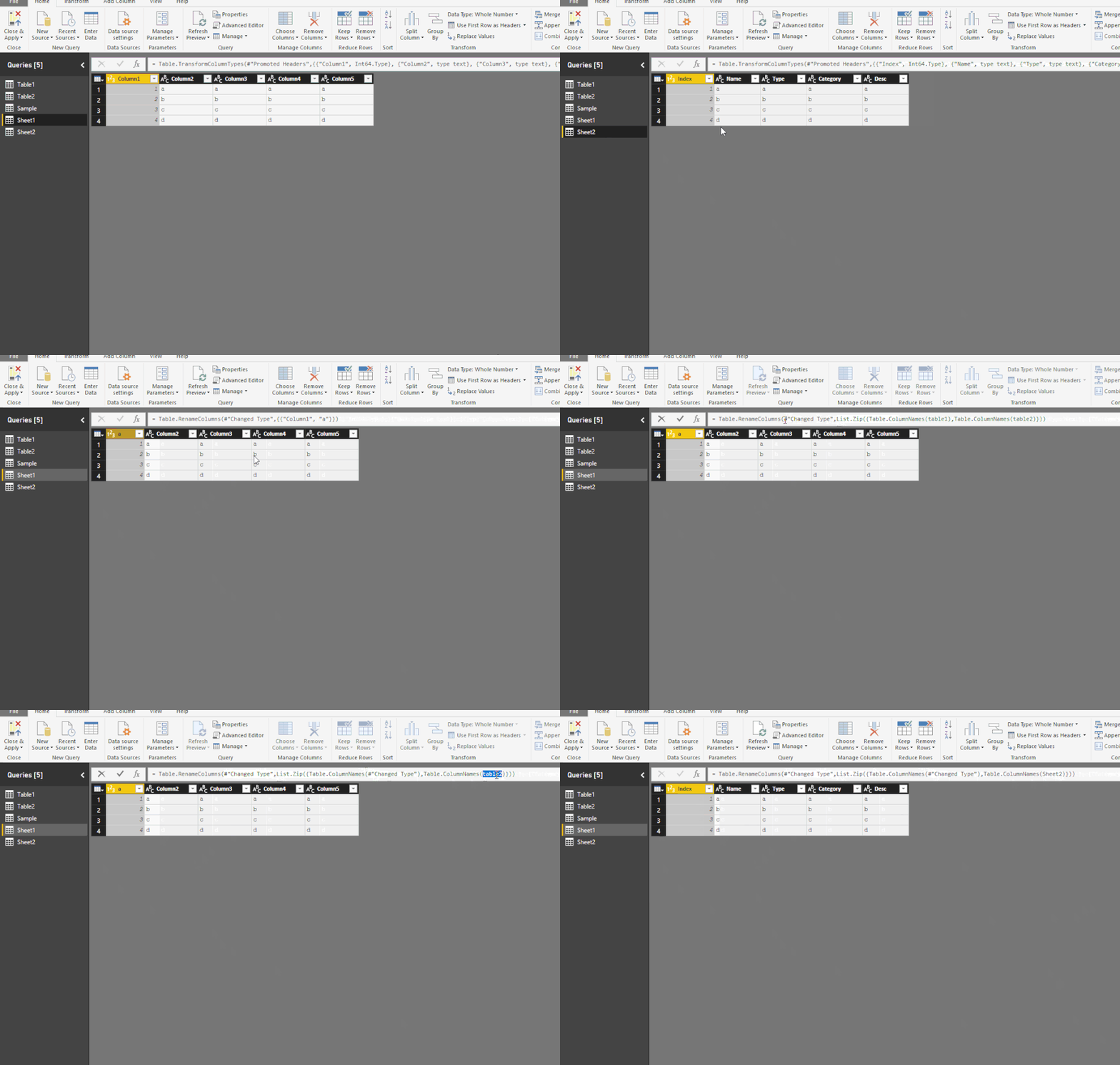
You can use List.zip, Table.Renamecolumns and Table.ColumnNames functions to auto rename one table names based other table.
Sample:
#"Renamed Columns" = Table.RenameColumns(#"Previous Step",List.Zip({Table.ColumnNames(#"Previous Step"),Table.ColumnNames(Sheet2)}))
Regards,
Xiaoxin Sheng
Hi @Anonymous, thanks you very much for your reply.
I think this code doesn't work in my example, because I don´t need to replace headers in "table1" with headers in "table2", what I need is to lookup Column1, Column2, etc in "table2" and return the text in column "Description" of "Table".
I hope I have explained this better....
#"Renamed Columns" = Table.RenameColumns(#"Source",List.Zip({Table.ColumnNames(#"Source"),Table.ColumnNames(Table2)}))
Many thanks
HI @underkar,
Based on double check on your snapshot, it seems like your columns are stored in table 2 with original column name and real column name.
For your scenario, I modify my formula to use table 2 columns to generate name parameter list which need to be use in table 1.
#"Renamed Columns" = Table.RenameColumns(#"Source",List.Zip({Table2[Column],Table2[Description]}))
Regards,
Xiaoxin Sheng
Thanks Xaoxing!! It works!
Share feedback directly with Fabric product managers, participate in targeted research studies and influence the Fabric roadmap.
Check out the February 2026 Power BI update to learn about new features.
| User | Count |
|---|---|
| 68 | |
| 61 | |
| 45 | |
| 19 | |
| 15 |
| User | Count |
|---|---|
| 108 | |
| 108 | |
| 39 | |
| 30 | |
| 26 |