Don't miss your chance to take the Fabric Data Engineer (DP-600) exam for FREE! Find out how by watching the DP-600 session on-demand now through April 28th.
Learn moreJoin the FabCon + SQLCon recap series. Up next: Power BI, Real-Time Intelligence, IQ and AI, and Data Factory take center stage. All sessions are available on-demand after the live show. Register now
Hi all,
I have columns:
Store name
Coleague name
Sales
And want to create table that includes only:
Colleague name
total sales for Store
I don't want to add extra column for Store name and then use allexcept etc.
Just want to add grouping/filter using DAX so the result will be as above. It is important to use DAX and not add any extra columns.
thanks
daniel
Solved! Go to Solution.
Hi @Anonymous
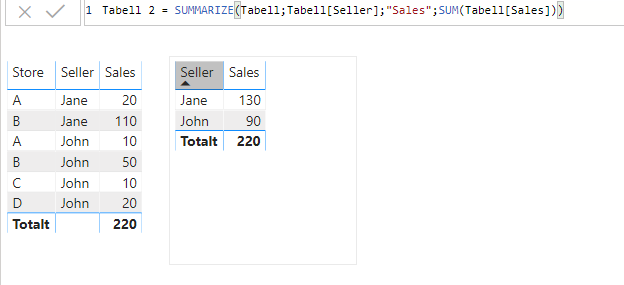
I would use the SUMMARIZE() function to create the table and the SUM() for calculating the sales:
In SUMMARIZE you chose what to group by and then create the measure which we name -> "Sales" and define it by SUM()
Hope this is what youre looking for
Hi,
I have managed to do this very similar way already. As per my post earlier.
Thanks for reply anyway and have a good day
daniel
Hi @Anonymous
I would use the SUMMARIZE() function to create the table and the SUM() for calculating the sales:
In SUMMARIZE you chose what to group by and then create the measure which we name -> "Sales" and define it by SUM()
Hope this is what youre looking for
Hi,
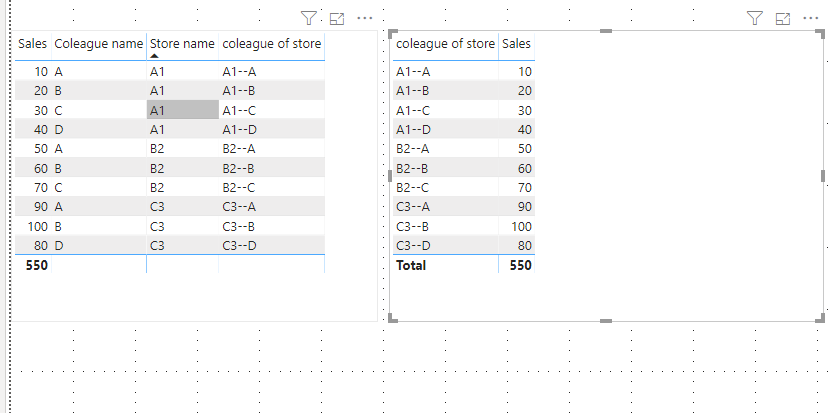
just managed to do this by linking summarized table (grouped by store) to colleague table (store name to store name).
Now when you run it by calleague it will pull total store's sales from summarized table.
Much appreciated
daniel
Hi,
thanks for reply!
This is close to what i want to achive:
The result I am looking for is as below:
Jane 30 (total sales for store A - where Jane works)
Jane 160 (total sales for store B - where Jane works)
John 30 (total sales for store A - where John works)
John 160 (total sales for store B - where John works)
John 10 (as he is the only one employe in store C)
John 20 (as he is the only one employe in store D)
much appreciated
daniel
Check out the April 2026 Power BI update to learn about new features.
If you have recently started exploring Fabric, we'd love to hear how it's going. Your feedback can help with product improvements.
A new Power BI DataViz World Championship is coming this June! Don't miss out on submitting your entry.
| User | Count |
|---|---|
| 41 | |
| 37 | |
| 34 | |
| 21 | |
| 16 |
| User | Count |
|---|---|
| 64 | |
| 58 | |
| 31 | |
| 25 | |
| 25 |