Get certified for free when you join Fabric Data Days 2026 and dive into Fabric, Power BI, SQL, AI, and other essential data skills.
Join nowTry your skills in the Power BI Dataviz World Championship! Round one ends June 26. Join now
Hello,
I want to add filter button to my report. Like this:
Between 07:05 - 15:20 Shift 1
Between 15:20 - 23-25 Shift 2
Between 23:35 - 07:05 Shift 3
Can you please help me?
Regards
Solved! Go to Solution.
Hi @Anonymous ,
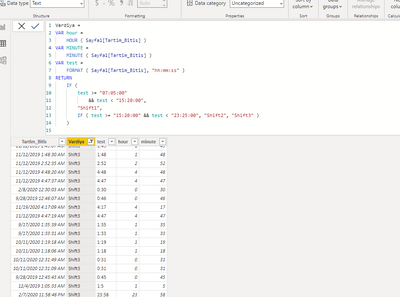
Test the below dax to create a new column:
Vardiya =
VAR hour =
HOUR ( Sayfa1[Tartim_Bitis] )
VAR MINUTE =
MINUTE ( Sayfa1[Tartim_Bitis] )
VAR test =
FORMAT ( Sayfa1[Tartim_Bitis], "hh:mm:ss" )
RETURN
IF (
test >= "07:05:00"
&& test < "15:20:00",
"Shift1",
IF ( test >= "15:20:00" && test < "23:25:00", "Shift2", "Shift3" )
)
Did I answer your question? Mark my post as a solution!
Best Regards
Lucien
Hi @Anonymous ,
Test the below dax to create a new column:
Vardiya =
VAR hour =
HOUR ( Sayfa1[Tartim_Bitis] )
VAR MINUTE =
MINUTE ( Sayfa1[Tartim_Bitis] )
VAR test =
FORMAT ( Sayfa1[Tartim_Bitis], "hh:mm:ss" )
RETURN
IF (
test >= "07:05:00"
&& test < "15:20:00",
"Shift1",
IF ( test >= "15:20:00" && test < "23:25:00", "Shift2", "Shift3" )
)
Did I answer your question? Mark my post as a solution!
Best Regards
Lucien
Who can help me?
@Anonymous , You can create a column for that
first have time column or var in a column
Time = [datetime].Time
or
Time = Time(hour([datetime]),minute([datetime]),second([datetime]))
New bucket =
var _1 = Time(hour([datetime]),minute([datetime]),second([datetime]))
return
Switch( True(),
_1>= time(7,5,0) && _1<= (15,20,0) , "Shift 1",
_1> (15,20,0) && _1<= (23,25,0) , "Shift 2",
"Shift 3"
)
You can use that filter
Hello @amitchandak
This formul worked but it doesn't calculate minutes. How can i fix this.
Thank you for reply @amitchandak
But I didn't understand how to do it. Can you help me with the attached file?
Thank you.
Don't miss out on Data Days, June 15 through August 7. Learn Fabric, Power BI, SQL, AI and more.
Check out the May 2026 Power BI update to learn about new features.
| User | Count |
|---|---|
| 23 | |
| 21 | |
| 20 | |
| 19 | |
| 13 |
| User | Count |
|---|---|
| 58 | |
| 52 | |
| 37 | |
| 31 | |
| 27 |