cancel
Showing results for 
Search instead for 
Did you mean: 

The Power BI Data Visualization World Championships is back! Get ahead of the game and start preparing now! Learn more

Reply
Anonymous
Not applicable

Add extra field with positive and negative category

Hello all,


This is my first post and I come from Tableau. Still getting used to the interface and all the options of Power BI.


I have the following table and I would like to add a column that would be the change Positive/Negative of the 'Change' field, so I can reflect it as a category and assign red color for negative and green for positive for example. In table is very easy to do with a table calculation. How is the way to do it on power BI? It does not need to be an extra column, I believe a calculated field would do.


RegionChangeLatitudeLongitudeTotal value (bn)
North America10.40%40.29068-97.29031000.6
Latin America-27%-1.24964-64.941435.8
Europe-38.80%47.4414910.714391
MEA222%12.0957125.7539113.5
APAC (Excluding Japan)-36%28.9225104.5195241
Japan2.40%35.78759138.379418.1


Thanks!!!

1 ACCEPTED SOLUTION
Anonymous
Not applicable

HI @Anonymous ,


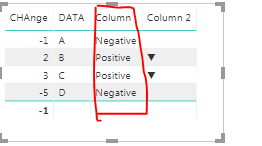
If you want a calculated Column you can use this DAX Columns formula:

Column = if ('Table (4)'[CHAnge]<0,"Negative","Positive")

You will get output some thing likt this.

Capture1.PNG

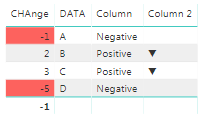
 If you just want to highlight the positive and -ve values in the changefield itself than you can simply use th Conditional formatting on that columns and apply rules for the values <0.

Capture2.PNG

let me know if this works.


Thanks,

Tejaswi


View solution in original post

1 REPLY 1
Anonymous
Not applicable

HI @Anonymous ,


If you want a calculated Column you can use this DAX Columns formula:

Column = if ('Table (4)'[CHAnge]<0,"Negative","Positive")

You will get output some thing likt this.

Capture1.PNG

 If you just want to highlight the positive and -ve values in the changefield itself than you can simply use th Conditional formatting on that columns and apply rules for the values <0.

Capture2.PNG

let me know if this works.


Thanks,

Tejaswi


Helpful resources

Announcements
Power BI DataViz World Championships

Power BI Dataviz World Championships

The Power BI Data Visualization World Championships is back! Get ahead of the game and start preparing now!

December 2025 Power BI Update Carousel

Power BI Monthly Update - December 2025

Check out the December 2025 Power BI Holiday Recap!

FabCon Atlanta 2026 carousel

FabCon Atlanta 2026

Join us at FabCon Atlanta, March 16-20, for the ultimate Fabric, Power BI, AI and SQL community-led event. Save $200 with code FABCOMM.

Users online (2,851)