cancel
Showing results for 
Search instead for 
Did you mean: 

Learn from the best! Meet the four finalists headed to the FINALS of the Power BI Dataviz World Championships! Register now

Reply
yanisyes
Frequent Visitor

Add data in a clustered column chart without modifying data source

Hello,


I've created the column stacked graph below 

yanisyes_2-1652507372782.png


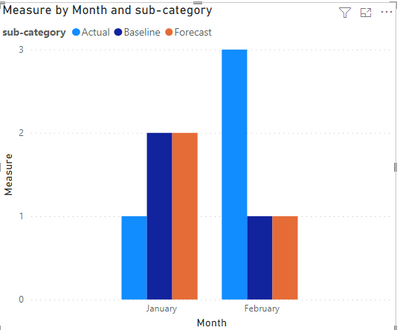
My measure is just a simple Calcultate(countrow(mytable)), and I've put the sub category as column serie.
WHat I want to do it to modify only the forecast data in February and minus one the column to have the graph below

yanisyes_0-1652507207882.png

Is it possible to do that without modifying my source data( with a measure for example).
Because when I try to use a calculate like this Calculate(countrow(mytable)+1,mytable[sub-category]="Forecast") it is modyfying all my data not only the forecast for jan and feb


I just want to  modify one specific sub category (here forecast) for one specific month (Here February).


THanks in advance for your help.


2 ACCEPTED SOLUTIONS
Arul
Super User
Super User

@yanisyes ,

I hope the below is your expected output, this can be achieved by writing one measure like the below by modifying it based on your data,


Sales Feb = IF(SELECTEDVALUE(financials[Month Name])="February",financials[Sales]+30000000,financials[Sales])


use this in your visual

Arul_0-1652509016558.png

Thanks,

Arul


Did I answer your question? Mark my post as a solution!

Proud to be a Super User!


LinkedIn


View solution in original post

Anonymous
Not applicable

Hi @yanisyes ,

Please refer to my pbix file to see if it helps you. 

Create a measure.

Measure =
VAR _month =
    MONTH ( MAX ( 'Table'[date] ) )
VAR _year =
    YEAR ( MAX ( 'Table'[date] ) )
RETURN
    CALCULATE (
        COUNTROWS ( 'Table' ),
        FILTER (
            ALL ( 'Table' ),
            MONTH ( 'Table'[date] ) = _month
                && YEAR ( 'Table'[date] ) = _year
                && 'Table'[sub-category] = SELECTEDVALUE ( 'Table'[sub-category] )
        )
    )


vpollymsft_0-1652774081815.png

If I have misunderstood your meaning, please provide your pbix file without privacy information and desired output with more details.


Best Regards

Community Support Team _ Polly


If this post helps, then please consider Accept it as the solution to help the other members find it more quickly.

View solution in original post

3 REPLIES 3
Anonymous
Not applicable

Hi @yanisyes ,

Please refer to my pbix file to see if it helps you. 

Create a measure.

Measure =
VAR _month =
    MONTH ( MAX ( 'Table'[date] ) )
VAR _year =
    YEAR ( MAX ( 'Table'[date] ) )
RETURN
    CALCULATE (
        COUNTROWS ( 'Table' ),
        FILTER (
            ALL ( 'Table' ),
            MONTH ( 'Table'[date] ) = _month
                && YEAR ( 'Table'[date] ) = _year
                && 'Table'[sub-category] = SELECTEDVALUE ( 'Table'[sub-category] )
        )
    )


vpollymsft_0-1652774081815.png

If I have misunderstood your meaning, please provide your pbix file without privacy information and desired output with more details.


Best Regards

Community Support Team _ Polly


If this post helps, then please consider Accept it as the solution to help the other members find it more quickly.

yanisyes
Frequent Visitor

Hi @Arul
First thanks for your answer but all my data are not in column like in your case so I can't do the thing you are suggesting + if I have two measure in the columns values ( means no column serie). I will not be able to click only on forecast or actual or baseline for the month selected.
WHen I will try to click it will only filter the month with all my data (it will display forecast baseline, actual of February if I click on forecast for the month of february). 
THis is why I've created only one measure 

yanisyes_5-1652513747966.png

Here is my data

yanisyes_0-1652512930564.pngyanisyes_1-1652512951839.png

My measure is counting the number of time the month appear for each subcategory and I want to delete the forecast of the milestone  3 in feb to change my chart from this 

yanisyes_2-1652513194106.png

TO this

yanisyes_3-1652513234428.png


THanks.


Arul
Super User
Super User

@yanisyes ,

I hope the below is your expected output, this can be achieved by writing one measure like the below by modifying it based on your data,


Sales Feb = IF(SELECTEDVALUE(financials[Month Name])="February",financials[Sales]+30000000,financials[Sales])


use this in your visual

Arul_0-1652509016558.png

Thanks,

Arul


Did I answer your question? Mark my post as a solution!

Proud to be a Super User!


LinkedIn


Helpful resources

Announcements
Join our Fabric User Panel

Join our Fabric User Panel

Share feedback directly with Fabric product managers, participate in targeted research studies and influence the Fabric roadmap.

February Power BI Update Carousel

Power BI Monthly Update - February 2026

Check out the February 2026 Power BI update to learn about new features.

FabCon Atlanta 2026 carousel

FabCon Atlanta 2026

Join us at FabCon Atlanta, March 16-20, for the ultimate Fabric, Power BI, AI and SQL community-led event. Save $200 with code FABCOMM.