Don't miss your chance to take the Fabric Data Engineer (DP-600) exam for FREE! Find out how by watching the DP-600 session on-demand now through April 28th.
Learn moreJoin the FabCon + SQLCon recap series. Up next: Power BI, Real-Time Intelligence, IQ and AI, and Data Factory take center stage. All sessions are available on-demand after the live show. Register now
Hello Guys,
Can I ask for your help on the report that I'm making.
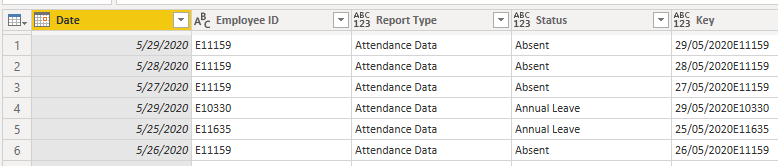
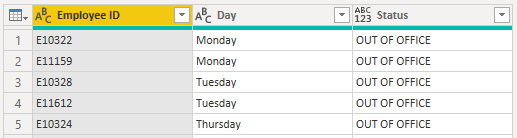
I have 2 tables that I'm working on:
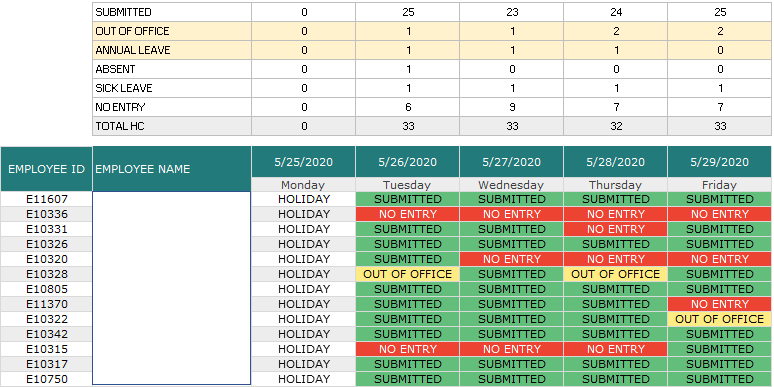
Basically, I want to know how many people submitted for the day and how many are on rest day.
I was able to create the report but having issues to adding the Out of Office & No Entry status since they are not really available "Daily Form Responses" table.
Is there a way to create an entry if the data for a person is missing? My apologies if I cant explain it clearly. But I really want to have a table that has all of the data that shows if they don't have an entry for the day or if they are on out of office status.
Solved! Go to Solution.
Hi @krixtsup3r ,
Don't know if the tables are as I have made the setup but try the following:
Tables:
Relationships:
Add a column with the weekday on the calendar table and on the Rest day, then make the following measure:
Status_Measure =
IF (
MAX ( 'Daily Form Responses'[Status] ) = BLANK ();
IF (
SELECTEDVALUE ( 'Calendar'[Weekday] ) = SELECTEDVALUE ( 'Rest Day'[Weekday] );
"OUT OF OFFICE";
"NO ENTRY"
);
"SUBMITTED"
)
Now just add a condittional formatting formula:
Condittional formating =
SWITCH (
[Status_Measure];
"NO ENTRY"; "RED";
"OUT OF OFFICE"; "YELLOW";
"GREEN"
)
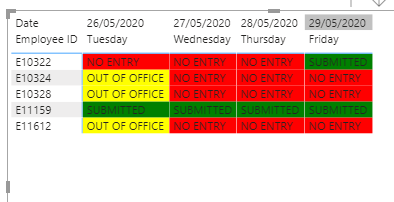
Result is below and in attach PBIX file.
Regards
Miguel Félix
Proud to be a Super User!
Check out my blog: Power BI em PortuguêsHere is one way to approach this:
1. Add a Date column to your Rest Day data (if not there already)
2. Append it to your Daily Form Responses table
3. Sort by Employee Name and Fill down on that column (if that second table really doesn't have name in it)
4. Load the data and make a matrix visual with Employee on the rows, Date on the columns
5. Make a measure like this - Status = IF(ISBLANK(MIN(Daily Form Responses[Status]), "No Entry", MIN(Daily Form Responses[Status]))
If this works for you, please mark it as solution. Kudos are appreciated too. Please let me know if not.
Regards,
Pat
To learn more about Power BI, follow me on Twitter or subscribe on YouTube.
Hi @krixtsup3r ,
Don't know if the tables are as I have made the setup but try the following:
Tables:
Relationships:
Add a column with the weekday on the calendar table and on the Rest day, then make the following measure:
Status_Measure =
IF (
MAX ( 'Daily Form Responses'[Status] ) = BLANK ();
IF (
SELECTEDVALUE ( 'Calendar'[Weekday] ) = SELECTEDVALUE ( 'Rest Day'[Weekday] );
"OUT OF OFFICE";
"NO ENTRY"
);
"SUBMITTED"
)
Now just add a condittional formatting formula:
Condittional formating =
SWITCH (
[Status_Measure];
"NO ENTRY"; "RED";
"OUT OF OFFICE"; "YELLOW";
"GREEN"
)
Result is below and in attach PBIX file.
Regards
Miguel Félix
Proud to be a Super User!
Check out my blog: Power BI em PortuguêsCheck out the April 2026 Power BI update to learn about new features.
If you have recently started exploring Fabric, we'd love to hear how it's going. Your feedback can help with product improvements.
A new Power BI DataViz World Championship is coming this June! Don't miss out on submitting your entry.
| User | Count |
|---|---|
| 48 | |
| 40 | |
| 38 | |
| 20 | |
| 17 |
| User | Count |
|---|---|
| 68 | |
| 65 | |
| 30 | |
| 26 | |
| 25 |