cancel
Showing results for 
Search instead for 
Did you mean: 

Learn from the best! Meet the four finalists headed to the FINALS of the Power BI Dataviz World Championships! Register now

Reply
Anonymous
Not applicable

Add column with same calculation

neeHi

I hope some body can help me! 

I have 2 tables, one with dates and one with values, they are connected. 

I then what to calculate the sum of the last month and insert the value in a column and same value for every row. 

So my data could look something like:


DateValue
2020-01-015
2020-01-108
2020-01-1588
2020-01-209
2020-01-3055
2020-02-08654
2020-02-1885
2020-02-251


The sum of the last month is 740 I would then like to have a new column there is just 740 for every row. Like below


DateValueTotal
2020-01-015740
2020-01-108740
2020-01-1588740
2020-01-209740
2020-01-3055740
2020-02-08654740
2020-02-1885740
2020-02-251740


Hope some body can help me 🙂 

2 ACCEPTED SOLUTIONS
amitchandak
Super User
Super User

@Snip , Create a new column as

Column = sumx(FILTER('Table',EOMONTH([date],0) =EOMONTH(max([Date]),0)),[Value])
Share with Power BI Enthusiasts: Full Power BI Video (20 Hours) YouTube
Microsoft Fabric Series 60+ Videos YouTube
Microsoft Fabric Hindi End to End YouTube

View solution in original post

v-xuding-msft
Community Support
Community Support

Hi @Anonymous ,


Please try this:

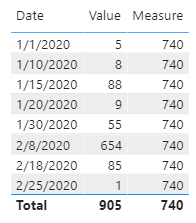
Measure =
VAR mon_ =
    CALCULATE ( MAX ( 'Table'[Date] ), ALLSELECTED ( 'Table' ) )
RETURN
    CALCULATE (
        SUM ( 'Table'[Value] ),
        FILTER (
            ALL ( 'Date' ),
            'Date'[Month] = MONTH ( mon_ )
                && MAX ( 'Table'[Value] ) <> BLANK ()
        )
    )

v-xuding-msft_0-1602148852901.png


Best Regards,
Xue Ding
If this post helps, then please consider Accept it as the solution to help the other members find it more quickly.

View solution in original post

3 REPLIES 3
v-xuding-msft
Community Support
Community Support

Hi @Anonymous ,


Please try this:

Measure =
VAR mon_ =
    CALCULATE ( MAX ( 'Table'[Date] ), ALLSELECTED ( 'Table' ) )
RETURN
    CALCULATE (
        SUM ( 'Table'[Value] ),
        FILTER (
            ALL ( 'Date' ),
            'Date'[Month] = MONTH ( mon_ )
                && MAX ( 'Table'[Value] ) <> BLANK ()
        )
    )

v-xuding-msft_0-1602148852901.png


Best Regards,
Xue Ding
If this post helps, then please consider Accept it as the solution to help the other members find it more quickly.
amitchandak
Super User
Super User

@Snip , Create a new column as

Column = sumx(FILTER('Table',EOMONTH([date],0) =EOMONTH(max([Date]),0)),[Value])
Share with Power BI Enthusiasts: Full Power BI Video (20 Hours) YouTube
Microsoft Fabric Series 60+ Videos YouTube
Microsoft Fabric Hindi End to End YouTube
Anonymous
Not applicable

It do not work. Can you maybe explain what it does? 

Remeber i have a date table and a table with the values. 

Helpful resources

Announcements
Power BI DataViz World Championships carousel

Power BI DataViz World Championships - June 2026

A new Power BI DataViz World Championship is coming this June! Don't miss out on submitting your entry.

Join our Fabric User Panel

Join our Fabric User Panel

Share feedback directly with Fabric product managers, participate in targeted research studies and influence the Fabric roadmap.

March Power BI Update Carousel

Power BI Community Update - March 2026

Check out the March 2026 Power BI update to learn about new features.