cancel
Showing results for 
Search instead for 
Did you mean: 

Learn from the best! Meet the four finalists headed to the FINALS of the Power BI Dataviz World Championships! Register now

Reply
Nnamarie_1997
Frequent Visitor

Add column based on another column values from another table

Hi,

Good day.

Asking for your help, I am only a beginner.

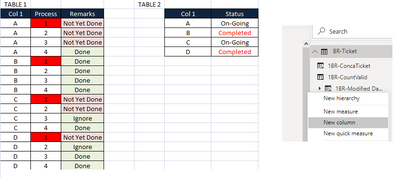
I am struggling to get the Status in Table 2 that excludes Process #1,

by using New column?


These are my 2 sample tables:

Nnamarie_1997_2-1639020261862.png


And my sample Desired Output:

Nnamarie_1997_1-1639020182308.png


Reference for my Status Column:

On-Going if the Group still have "Not Yet Done" Remarks, ignoring Process 1.

Completed If the Group have "Ignore/Done" Remarks, ignoring Process 1.


Thank you in advance ‌‌:)

1 ACCEPTED SOLUTION
Jihwan_Kim
Super User
Super User

Picture2.png


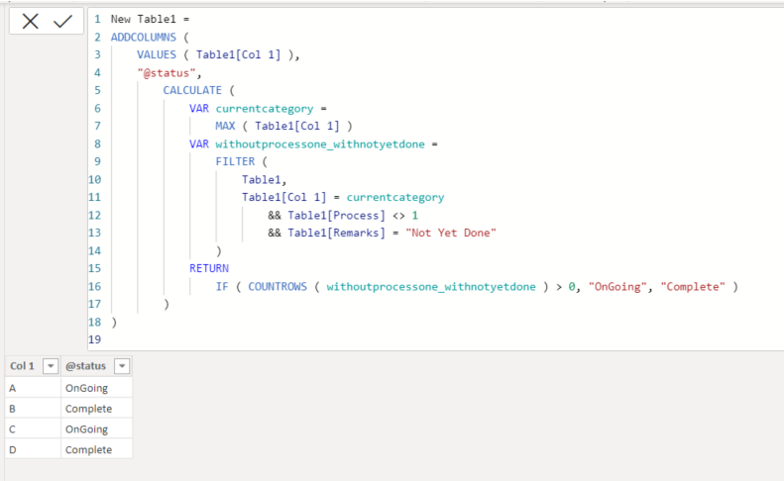
New Table1 =
ADDCOLUMNS (
VALUES ( Table1[Col 1] ),
"@status",
CALCULATE (
VAR currentcategory =
MAX ( Table1[Col 1] )
VAR withoutprocessone_withnotyetdone =
FILTER (
Table1,
Table1[Col 1] = currentcategory
&& Table1[Process] <> 1
&& Table1[Remarks] = "Not Yet Done"
)
RETURN
IF ( COUNTROWS ( withoutprocessone_withnotyetdone ) > 0, "OnGoing", "Complete" )
)
)

If this post helps, then please consider accepting it as the solution to help other members find it faster, and give a big thumbs up.


Click here to visit my LinkedIn page

View solution in original post

2 REPLIES 2
Jihwan_Kim
Super User
Super User

Picture2.png


New Table1 =
ADDCOLUMNS (
VALUES ( Table1[Col 1] ),
"@status",
CALCULATE (
VAR currentcategory =
MAX ( Table1[Col 1] )
VAR withoutprocessone_withnotyetdone =
FILTER (
Table1,
Table1[Col 1] = currentcategory
&& Table1[Process] <> 1
&& Table1[Remarks] = "Not Yet Done"
)
RETURN
IF ( COUNTROWS ( withoutprocessone_withnotyetdone ) > 0, "OnGoing", "Complete" )
)
)

If this post helps, then please consider accepting it as the solution to help other members find it faster, and give a big thumbs up.


Click here to visit my LinkedIn page

Thank You so much Sir..

Helpful resources

Announcements
Join our Fabric User Panel

Join our Fabric User Panel

Share feedback directly with Fabric product managers, participate in targeted research studies and influence the Fabric roadmap.

February Power BI Update Carousel

Power BI Monthly Update - February 2026

Check out the February 2026 Power BI update to learn about new features.

FabCon Atlanta 2026 carousel

FabCon Atlanta 2026

Join us at FabCon Atlanta, March 16-20, for the ultimate Fabric, Power BI, AI and SQL community-led event. Save $200 with code FABCOMM.