cancel
Showing results for 
Search instead for 
Did you mean: 

The Power BI Data Visualization World Championships is back! Get ahead of the game and start preparing now! Learn more

Reply
Anonymous
Not applicable

Add a second header in matrix PBI with no hierarchy defined

Hi all,


I have the following table:

FinYui8_1-1668595337431.png


And I need to build a matrix in PBI as the following, but withouth unpivot columns:

FinYui8_2-1668595348020.png


Does anyone know how to do it?


Thanks a lot!


1 ACCEPTED SOLUTION
v-henryk-mstf
Community Support
Community Support

Hi @Anonymous ,


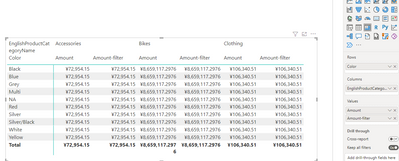
If the second header statistics is similar to the aggregated value, you can try multiple measures to achieve a similar effect.

vhenrykmstf_0-1668677913229.png


If the problem is still not resolved, please provide detailed error information and let me know immediately. Looking forward to your reply.


Best Regards,
Henry


If this post helps, then please consider Accept it as the solution to help the other members find it more quickly.

View solution in original post

4 REPLIES 4
MFelix
Super User
Super User

Hi @Anonymous,


For doing this you have currently two options.


Field parameters

In this case  you can create a field parameter table (see link) then on this table add a column with the category you need to group by and you can then use that on your matrix.


Disconnected table

This is similar to the other option however you need to build the table manually so you would get something similar to this:

Group Measure ID
Total Sales Total_Sales_Wheels 1
Total Sales Total_Sales_Engines 2
Total Costs Total_Costs_Wheels 3
Total Costs Total_Costs_Engines 4


Now you just need to create a metric similar to the one below:

Matrix value =
SWITCH (
    SELECTEDVALUE ( Table[ID] ),
    1, [Total_Sales_Wheels],
    2, [Total_Sales_Engines],
    3, [Total_Costs_Wheels],
    4, [Total_Costs_Engines]
)


Now use this metric on the matrix visualization.


Regards

Miguel Félix


Did I answer your question? Mark my post as a solution!

Proud to be a Super User!

Check out my blog: Power BI em Português



Amazing solution, I also love to use Fields parameter 🙂

v-henryk-mstf
Community Support
Community Support

Hi @Anonymous ,


If the second header statistics is similar to the aggregated value, you can try multiple measures to achieve a similar effect.

vhenrykmstf_0-1668677913229.png


If the problem is still not resolved, please provide detailed error information and let me know immediately. Looking forward to your reply.


Best Regards,
Henry


If this post helps, then please consider Accept it as the solution to help the other members find it more quickly.

@v-henryk-mstf ,


Not sure why this is accept has an answers this is the oposite of what the user want he want to group the measure by type (sales, cost) and then by product.


Does not make sense to have this answer selected.


Regards

Miguel Félix


Did I answer your question? Mark my post as a solution!

Proud to be a Super User!

Check out my blog: Power BI em Português


Helpful resources

Announcements
November Power BI Update Carousel

Power BI Monthly Update - November 2025

Check out the November 2025 Power BI update to learn about new features.

Fabric Data Days Carousel

Fabric Data Days

Advance your Data & AI career with 50 days of live learning, contests, hands-on challenges, study groups & certifications and more!

FabCon Atlanta 2026 carousel

FabCon Atlanta 2026

Join us at FabCon Atlanta, March 16-20, for the ultimate Fabric, Power BI, AI and SQL community-led event. Save $200 with code FABCOMM.