Join us at FabCon Atlanta from March 16 - 20, 2026, for the ultimate Fabric, Power BI, AI and SQL community-led event. Save $200 with code FABCOMM.
Register now!The Power BI Data Visualization World Championships is back! Get ahead of the game and start preparing now! Learn more
Hi all,
Everything is pretty much in the title : I would like to add a dynamic vertical line on a combo chart.
I've seen that there are solutions to do it depending on the kind of chart you're using, but I can't find a way to do it on the combo chart :
-The Analytics pane can't be used.
-I can't use a column for that (unless there is a trick I don't know yet) as I have measures for both lines and columns.
Is there something I could try ?
Regards,
Martin.
Solved! Go to Solution.
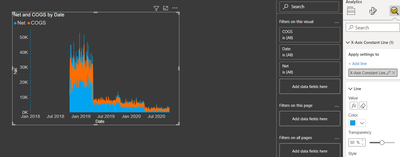
@Anonymous , I am able to add a vertical line using X-axis constant line in the analytic pane. You can do that only for the date and number type of axis. Using FX you can add a measure that can change based on slicer values
Thanks a lot !
I was using a hierarchy of date to only show the months, and as a result the Analytics pane didn't work.
It's indeed working with the full date.
Regards,
Martin.
The Power BI Data Visualization World Championships is back! Get ahead of the game and start preparing now!
| User | Count |
|---|---|
| 38 | |
| 38 | |
| 36 | |
| 28 | |
| 28 |
| User | Count |
|---|---|
| 124 | |
| 89 | |
| 73 | |
| 66 | |
| 65 |