Join us at FabCon Atlanta from March 16 - 20, 2026, for the ultimate Fabric, Power BI, AI and SQL community-led event. Save $200 with code FABCOMM.
Register now!The Power BI Data Visualization World Championships is back! It's time to submit your entry. Live now!
Hello,
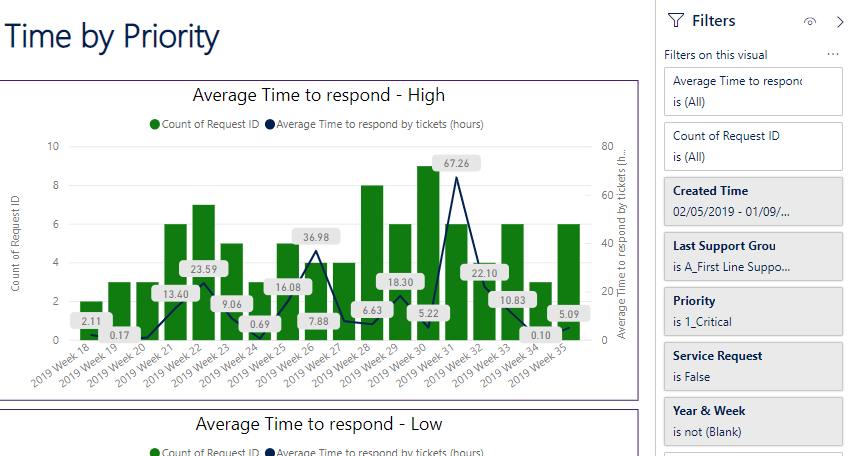
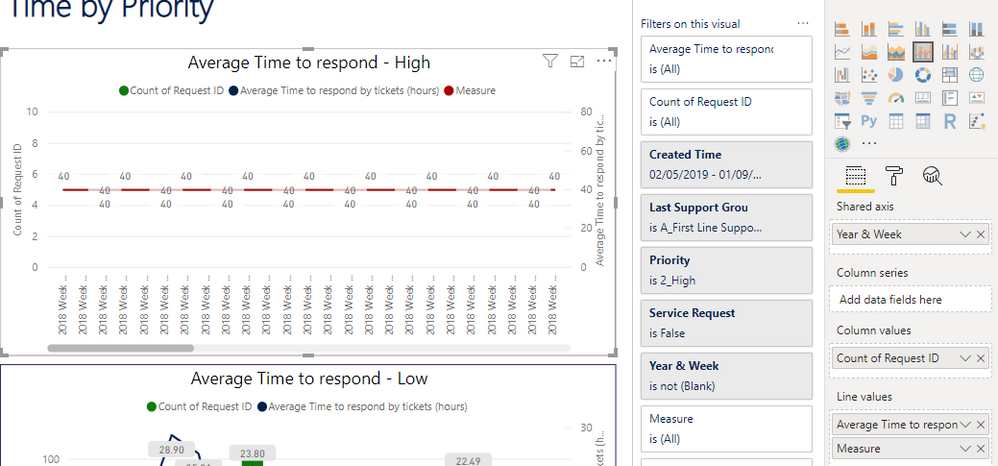
I have a visual Line and stacked column charts where I'd like to add a constant line. I noticed that it's not possible with this kind of visual so I tried using a measure "Measure = 40". When I had the measure to my visual, it's indeed showing the constant line 1.5 but it shown all the values without taking in count my axis filter (visual filter based on the date) :
Here's my original graph with filters :
And here's when I add the measure = 40
How can I do to have the measure also filtered by the Created time ?
Thanks a lot for your help.
Kind regards,
Yannick
Solved! Go to Solution.
Try filtering your other values in the visual (Filter Pane) like count of request ID is <> to 0.
D*mn, it was so simple... I didn't even realize I was not on the same Table (Created Time and Request ID) !
Well, thanks a lot for your fast and perfect reply ![]()
Have a nice day !
The Power BI Data Visualization World Championships is back! It's time to submit your entry.
Check out the January 2026 Power BI update to learn about new features.
| User | Count |
|---|---|
| 60 | |
| 49 | |
| 30 | |
| 25 | |
| 23 |
| User | Count |
|---|---|
| 131 | |
| 103 | |
| 58 | |
| 39 | |
| 31 |