cancel
Showing results for 
Search instead for 
Did you mean: 

Get Fabric Certified for FREE during Fabric Data Days. Don't miss your chance! Request now

Reply
tomsmith213
Frequent Visitor

Add Up Column In A Table

Hi All,


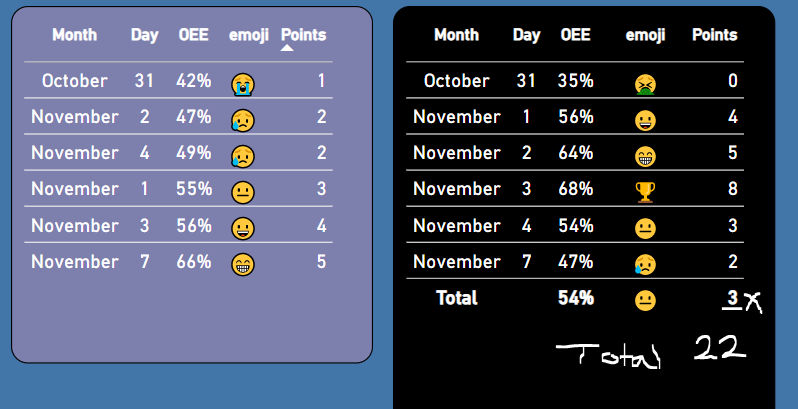
Pretty new to Power Bi. I can’t get this column in this table to add up.

They are two measures.

“OEE = %”

“Points = whole number”


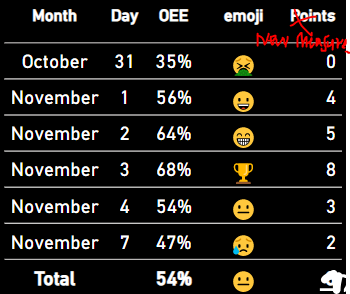
When it totals at the bottom, it picks up the average of the OEE total and scores the total as 3, but the total of the column = 22


How do I get this to show 22?


If it can't be done in the table, is there a measure I can use in card visual to show 22 instead?


Capture.PNG


2 ACCEPTED SOLUTIONS
Anonymous
Not applicable

Hi @tomsmith213 ,

You can create another new measure as below and put this new measure to replace the original measure [Points] onto the table visual...

New Measure = SUMX ( GROUPBY ( 'Table', 'Table'[Month], 'Table'[Day] ), [Points] )

yingyinr_1-1667969729401.png

In addition, you can refer the following links to try to solve your problem...

Why Your Total Is Incorrect In Power BI - The Key DAX Concept To Understand

Dax for Power BI: Fixing Incorrect Measure Totals


If the above one can't help you get the desired result, please provide some sample data in your table(exclude sensitive data) with Text format and your expected result with backend logic and special examples. It is better if you can share a simplified pbix file. You can refer the following link to upload the file to the community. Thank you.

How to upload PBI in Community

Best Regards

View solution in original post

You legend, thanks so much!!

View solution in original post

5 REPLIES 5
mangaus1111
Solution Sage
Solution Sage

Hi @tomsmith213 ,

try to use this measure in a card

Measure = 
SUMX(
 ADDCOLUMNS(
            ADDCOLUMNS(
                    SUMMARIZE(Table,
                              Table[Day],
                              Table[Month ]
                              ),
                   "@Pct",[OEE]
                   ),
                      
         "@Points",SWITCH(TRUE(),
                           [@Pct] <= 0.35, 3,
                           [@Pct] <= 0.45, 6,
                           10
                          )
                   ),
        [@Points]
)

If this post helps, then please consider Accept it as the solution to help the other members find it more quickly.

mangaus1111
Solution Sage
Solution Sage

Hi @tomsmith213 ,

try to use this measure


SUMX(

         SUMMARIZE('Table',

                            'Table'[Month],

                            'Table'[Day]

                              ),

       [Points]

)

If this post helps, then please consider Accept it as the solution to help the other members find it more quickly.

Hi, thanks for the reply, however im not using a ‘table’

It’s a table visual just with a few measures inside of it.

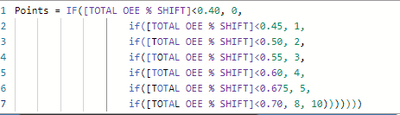
Below is the measure for points, which I dragged into the table.

All I need to do, is add up the points as a total.


I would prefer the total of this table shown as a new measure (somehow) so i can place the result in a card visual


tomsmith213_1-1667919473158.png


tomsmith213_0-1667919365743.png


Anonymous
Not applicable

Hi @tomsmith213 ,

You can create another new measure as below and put this new measure to replace the original measure [Points] onto the table visual...

New Measure = SUMX ( GROUPBY ( 'Table', 'Table'[Month], 'Table'[Day] ), [Points] )

yingyinr_1-1667969729401.png

In addition, you can refer the following links to try to solve your problem...

Why Your Total Is Incorrect In Power BI - The Key DAX Concept To Understand

Dax for Power BI: Fixing Incorrect Measure Totals


If the above one can't help you get the desired result, please provide some sample data in your table(exclude sensitive data) with Text format and your expected result with backend logic and special examples. It is better if you can share a simplified pbix file. You can refer the following link to upload the file to the community. Thank you.

How to upload PBI in Community

Best Regards

You legend, thanks so much!!

Helpful resources

Announcements
November Power BI Update Carousel

Power BI Monthly Update - November 2025

Check out the November 2025 Power BI update to learn about new features.

Fabric Data Days Carousel

Fabric Data Days

Advance your Data & AI career with 50 days of live learning, contests, hands-on challenges, study groups & certifications and more!

FabCon Atlanta 2026 carousel

FabCon Atlanta 2026

Join us at FabCon Atlanta, March 16-20, for the ultimate Fabric, Power BI, AI and SQL community-led event. Save $200 with code FABCOMM.

Top Solution Authors
Top Kudoed Authors