Join us at FabCon Atlanta from March 16 - 20, 2026, for the ultimate Fabric, Power BI, AI and SQL community-led event. Save $200 with code FABCOMM.
Register now!Vote for your favorite vizzies from the Power BI Dataviz World Championship submissions. Vote now!
Hello
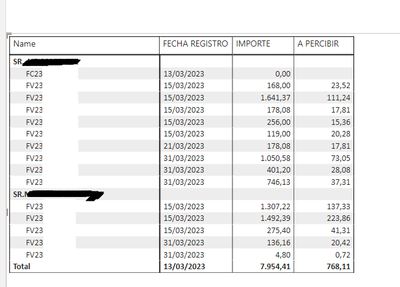
Is there a way to add a total right after the last row of each sector?
That is, there is a sector of SR and its invoices, because just at the end that puts the total, so for each SR
Thanks a lot.
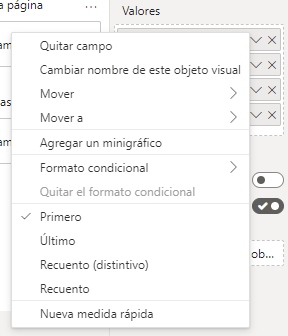
On the other hand, now I have added a new field in Matrix values and of course, in the total row I add the first value since I consider it a value.
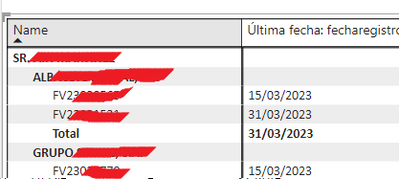
I'm adding it in the values part because if I add it in the rows part, it creates sub row of each field I put and I don't want it that way. Attached capture of how I do NOT want it.
Thank you.
Yes, that's what I wanted, although a detail would be missing that I do not know if it is possible. I want to remove the grand total (the one in the previous screenshot)
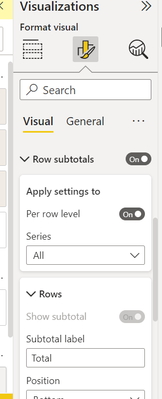
Hi @Syndicate_Admin in your report view >> hover over to Format Visuals >> Turn On Row Subtotals >>Change Position to Bottom and you should get your result that you expected.
BR
Dax_Noob
Vote for your favorite vizzies from the Power BI World Championship submissions!
If you love stickers, then you will definitely want to check out our Community Sticker Challenge!
Check out the January 2026 Power BI update to learn about new features.
| User | Count |
|---|---|
| 56 | |
| 53 | |
| 40 | |
| 17 | |
| 16 |
| User | Count |
|---|---|
| 122 | |
| 108 | |
| 44 | |
| 32 | |
| 26 |