Don't miss your chance to take the Fabric Data Engineer (DP-600) exam for FREE! Find out how by attending the DP-600 session on April 23rd (pacific time), live or on-demand.
Learn moreNext up in the FabCon + SQLCon recap series: The roadmap for Microsoft SQL and Maximizing Developer experiences in Fabric. All sessions are available on-demand after the live show. Register now
Hi
Is there any way that i can let users Free Type text into a cell held within a Power BI report?
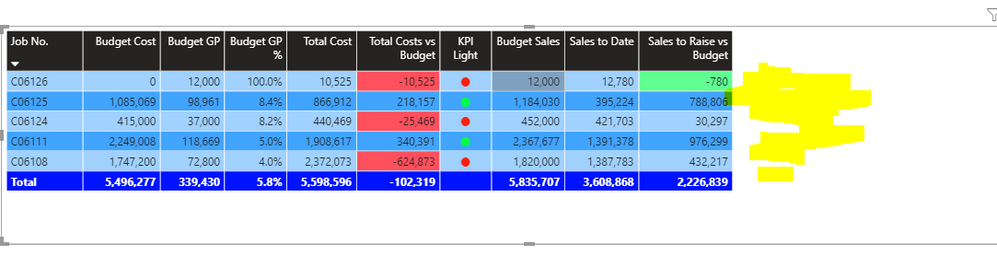
In my example below, i would like to enable users to be able to type in a Comment beside the various jobs numbers in the Yellow Hightighted space below.
For example - to explain why Total Costs are > than Budget on Job no. C06124?
Is this possible? Are there any reports that users can type into?
Solved! Go to Solution.
Hello @Sean-OReilly ,
I think you're looking for a Power Apps form. See the following link that shows how to create them in Power BI:
Thank you
Pragati
Hello @Sean-OReilly ,
I think you're looking for a Power Apps form. See the following link that shows how to create them in Power BI:
Thank you
Pragati
Thanks Pragati
Power App Form is what i need....
Now i need to learn Power Apps
Hi @Sean-OReilly ,
I am glad that you found the solution helpful. Do accept it as a solution if it is helpful. 🙂
Power Apps is quite interesting to learn.
Keep Learning, Keep Exploring!
Thanks,
Pragati
Proud to be a Super User!
Thanks a million for your Help Vanessafvg
I was aware of the comments feature and it is useful but i want users to be able to type beside each line of my table in a report so as to explain that figure
If you have recently started exploring Fabric, we'd love to hear how it's going. Your feedback can help with product improvements.
A new Power BI DataViz World Championship is coming this June! Don't miss out on submitting your entry.
| User | Count |
|---|---|
| 46 | |
| 43 | |
| 39 | |
| 19 | |
| 15 |
| User | Count |
|---|---|
| 68 | |
| 68 | |
| 31 | |
| 27 | |
| 24 |