Join us in Barcelona for FabCon and SQLCon, September 28 - October 1, 2026.
This is best Fabric, Power BI, SQL and AI community event. How do we know? The last event sold out! Save €200 with code FABCMTY200.
Register now- Power BI forums
- Get Help with Power BI
- Desktop
- Service
- Report Server
- Power Query
- Mobile Apps
- Developer
- DAX Commands and Tips
- Custom Visuals Development Discussion
- Health and Life Sciences
- Power BI Spanish forums
- Translated Spanish Desktop
- Training and Consulting
- Instructor Led Training
- Dashboard in a Day for Women, by Women
- Galleries
- Data Stories Gallery
- Themes Gallery
- Contests Gallery
- QuickViz Gallery
- Quick Measures Gallery
- Visual Calculations Gallery
- Fabric Apps Gallery
- Notebook Gallery
- Translytical Task Flow Gallery
- TMDL Gallery
- R Script Showcase
- Webinars and Video Gallery
- Ideas
- Custom Visuals Ideas (read-only)
- Issues
- Issues
- Events
- Upcoming Events
July 28 - August 9 | Final Round of the Power BI Dataviz World Championships. This is your chance. Learn more
- Power BI forums
- Forums
- Get Help with Power BI
- Desktop
- Re: Add Measure Count Across Two Tables
- Subscribe to RSS Feed
- Mark Topic as New
- Mark Topic as Read
- Float this Topic for Current User
- Bookmark
- Subscribe
- Printer Friendly Page


- Mark as New
- Bookmark
- Subscribe
- Mute
- Subscribe to RSS Feed
- Permalink
- Report Inappropriate Content
Add Measure Count Across Two Tables
Hi all,
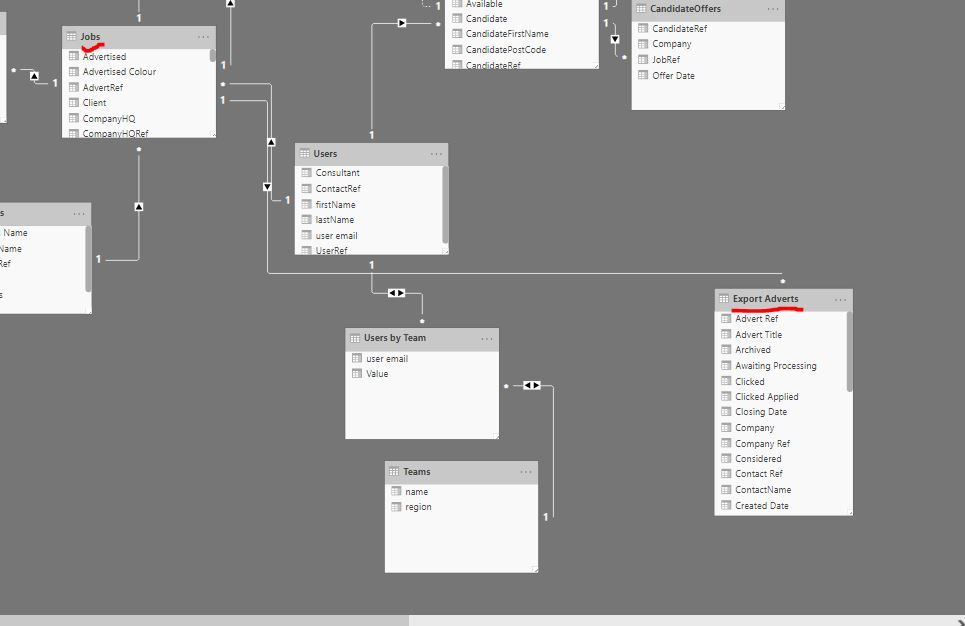
I have to tables: Jobs and Export Adverts
They are joined on 'Jobref' Columns
I want to create a measure which counts 'Jobs'[Jobref] when that Jobref has 'Export Adverts'[Mailshots] <1 or blank
I created the below measure
But its not working I think it is something to do with filters across two tables?
Solved! Go to Solution.


- Mark as New
- Bookmark
- Subscribe
- Mute
- Subscribe to RSS Feed
- Permalink
- Report Inappropriate Content
Hi @HenryJS
Try this
Without Reach =
VAR __JobRef =
    CALCULATETABLE(
        VALUES( 'Jobs'[JobRef] ),
        FILTER(
            ALL( 'Jobs'[Offers] ),
            'Jobs'[Offers] < 1
        )
    )
RETURN
SUMX(
    __JobRef,
    CALCULATE(
        INT(
            ISEMPTY(
                FILTER(
                'Export Adverts',
                'Export Adverts'[Mailshots] >= 1
                )
            )
        )
    )
)
Mariusz
If this post helps, then please consider Accepting it as the solution.
Please feel free to connect with me.

- Mark as New
- Bookmark
- Subscribe
- Mute
- Subscribe to RSS Feed
- Permalink
- Report Inappropriate Content
HI @HenryJS,
You can try to use the following measure formula if it meets for your requirement:
Without Reach =
VAR filtered =
    CALCULATETABLE (
        VALUES ( 'Export Adverts'[Advert Ref] ),
        FILTER (
            ALLSELECTED ( 'Export Adverts' ),
            'Export Adverts'[Mailshots] <= 0.9
                || 'Export Adverts'[Mailshots] <> BLANK ()
        )
    )
RETURN
    CALCULATE (
        DISTINCTCOUNT ( 'Jobs'[JobRef] ),
        FILTER ( ALLSELECTED ( 'Jobs' ), 'Jobs'[AdvertRef] IN filtered )
    )
If above not helps, please share some dummy data with formulas that used in your calculation to help us clarify your scenario and test on it.
Regards,
Xiaoxin Sheng
- Mark as New
- Bookmark
- Subscribe
- Mute
- Subscribe to RSS Feed
- Permalink
- Report Inappropriate Content
Hi @HenryJS
Or try this as another option
Without Reach =
SUMX(
    VALUES( 'Jobs'[JobRef] ),
    CALCULATE(
        INT(
            ISEMPTY(
                FILTER(
                    'Export Adverts',
                    'Export Adverts'[Mailshots] >= 1
                )
            )
        )
    )
)
- Mark as New
- Bookmark
- Subscribe
- Mute
- Subscribe to RSS Feed
- Permalink
- Report Inappropriate Content
- Mark as New
- Bookmark
- Subscribe
- Mute
- Subscribe to RSS Feed
- Permalink
- Report Inappropriate Content
- Mark as New
- Bookmark
- Subscribe
- Mute
- Subscribe to RSS Feed
- Permalink
- Report Inappropriate Content
@Mariusz Hi
Below measure worked. Need to add 'Jobs'[Offers]<1 if possible?
- Mark as New
- Bookmark
- Subscribe
- Mute
- Subscribe to RSS Feed
- Permalink
- Report Inappropriate Content
Hi @HenryJS
Try this
Without Reach =
VAR __JobRef =
    CALCULATETABLE(
        VALUES( 'Jobs'[JobRef] ),
        FILTER(
            ALL( 'Jobs'[Offers] ),
            'Jobs'[Offers] < 1
        )
    )
RETURN
SUMX(
    __JobRef,
    CALCULATE(
        INT(
            ISEMPTY(
                FILTER(
                'Export Adverts',
                'Export Adverts'[Mailshots] >= 1
                )
            )
        )
    )
)
Mariusz
If this post helps, then please consider Accepting it as the solution.
Please feel free to connect with me.


- Mark as New
- Bookmark
- Subscribe
- Mute
- Subscribe to RSS Feed
- Permalink
- Report Inappropriate Content
Hi. I may be wrong but you mention you want to know if its < 1 or blank. Your formula is asking for values <> blank and not = blank.
Don't you want blank values or < 1?
Without Reach = CALCULATE(
DISTINCTCOUNT('Jobs'[JobRef]),
'Export Adverts'[Mailshots]<=0.9
|| ISBLANK( 'Export Adverts'[Mailshots]
)
Regards,
Happy to help!
- Mark as New
- Bookmark
- Subscribe
- Mute
- Subscribe to RSS Feed
- Permalink
- Report Inappropriate Content
- Mark as New
- Bookmark
- Subscribe
- Mute
- Subscribe to RSS Feed
- Permalink
- Report Inappropriate Content
- Mark as New
- Bookmark
- Subscribe
- Mute
- Subscribe to RSS Feed
- Permalink
- Report Inappropriate Content
Hi @HenryJS
Try this.
CALCULATE(
DISTINCTCOUNT(Jobs[JobRef]),
CROSSFILTER('Export Adverts'[Job Ref],JobActions[JobRef],Both),
'Export Adverts'[Mailshots]<1 || ISBLANK('Export Adverts'[Mailshots])
)
Mariusz
If this post helps, then please consider Accepting it as the solution.
Please feel free to connect with me.
- Mark as New
- Bookmark
- Subscribe
- Mute
- Subscribe to RSS Feed
- Permalink
- Report Inappropriate Content
Helpful resources

FabCon & SQLCon – Barcelona 2026
Join us in Barcelona for FabCon and SQLCon, the Fabric, Power BI, SQL, and AI community event. Save €200 with code FABCMTY200.

Power BI DataViz World Championships - June 2026
A new Power BI DataViz World Championship is coming this June! Don't miss out on submitting your entry.

| User | Count |
|---|---|
| 25 | |
| 23 | |
| 20 | |
| 18 | |
| 14 |


| User | Count |
|---|---|
| 22 | |
| 20 | |
| 20 | |
| 20 | |
| 20 |


