Join us at FabCon Atlanta from March 16 - 20, 2026, for the ultimate Fabric, Power BI, AI and SQL community-led event. Save $200 with code FABCOMM.
Register now!The Power BI Data Visualization World Championships is back! Get ahead of the game and start preparing now! Learn more
Hi All,
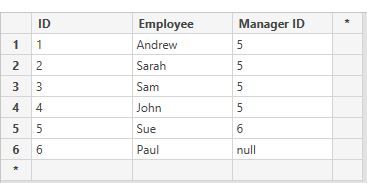
Hoping this is fairly simple. I have single table as shown below (real table has 1000's of rows)
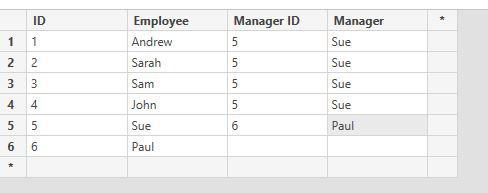
I'm not interested in "Manager ID". I want manager name as per below.
Any suggestions? The logic is something along the lines of
Thanks
Solved! Go to Solution.
hi, @quinla01
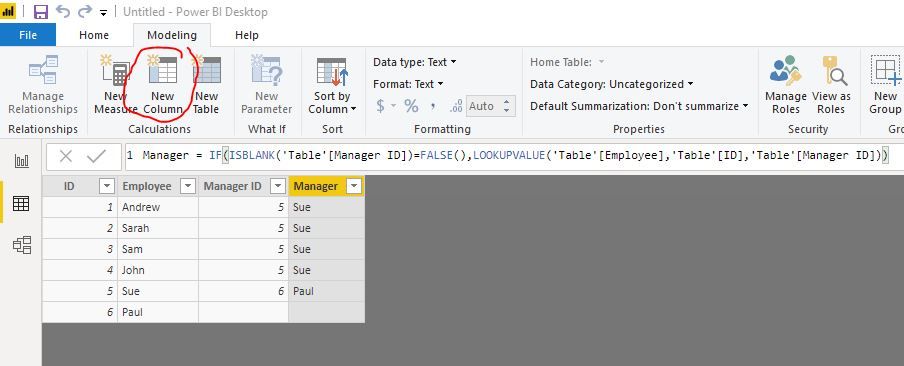
You could use LOOKUPVALUE Function to create a calculate column as below:
Manager = IF(ISBLANK('Table'[Manager ID])=FALSE(),LOOKUPVALUE('Table'[Employee],'Table'[ID],'Table'[Manager ID]))
Result:
Best Regards,
Lin
hi, @quinla01
You could use LOOKUPVALUE Function to create a calculate column as below:
Manager = IF(ISBLANK('Table'[Manager ID])=FALSE(),LOOKUPVALUE('Table'[Employee],'Table'[ID],'Table'[Manager ID]))
Result:
Best Regards,
Lin
That worked a charm. Many Thanks.
Out of interest, do you know how this would be done from the query editor rather than in report view?
Thanks
The Power BI Data Visualization World Championships is back! Get ahead of the game and start preparing now!
| User | Count |
|---|---|
| 40 | |
| 36 | |
| 34 | |
| 31 | |
| 27 |
| User | Count |
|---|---|
| 136 | |
| 103 | |
| 66 | |
| 65 | |
| 56 |