Good Afternoon All,
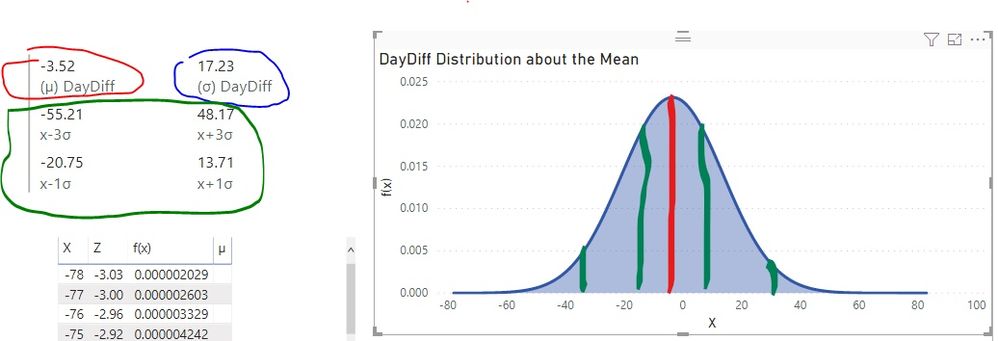
I am needing some help as I have exhausted everyting I can think of in doing this. I have a Gauss Curve, or "bell curve" I created for information related to how many days difference vendors are from getting their purchase orders to us on time (called DayDiff). With this data I was able to review a video that showed me how to create a bell curve graph. What I would like to do now is create measure/calculated column to be able to display the mean and std dev +- 1 and +- 3 within the curve and the data label associated. I undertand this may sound like a lot, in fact I have tried all kinds of ways to manipulate it but I can't seem to get it. Below is all the information.
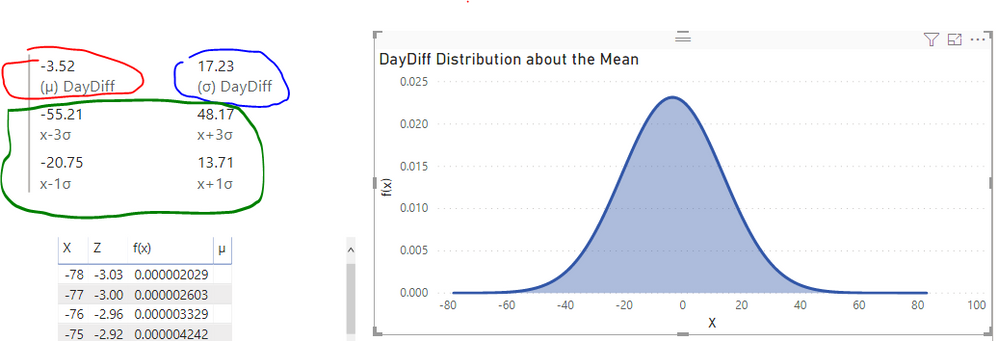
The Measures created for the red (mean) and the blue (std dev):
(µ) DayDiff = AVERAGE(OnTimeDelivery[DayDiff])
(σ) DayDiff = STDEV.S(OnTimeDelivery[DayDiff])
Measures for +-1 and +-3:
x+1σ = [(µ) DayDiff] + 1*[(σ) DayDiff]
x-1σ = [(µ) DayDiff] - 1*[(σ) DayDiff]
x+3σ = [(µ) DayDiff] + 3*[(σ) DayDiff]
x-3σ = [(µ) DayDiff] - 3*[(σ) DayDiff]
*Hopefully this information helps. Any help would be appreciated, thank you!