This time we’re going bigger than ever. Fabric, Power BI, SQL, AI and more. We're covering it all. You won't want to miss it.
Learn moreDid you hear? There's a new SQL AI Developer certification (DP-800). Start preparing now and be one of the first to get certified. Register now
Hi Community,
Thanks for any help!
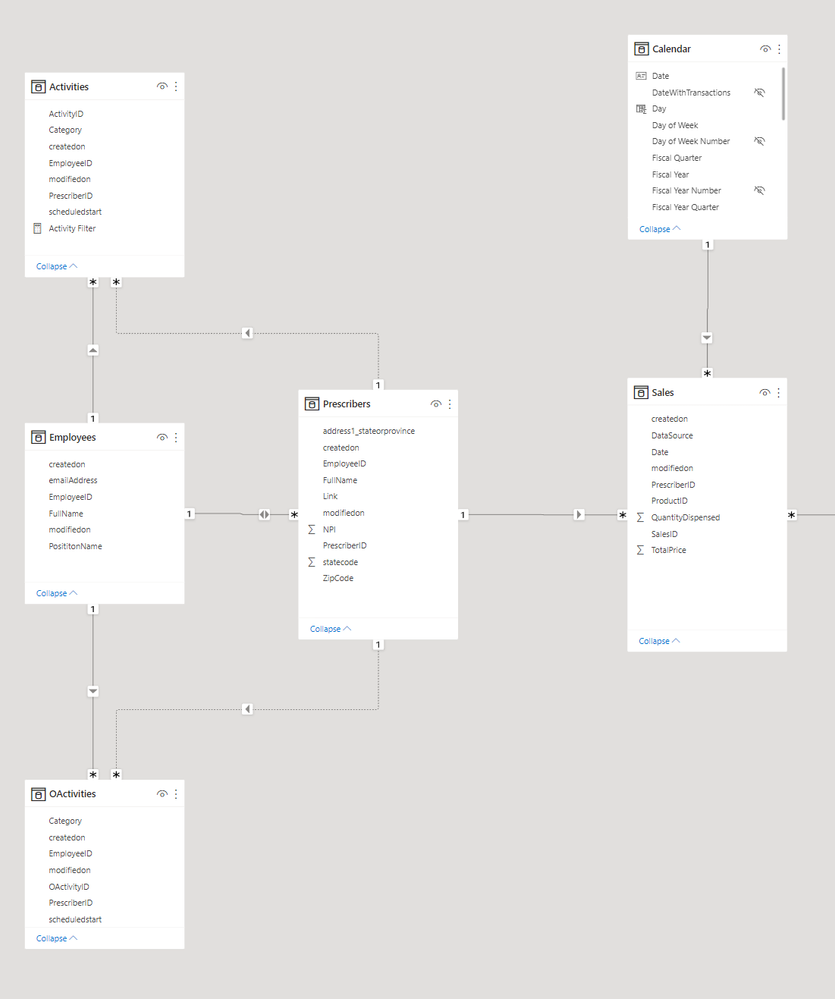
I have the following data schema:
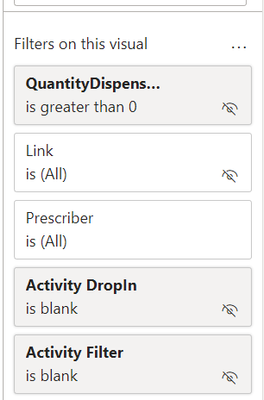
I would like as a result All Prescribers that doesnt exists in "OActivities" and "Activities" Tables, but they exists in "Sales" Table. By now I solved it as following:
Measures:
Its working by now, but it is too slow (even with 5000 test prescribers). Also, when I increase the prescribers to more than 10,000 the visual breaks and show me the "Insufficient memory error".
I was thinking of maybe would be better to add a Boolean custom column that will do this check and return a true or false, then i can filter this column to show only the True ones (The ones that fits with the criteria), but im not sure how to do this.
Any other recommendation will be very welcome!
Thanks in advance!
Solved! Go to Solution.
@GuidoPinares , Prescribers is a dimension, it should not join with another dimension employee. Also avoid Bi-Directional join
In case you want just to filter the slicer based on employee refer
How to filter the slicer of a disconnected table: https://youtu.be/cV5WfaQt6C8
Hi @GuidoPinares ,
You can create a measure [Flag] as below and apply a visual-level filter with the codition ([Flag] is 1😞
Flag =
VAR _selpres =
SELECTEDVALUE ( Prescribers[PrescriberID] )
VAR _oactabs =
UNION (
VALUES ( OActivities[PrescriberID] ),
VALUES ( Activities[PrescriberID] )
)
VAR _selestab =
VALUES ( Sales[PrescriberID] )
RETURN
IF ( NOT ( _selpres ) IN _oactabs && _selpres IN _selestab, 1, 0 )
If the above one can't help you get the desired result, please provide more raw data in your tables (exclude sensitive data) with Text format and your expected result with backend logic and special examples. It is better if you can share a simplified pbix file. You can refer the following link to upload the file to the community. Thank you.
How to upload PBI in Community
Best Regards
@GuidoPinares , Prescribers is a dimension, it should not join with another dimension employee. Also avoid Bi-Directional join
In case you want just to filter the slicer based on employee refer
How to filter the slicer of a disconnected table: https://youtu.be/cV5WfaQt6C8
Check out the April 2026 Power BI update to learn about new features.
If you have recently started exploring Fabric, we'd love to hear how it's going. Your feedback can help with product improvements.
| User | Count |
|---|---|
| 37 | |
| 37 | |
| 31 | |
| 21 | |
| 16 |
| User | Count |
|---|---|
| 66 | |
| 56 | |
| 31 | |
| 26 | |
| 23 |