cancel
Showing results for 
Search instead for 
Did you mean: 

The Power BI Data Visualization World Championships is back! Get ahead of the game and start preparing now! Learn more

Reply
Anonymous
Not applicable

Active Employees HR headcount dashboard

Hello,


I am trying to calculate the active employee's in the company between the dates i put in my date filter. I've got a master date table that I am using in the date filter. Below is the measure I am currently using but it keeps coming up with "blank":

active employees = CALCULATE(COUNT(Starters[Emp code]),FILTER('Starters - ETWeb','Starters - ETWeb'[Date hired] <= MAX('Date'[DATE]) && 'Starters - ETWeb'[Actual leaving date]> MIN('Date'[DATE])))
 
Can anyone help?
 
Thanks,
Alice
1 ACCEPTED SOLUTION
v-juanli-msft
Community Support
Community Support

Hi @Anonymous 

If active employees refer to the ones who are working for this company between selected date the period.

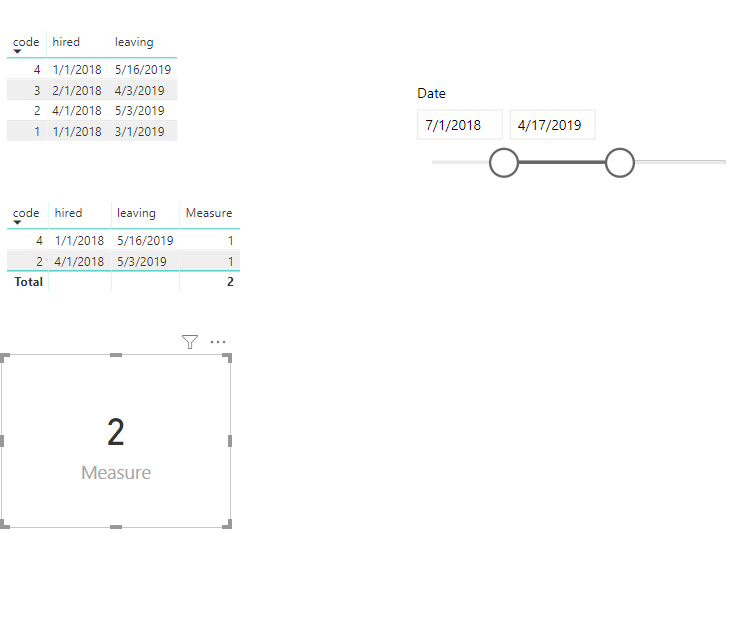
For example, if i select date 2018/7/1~2019/4/17, then active employees should be hired before or at 2018/7/1, leave after 2019/4/17.


If my assumption is the same as your scenario,


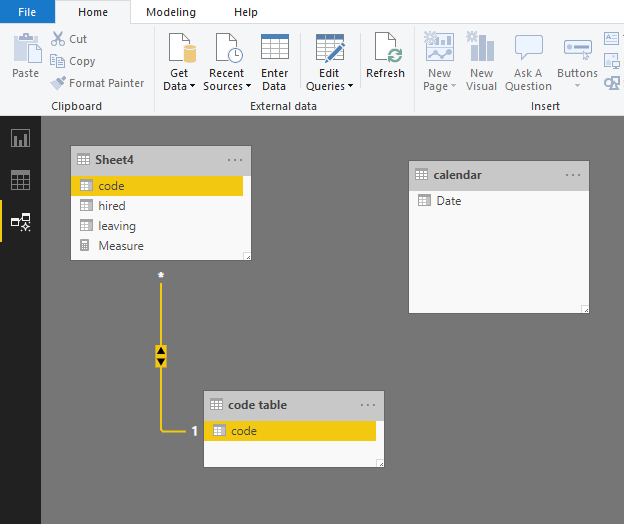
Please create such relationship

2.png

create such measure

Measure = CALCULATE(COUNT('code table'[code]),FILTER(Sheet4,Sheet4[hired]<=MIN('calendar'[Date])&&Sheet4[leaving]>MAX('calendar'[Date])))

3.png

Best Regards

Maggie

View solution in original post

2 REPLIES 2
v-juanli-msft
Community Support
Community Support

Hi @Anonymous 

If active employees refer to the ones who are working for this company between selected date the period.

For example, if i select date 2018/7/1~2019/4/17, then active employees should be hired before or at 2018/7/1, leave after 2019/4/17.


If my assumption is the same as your scenario,


Please create such relationship

2.png

create such measure

Measure = CALCULATE(COUNT('code table'[code]),FILTER(Sheet4,Sheet4[hired]<=MIN('calendar'[Date])&&Sheet4[leaving]>MAX('calendar'[Date])))

3.png

Best Regards

Maggie

Anonymous
Not applicable

Hi @Anonymous 


I am not sure if the following approach can work for you.

The approach assumes you have a CalendarTable.  My fact table is FactHR.  The two tables are linked on Date field in both tables.


1. Compute Continuing Employees


ContinuingEmployees =
VAR CurrentEmployees =
       CALCULATETABLE(
          DISTINCT('FactHR'[Employee GEID]),'FactHR')
VAR PreviousEmployees =
       CALCULATETABLE(
          DISTINCT('FactHR'[Employee GEID]) ,
               CALCULATETABLE( 'FactHR',
                  FILTER( ALL('MasterCalendar'),
                          'MasterCalendar'[Date] < MIN('MasterCalendar'[Date])
                     )     )  )
RETURN
CALCULATE(COUNTROWS(DISTINCT('FactHR'[Employee GEID])),
     INTERSECT(CurrentEmployees,PreviousEmployees)  )
 
This one creates the current table of Employee ID as of the selected month.
Then computes the table of employeeids before the selected month.
 
Similarly compute the new employees in a month.
 
2.  NewEmployees =
VAR CurrentEmployees =
    CALCULATETABLE(
       DISTINCT('FactHR'[Employee GEID]), 'FactHR')
VAR PreviousEmployees =
    CALCULATETABLE(
        DISTINCT('FactHR'[Employee GEID]) ,
            CALCULATETABLE('FactHR',
                FILTER( ALL('MasterCalendar'),
                        'MasterCalendar'[Date] < MIN('MasterCalendar'[Date])
                )  )   )
Return
CALCULATE(COUNTROWS(DISTINCT('FactHR'[Employee GEID])),
          EXCEPT(CurrentEmployees, PreviousEmployees))
 
3. PreviousMonthCount
PreviousMonthEmpCount = CALCULATE(COUNTROWS(DISTINCT('FactHR'[Employee GEID]))
                                 ,DATEADD('MasterCalendar'[Date],-1,month))
 
 
4. Left Employees
LeftEmployees = IF(ISBLANK(COUNTROWS(DISTINCT('FactHR'[Employee GEID]))),
                      BLANK(),
                        IF(not ISBLANK([PreviousMonthEmpCount]),
                     [PreviousMonthEmpCount] - [ContinuingEmployees])  )
 
4. Active as at end month
 
HeadCount = [PreviousMonthEmpCount] + [RevNewEmployees] - [RevLeftEmployees]
 
Cheers
 
CheenuSing


Helpful resources

Announcements
Power BI DataViz World Championships

Power BI Dataviz World Championships

The Power BI Data Visualization World Championships is back! Get ahead of the game and start preparing now!

December 2025 Power BI Update Carousel

Power BI Monthly Update - December 2025

Check out the December 2025 Power BI Holiday Recap!

FabCon Atlanta 2026 carousel

FabCon Atlanta 2026

Join us at FabCon Atlanta, March 16-20, for the ultimate Fabric, Power BI, AI and SQL community-led event. Save $200 with code FABCOMM.