FabCon is coming to Atlanta
Join us at FabCon Atlanta from March 16 - 20, 2026, for the ultimate Fabric, Power BI, AI and SQL community-led event. Save $200 with code FABCOMM.
Register now!- Power BI forums
- Get Help with Power BI
- Desktop
- Service
- Report Server
- Power Query
- Mobile Apps
- Developer
- DAX Commands and Tips
- Custom Visuals Development Discussion
- Health and Life Sciences
- Power BI Spanish forums
- Translated Spanish Desktop
- Training and Consulting
- Instructor Led Training
- Dashboard in a Day for Women, by Women
- Galleries
- Data Stories Gallery
- Themes Gallery
- Contests Gallery
- QuickViz Gallery
- Quick Measures Gallery
- Visual Calculations Gallery
- Notebook Gallery
- Translytical Task Flow Gallery
- TMDL Gallery
- R Script Showcase
- Webinars and Video Gallery
- Ideas
- Custom Visuals Ideas (read-only)
- Issues
- Issues
- Events
- Upcoming Events
The Power BI Data Visualization World Championships is back! Get ahead of the game and start preparing now! Learn more
- Power BI forums
- Forums
- Get Help with Power BI
- Desktop
- Re: Accumulating within categories
- Subscribe to RSS Feed
- Mark Topic as New
- Mark Topic as Read
- Float this Topic for Current User
- Bookmark
- Subscribe
- Printer Friendly Page


- Mark as New
- Bookmark
- Subscribe
- Mute
- Subscribe to RSS Feed
- Permalink
- Report Inappropriate Content
Accumulating within categories
Hello all!
I have a visualization that looks like this:
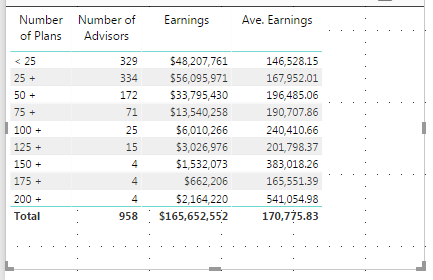
This is set up to count the number of advisors that meet the criteria in column 1 for number of plans sold (this is just a custom column that indicates the advisors meeting the critera for that category). Right now it is categorizing them as 25-49, 50-74, 75-99, etc. What I want is for the 2nd column to count ALL those with 25+ plans, then ALL those with 50+ plans, then ALL those with 75+ plans, etc.
So column 2 should look like this:
| 329 |
| 629 |
| 295 |
| 123 |
| 52 |
| 27 |
| 12 |
| 8 |
| 4 |
Here are some of my measures/columns:
Column:
Number of Plans =
IF(TotalPlans[Plans Grand Total] < 25, "< 25",
IF(TotalPlans[Plans Grand Total] > 24 && TotalPlans[Plans Grand Total] < 50, "25 +",
IF(TotalPlans[Plans Grand Total] > 49 && TotalPlans[Plans Grand Total] < 75, "50 +",
IF(TotalPlans[Plans Grand Total] > 74 && TotalPlans[Plans Grand Total] < 100, "75 +",
IF(TotalPlans[Plans Grand Total] > 99 && TotalPlans[Plans Grand Total] < 125, "100 +",
IF(TotalPlans[Plans Grand Total] > 124 && TotalPlans[Plans Grand Total] < 150, "125 +",
IF(TotalPlans[Plans Grand Total] > 149 && TotalPlans[Plans Grand Total] < 175, "150 +",
IF(TotalPlans[Plans Grand Total] > 174 && TotalPlans[Plans Grand Total] < 200, "175 +",
IF(TotalPlans[Plans Grand Total] > 199, "200 +")))))))))
Measures:
Number of Advisors = COUNTROWS ( TotalPlans )
Ave. Earnings = DIVIDE( SUM ( TotalEarnings[Earnings] ) , ( COUNTROWS( TotalEarnings ) ) ,0)
"Earnings" is just the data in the original source.
So I think I need a different calculation for "Number of Advisors" but don't know how to do it to get what I want. Any help is appreciated!
Thanks!
Tom
Solved! Go to Solution.


- Mark as New
- Bookmark
- Subscribe
- Mute
- Subscribe to RSS Feed
- Permalink
- Report Inappropriate Content
Hi @tborg,
You also can add it in the Query Editor like this. Please note the tips in the snapshot.
Best Regards,
Dale
If this post helps, then please consider Accept it as the solution to help the other members find it more quickly.
- Mark as New
- Bookmark
- Subscribe
- Mute
- Subscribe to RSS Feed
- Permalink
- Report Inappropriate Content
Dale, you rock! I never would have guessed about the single quote!
Thanks a million!
Tom
- Mark as New
- Bookmark
- Subscribe
- Mute
- Subscribe to RSS Feed
- Permalink
- Report Inappropriate Content
Hi @tborg,
Could you please share the original data please? A dummy one is enough. I think function Summarize could help.
Best Regards,
Dale
If this post helps, then please consider Accept it as the solution to help the other members find it more quickly.
- Mark as New
- Bookmark
- Subscribe
- Mute
- Subscribe to RSS Feed
- Permalink
- Report Inappropriate Content
Here is a sample of the data. The first column identifies the advisor, the 2nd column is the count of plans, where I have identified the groupings, "<25", "25+", "50+", etc. So in this sample, the count in category "25+" should be 827, in "50+" should be 605, in "125+" should be 315, and in "175+" should be 184.
I hope this is enough info.
Advisor ID Grand Total Category
| 14110 | 184 | 175+ |
| 15474 | 29 | 25+ |
| 14994 | 5 | <25 |
| 03793 | 5 | <25 |
| 01473 | 49 | 25+ |
| 14930 | 56 | 50+ |
| 15595 | 26 | 25+ |
| 15194 | 16 | <25 |
| 13189 | 58 | 50+ |
| 01759 | 50 | 50+ |
| 14267 | 48 | 25+ |
| 03188 | 28 | 25+ |
| 13846 | 66 | 50+ |
| 07588 | 60 | 50+ |
| 10220 | 42 | 25+ |
| 13463 | 131 | 125+ |
| 15169 | 1 | <25 |
Thanks!
- Mark as New
- Bookmark
- Subscribe
- Mute
- Subscribe to RSS Feed
- Permalink
- Report Inappropriate Content
Correction:
I was just reviewing the sample data, and realized I did not explain correctly what I weant to do.
In this data, there are 17 advisors. Four have <25 plans. Six are in the 25-49 category, 5 in the 50-74 category, 2 in the 125-149 category, and 1 in the 175-199 category. It looks like this:
<25 4
25+ 6
50+ 5
75+ 0
100+ 0
125+ 1
150+ 0
175+ 1
200+ 0
What I want to show is how many are in a category AND ALL CATEGORIES ABOVE THAT:
<25 4
25+ 13 (the sum of 6+5+1+1)
50+ 7 (the sum of 5+1+1)
75+ 2 (the sum of 1+1)
100+ 2
125+ 2
150+ 1
175+ 1
200+ 0
Sorry for the confusion!
Thanks.
- Mark as New
- Bookmark
- Subscribe
- Mute
- Subscribe to RSS Feed
- Permalink
- Report Inappropriate Content
Hi @tborg,
You can try it out in this file.
1. Add a conditional column in the Query Editor.
2. Then create a measure like this.
Accumulating =
IF (
    MIN ( 'Table1'[Index] ) = 1,
    COUNT ( Table1[Grand Total] ),
    CALCULATE (
        COUNT ( 'Table1'[Grand Total] ),
        FILTER ( ALL ( 'Table1' ), 'Table1'[Index] >= MIN ( 'Table1'[Index] ) )
    )
)
Best Regards,
Dale
If this post helps, then please consider Accept it as the solution to help the other members find it more quickly.
- Mark as New
- Bookmark
- Subscribe
- Mute
- Subscribe to RSS Feed
- Permalink
- Report Inappropriate Content
Thanks! This might work, but I'm having a problem with your "Category" column. My equivalent column was a custom column created in the Desktop, so it is not available when I create the conditional column. So I first created a new conditional column to create the Cagtegory column, but it never registers anything above "25+".
How did you creaate your "Category" column?
(I could not view your attached file, as it can't get through our firewall.)
Thx!
- Mark as New
- Bookmark
- Subscribe
- Mute
- Subscribe to RSS Feed
- Permalink
- Report Inappropriate Content
Hi @tborg,
You also can add it in the Query Editor like this. Please note the tips in the snapshot.
Best Regards,
Dale
If this post helps, then please consider Accept it as the solution to help the other members find it more quickly.
- Mark as New
- Bookmark
- Subscribe
- Mute
- Subscribe to RSS Feed
- Permalink
- Report Inappropriate Content
Dale, you rock! I never would have guessed about the single quote!
Thanks a million!
Tom

Helpful resources

Power BI Dataviz World Championships
The Power BI Data Visualization World Championships is back! Get ahead of the game and start preparing now!

Power BI Monthly Update - December 2025
Check out the December 2025 Power BI Holiday Recap!

FabCon Atlanta 2026
Join us at FabCon Atlanta, March 16-20, for the ultimate Fabric, Power BI, AI and SQL community-led event. Save $200 with code FABCOMM.

| User | Count |
|---|---|
| 39 | |
| 38 | |
| 38 | |
| 28 | |
| 27 |


| User | Count |
|---|---|
| 124 | |
| 88 | |
| 73 | |
| 66 | |
| 65 |


