Join us at FabCon Atlanta from March 16 - 20, 2026, for the ultimate Fabric, Power BI, AI and SQL community-led event. Save $200 with code FABCOMM.
Register now!Get Fabric Certified for FREE during Fabric Data Days. Don't miss your chance! Request now
Hello guys, I hope you all are well.
This time I'm trying to do a matrix table, which have a list of categories in several levels, with month columns. It is a result table for accounting issues.
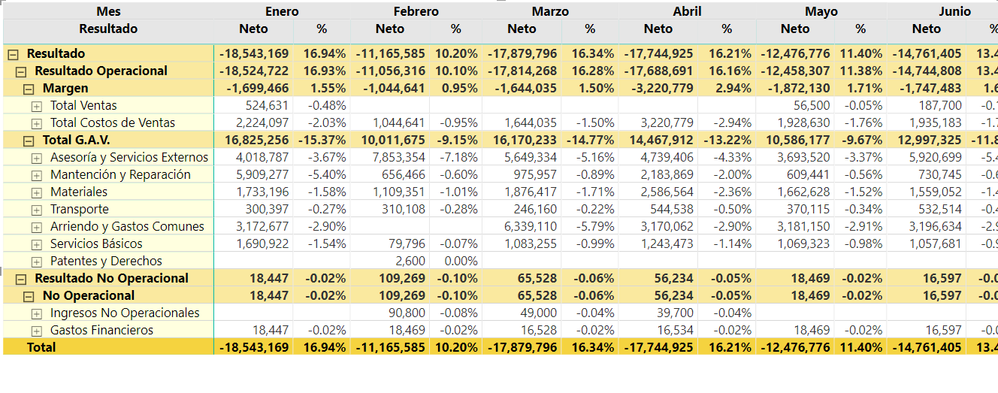
Now, I already did all the levels in my matrix, and this is what I got so far:
I need a master measure that calculates Amount by every level, but the most difficult is that I need it to be like this:
Resultado (This should be Resultado Operacional - Resultado No Operacional ) 250 < The last result
Resultado Operacional (This should be Margen - Total G.A.V) 350
Margen (this should be Total Ventas - Total Costos de Ventas) 650
Total Ventas 1000
Total Costos de Ventas 350
Total G.A.V. (this should be a SUM of all the accounts inside it) 300
Asesoria y Servicios Externos 100
Transporte 100
Servicios Basicos 50
Patentes 50
Resultado No Operacional (This should be a SUM of all the accounts inside it) 100
No Operacional ( this should be a SUM of all the accounts inside it) 100
Ingreso no Operacional 50
Gastos Financieros 20
Impuestos 30
Im sending here a google drive link with both archives (.pbix and the Excel file), in case you need it>
https://drive.google.com/drive/folders/15GbeJRhq9yd49ituJh-_QB2UrzQeLOu3?usp=sharing
Guys, I know you can help me!!! Please, and THANKS A LOT!
Solved! Go to Solution.
Hi @omarevp ,
Believe that the best way is to create the singular measures for each of your levels and then make it the calculations on a measure to put on the matrix.
Margen =
CALCULATE (
SUM ( 'Datos Origen'[Monto Neto] );
FILTER (
ALL ( 'Cuentas y Conceptos'[Padre] );
'Cuentas y Conceptos'[Padre] = "Total Ventas"
)
)
- CALCULATE (
SUM ( 'Datos Origen'[Monto Neto] );
FILTER (
ALL ( 'Cuentas y Conceptos'[Padre] );
'Cuentas y Conceptos'[Padre] = "Total Costos de Ventas"
)
)
Resultado No Operacional =
CALCULATE (
SUM ( 'Datos Origen'[Monto Neto] );
FILTER (
ALL ( 'Cuentas y Conceptos'[Totales] );
'Cuentas y Conceptos'[Totales] = "Resultado No Operacional"
)
)
Total G.A.V =
CALCULATE (
SUM ( 'Datos Origen'[Monto Neto] );
FILTER (
ALL ( 'Cuentas y Conceptos'[Subtotales] );
'Cuentas y Conceptos'[Subtotales] = "Total G.A.V."
)
)
Neto =
SWITCH (
TRUE ();
SELECTEDVALUE ( 'Cuentas y Conceptos'[Subtotales] ) = "Margen"
&& NOT ( HASONEFILTER ( 'Cuentas y Conceptos'[Padre] ) ); [Margen];
SELECTEDVALUE ( 'Cuentas y Conceptos'[Totales] ) = "Resultado Operacional"
&& NOT ( HASONEFILTER ( 'Cuentas y Conceptos'[Subtotales] ) ); [Margen] - [Total G.A.V];
NOT ( HASONEFILTER ( 'Cuentas y Conceptos'[Totales] ) ); [Margen] - [Total G.A.V] - [Resultado No Operacional];
SUM ( 'Datos Origen'[Monto Neto] )
)
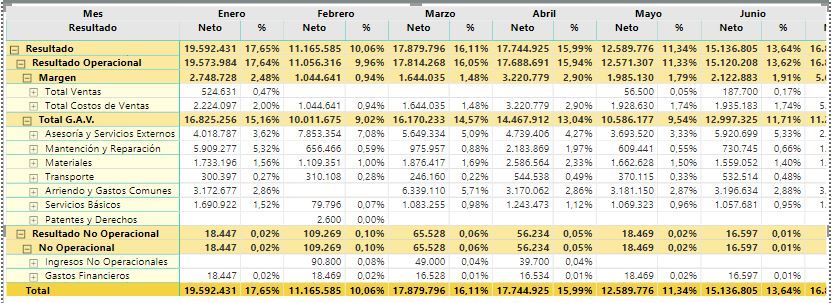
Final result below and in attach PBIX file.
Hope this helps.
Regards,
MFelix
Regards
Miguel Félix
Proud to be a Super User!
Check out my blog: Power BI em PortuguêsHi @omarevp ,
Believe that the best way is to create the singular measures for each of your levels and then make it the calculations on a measure to put on the matrix.
Margen =
CALCULATE (
SUM ( 'Datos Origen'[Monto Neto] );
FILTER (
ALL ( 'Cuentas y Conceptos'[Padre] );
'Cuentas y Conceptos'[Padre] = "Total Ventas"
)
)
- CALCULATE (
SUM ( 'Datos Origen'[Monto Neto] );
FILTER (
ALL ( 'Cuentas y Conceptos'[Padre] );
'Cuentas y Conceptos'[Padre] = "Total Costos de Ventas"
)
)
Resultado No Operacional =
CALCULATE (
SUM ( 'Datos Origen'[Monto Neto] );
FILTER (
ALL ( 'Cuentas y Conceptos'[Totales] );
'Cuentas y Conceptos'[Totales] = "Resultado No Operacional"
)
)
Total G.A.V =
CALCULATE (
SUM ( 'Datos Origen'[Monto Neto] );
FILTER (
ALL ( 'Cuentas y Conceptos'[Subtotales] );
'Cuentas y Conceptos'[Subtotales] = "Total G.A.V."
)
)
Neto =
SWITCH (
TRUE ();
SELECTEDVALUE ( 'Cuentas y Conceptos'[Subtotales] ) = "Margen"
&& NOT ( HASONEFILTER ( 'Cuentas y Conceptos'[Padre] ) ); [Margen];
SELECTEDVALUE ( 'Cuentas y Conceptos'[Totales] ) = "Resultado Operacional"
&& NOT ( HASONEFILTER ( 'Cuentas y Conceptos'[Subtotales] ) ); [Margen] - [Total G.A.V];
NOT ( HASONEFILTER ( 'Cuentas y Conceptos'[Totales] ) ); [Margen] - [Total G.A.V] - [Resultado No Operacional];
SUM ( 'Datos Origen'[Monto Neto] )
)
Final result below and in attach PBIX file.
Hope this helps.
Regards,
MFelix
Regards
Miguel Félix
Proud to be a Super User!
Check out my blog: Power BI em PortuguêsPerhaps this link might help...
Perhaps this link might help...
Hi @omarevp ,
By my research based on your sample data, I'm afraid that there is no default option for us to achieve your desired output in matrix currently.
Hope @Greg_Deckler and @MFelix have other ideas.
Best Regards,
Cherry
Check out the November 2025 Power BI update to learn about new features.
Advance your Data & AI career with 50 days of live learning, contests, hands-on challenges, study groups & certifications and more!