cancel
Showing results for 
Search instead for 
Did you mean: 

Next up in the FabCon + SQLCon recap series: The roadmap for Microsoft SQL and Maximizing Developer experiences in Fabric. All sessions are available on-demand after the live show. Register now

Reply
kelly008
Helper I
Helper I

Absolute Percentage Difference

Hello,


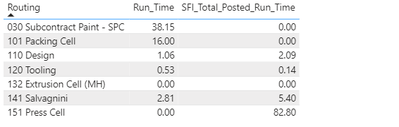
I am currently trying to get the absolute percentage difference between 2 time values, but I'm struggling to get it to work.


I have this table:

kelly008_0-1667820406622.png

I need the following calculation: Run_Time/SFI_Total_Posted_Run_Time x 100


However the calculation I use doesnt work:


PercentDiff = CALCULATE(
SUM(RoutingLinesNew[Run_Time])/
SUM(routinglinesnew[sfi_total_posted_run_time]*100))
 
Any help would be greatly appreciated.
Thanks!


1 ACCEPTED SOLUTION
amitchandak
Super User
Super User

@kelly008 , you have to create a measure like


Divide(

SUM(RoutingLinesNew[Run_Time]),
SUM(routinglinesnew[sfi_total_posted_run_time]))


and mark that as % column


Please remember the two are not equal

Run_Time/SFI_Total_Posted_Run_Time <>

Divide(

SUM(RoutingLinesNew[Run_Time]),
SUM(routinglinesnew[sfi_total_posted_run_time]))

Share with Power BI Enthusiasts: Full Power BI Video (20 Hours) YouTube
Microsoft Fabric Series 60+ Videos YouTube
Microsoft Fabric Hindi End to End YouTube

View solution in original post

1 REPLY 1
amitchandak
Super User
Super User

@kelly008 , you have to create a measure like


Divide(

SUM(RoutingLinesNew[Run_Time]),
SUM(routinglinesnew[sfi_total_posted_run_time]))


and mark that as % column


Please remember the two are not equal

Run_Time/SFI_Total_Posted_Run_Time <>

Divide(

SUM(RoutingLinesNew[Run_Time]),
SUM(routinglinesnew[sfi_total_posted_run_time]))

Share with Power BI Enthusiasts: Full Power BI Video (20 Hours) YouTube
Microsoft Fabric Series 60+ Videos YouTube
Microsoft Fabric Hindi End to End YouTube

Helpful resources

Announcements
New to Fabric survey Carousel

New to Fabric Survey

If you have recently started exploring Fabric, we'd love to hear how it's going. Your feedback can help with product improvements.

Power BI DataViz World Championships carousel

Power BI DataViz World Championships - June 2026

A new Power BI DataViz World Championship is coming this June! Don't miss out on submitting your entry.

Join our Fabric User Panel

Join our Fabric User Panel

Share feedback directly with Fabric product managers, participate in targeted research studies and influence the Fabric roadmap.

March Power BI Update Carousel

Power BI Community Update - March 2026

Check out the March 2026 Power BI update to learn about new features.