Join us at FabCon Atlanta from March 16 - 20, 2026, for the ultimate Fabric, Power BI, AI and SQL community-led event. Save $200 with code FABCOMM.
Register now!Get Fabric Certified for FREE during Fabric Data Days. Don't miss your chance! Request now
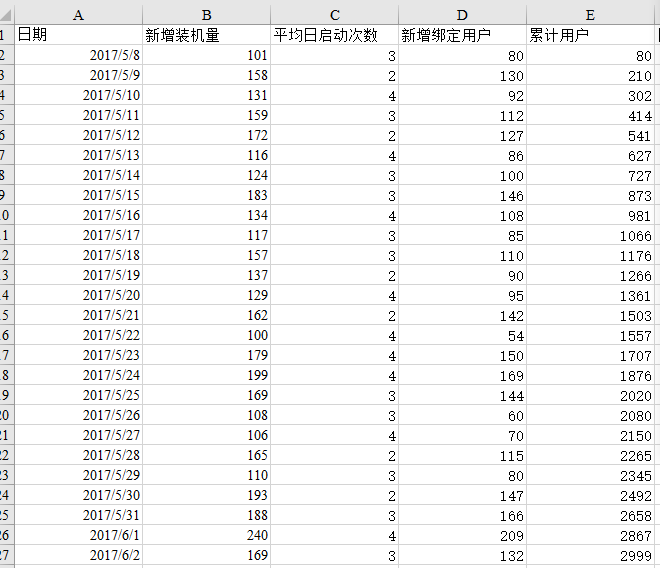
My data range from 2017.5.8 to 2018.10.8,
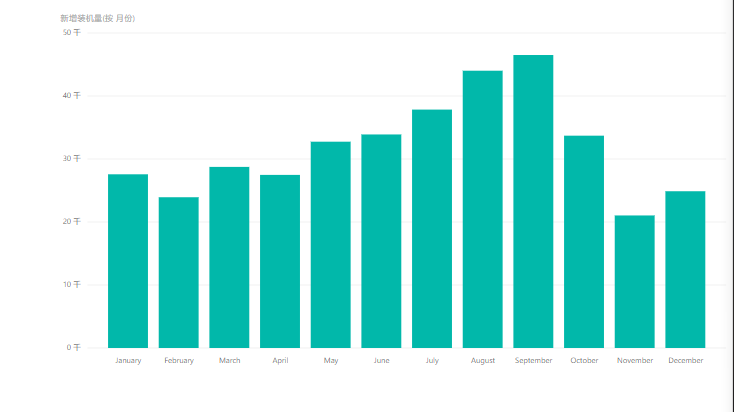
and I hope the visual can display the total amount of every mouth(18 months).Unfortunately,It only has 12 months,which means it add the data in each month of 2017 to that in the same month of 2018.
And it is not right.How can I have the expected result,please help.Thanks.
Hi @ccyccxcl,
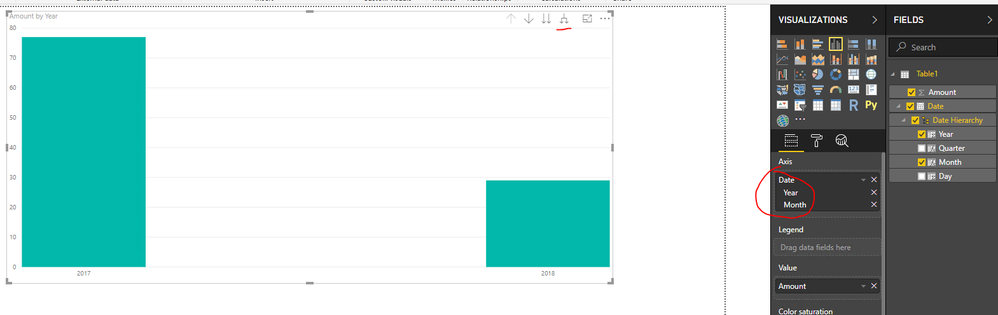
You can drag the date hierarchy Year - Month to the X-axis of the chart, then click on the Expand all down one level of the hierarchy on the top right corner of the chart. You can refer to attached pbix file.
Reference:
https://docs.microsoft.com/en-us/power-bi/consumer/end-user-drill
Best Regards,
Qiuyun Yu
Check out the November 2025 Power BI update to learn about new features.
Advance your Data & AI career with 50 days of live learning, contests, hands-on challenges, study groups & certifications and more!