Join us at FabCon Atlanta from March 16 - 20, 2026, for the ultimate Fabric, Power BI, AI and SQL community-led event. Save $200 with code FABCOMM.
Register now!Get Fabric Certified for FREE during Fabric Data Days. Don't miss your chance! Request now
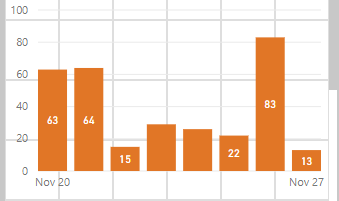
There should be a way to force data labels to show on charts such as the stacked column chart. Currently the system randomly doesn't show some of the data labels even when there is clearly sufficient room to display the label. This screenshot shows a mobile view where some of the columns are shown and others are not shown. Every combination of options such as orientation, position, and overflow text have been attempted but still no success.
Solved! Go to Solution.
Hi @maracucho1997,
Please go to Formatting pane -> Data Labels, set Label density value as 100%.
Best Regards,
Qiuyun Yu
Hi @maracucho1997,
Please go to Formatting pane -> Data Labels, set Label density value as 100%.
Best Regards,
Qiuyun Yu
In what scenarios is Label Density supposed to displayed as an option?
In a stacked column chart now, and I don't have that option
@RyanP ,
In my experiences if the graph is too "complex", to where it has a lot of different cars then it won't have that option. If there are only a few data points you can change that option.
Single visual report
- stacked columns, 3 in total.
With 1 single Analytics Constant line.
I'd hope that's not too complex for PowerBI :0
That solved it. Thanks!
Check out the November 2025 Power BI update to learn about new features.
Advance your Data & AI career with 50 days of live learning, contests, hands-on challenges, study groups & certifications and more!