cancel
Showing results for 
Search instead for 
Did you mean: 

Level up your Power BI skills this month - build one visual each week and tell better stories with data! Get started

Reply
Anonymous
Not applicable

AS Timeline link visuals?

Hello,


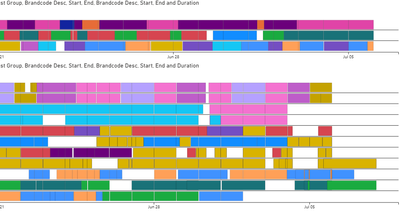
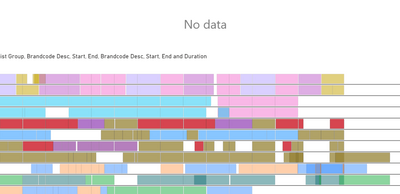
I have two AS Timeline visuals to show our plants production schedule. Both timelines are pulling data from the same sheet, however, I have split it into two different visuals to seperate the loaction of the lines. Is it possible to have the two visuals linked, so that, for example, when I click the red bar it will highlight all of them in both visuals. Currently, it is doing what is happening in the second image.


1st:


bhai-ali_0-1595505228635.png


2nd:


bhai-ali_1-1595505349145.png


Thanks in advance!


1 ACCEPTED SOLUTION

Hi  @Anonymous ,


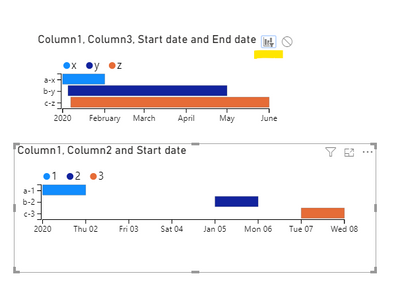
First make sure that the interactions between the 2 visuals are "Filter":

Annotation 2020-07-24 163755.png

Then go to "field">"Behavior">"Multiselect adds to ..",check whether it's on:

Annotation 2020-07-24 163629.png

If it is "on",you need to make it off or you need to click triple times to highlight the data that is crossing over the data you select.

Here is a video.

https://www.youtube.com/watch?v=1U2_h7FY3ag


Best Regards,
Kelly
Did I answer your question? Mark my post as a solution!


View solution in original post

4 REPLIES 4
FarhanAhmed
Community Champion
Community Champion

Kindly refer to link below


https://docs.microsoft.com/en-us/power-bi/create-reports/service-reports-visual-interactions


https://docs.microsoft.com/en-us/power-bi/consumer/end-user-interactions


Did I answer your question? Mark my post as a solution! Appreciate your Kudos!!

Proud to be a Super User!


amitchandak
Super User
Super User

@Anonymous , Not very clear. Are looking for interactions (cross filtering)

https://docs.microsoft.com/en-us/power-bi/service-reports-visual-interactions


Share with Power BI Enthusiasts: Full Power BI Video (20 Hours) YouTube
Microsoft Fabric Series 60+ Videos YouTube
Microsoft Fabric Hindi End to End YouTube
Anonymous
Not applicable


@amitchandak 

Yes, I am looking for a type of cross filter. In both visuals the red bars ave the exact same name. I have made sure that the filter icon is selected in both both visuals when editing interactions, however, when I go to select the red bars in one visual the other says "No data" like the image I have provided

Hi  @Anonymous ,


First make sure that the interactions between the 2 visuals are "Filter":

Annotation 2020-07-24 163755.png

Then go to "field">"Behavior">"Multiselect adds to ..",check whether it's on:

Annotation 2020-07-24 163629.png

If it is "on",you need to make it off or you need to click triple times to highlight the data that is crossing over the data you select.

Here is a video.

https://www.youtube.com/watch?v=1U2_h7FY3ag


Best Regards,
Kelly
Did I answer your question? Mark my post as a solution!


Helpful resources

Announcements
Fabric SQL PBI Data Days

Data Days 2026 coming soon!

Sign up to receive a private message when registration opens and key events begin.

New to Fabric survey Carousel

New to Fabric Survey

If you have recently started exploring Fabric, we'd love to hear how it's going. Your feedback can help with product improvements.

Power BI DataViz World Championships carousel

Power BI DataViz World Championships - June 2026

A new Power BI DataViz World Championship is coming this June! Don't miss out on submitting your entry.