

Join us at FabCon Atlanta from March 16 - 20, 2026, for the ultimate Fabric, Power BI, AI and SQL community-led event. Save $200 with code FABCOMM.
Register now!The Power BI Data Visualization World Championships is back! Get ahead of the game and start preparing now! Learn more
Hi All,
I have data in different pages like:
Page01:https://abccccccc.teamwork.com/projects.json/page=1
Page02:https://abccccccc..teamwork.com/projects.json/page=2........
..
..
Page15:https://abccccccc..teamwork.com/projects.json/page=15
How to load data in Power bi all apis at a time.
Thanks,
Pratima
Hi @Pratima,
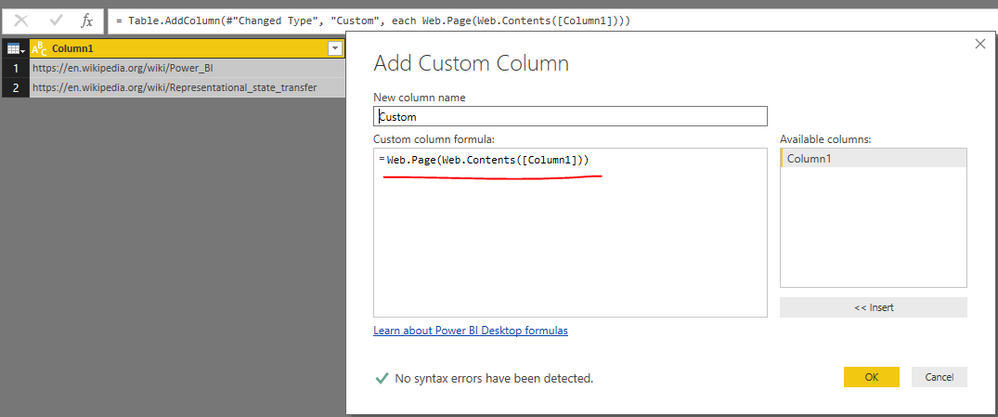
One workaround is listing all the page URLs in a single column like below.
Then, add a custome column to load data from these pages.
Click to expand to the table, you will get all available data in a single query.
However, the limitation for this workaround is that we are not able to refesh data after publishing to service.
So, another option to work around your requirement is writing external procedure to load data from all APIs into a file or database, then, in Power BI desktop, you can directly connect to the file or database to fetch data at a time.
Best regards,
Yuliana Gu
The Power BI Data Visualization World Championships is back! Get ahead of the game and start preparing now!
| User | Count |
|---|---|
| 56 | |
| 45 | |
| 35 | |
| 34 | |
| 21 |
| User | Count |
|---|---|
| 143 | |
| 122 | |
| 100 | |
| 80 | |
| 57 |