Don't miss your chance to take the Fabric Data Engineer (DP-700) exam on us!
Learn moreWe've captured the moments from FabCon & SQLCon that everyone is talking about, and we are bringing them to the community, live and on-demand. Starts on April 14th. Register now
Hi guys,
I have some problems with API from ABS web site as a data set on Power BI Desktop. I have read a lot and I can do with others samples API, but not with API from ABS. I dont have experience on Json, for this reason it is quite hard for me.
I think the problem is probably the structure of the tables. Can you help me with this?.
this is the API data query: http://stat.data.abs.gov.au/sdmx-json/data/RES_PROP_INDEX/1+2+3.3+2+1.1GSYD+2GMEL+3GBRI+4GADE+5GPER+...
Cheers.
Solved! Go to Solution.
Hi @juangbiestro,
You should be able to use Get Data -> From Web and enter the URL (or local path) to the JSON file. PBI will interpret that file as JSON and show you the root node, which you can drill in and expand on to get to the data elements you want.
Here is a similar thread for your reference. The exact steps will depend on the shape of your JSON. For example, following is the sample query which I used to get the data from the "dataSets" elements of JSON file you proveded above.![]()
let
Source = Web.Contents("http://stat.data.abs.gov.au/sdmx-json/data/RES_PROP_INDEX/1+2+3.3+2+1.1GSYD+2GMEL+3GBRI+4GADE+5GPER+6GHOB+7GDAR+8ACTE+100.Q/all?startTime=2014-Q4&endTime=2016-Q3&dimensionAtObservation=allDimensions"),
#"2" = #table(1, {{Source}}),
Column1 = #"2"{0}[Column1],
#"Imported JSON" = Json.Document(Column1,65001),
dataSets = #"Imported JSON"[dataSets],
dataSets1 = dataSets{0},
observations = dataSets1[observations],
#"Converted to Table" = Record.ToTable(observations),
#"Extracted Values" = Table.TransformColumns(#"Converted to Table", {"Value", each Text.Combine(List.Transform(_, Text.From), ","), type text})
in
#"Extracted Values"
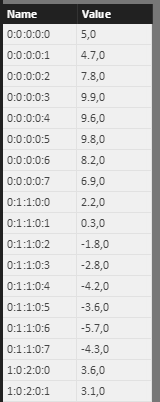
Regards
Hi @juangbiestro,
You should be able to use Get Data -> From Web and enter the URL (or local path) to the JSON file. PBI will interpret that file as JSON and show you the root node, which you can drill in and expand on to get to the data elements you want.
Here is a similar thread for your reference. The exact steps will depend on the shape of your JSON. For example, following is the sample query which I used to get the data from the "dataSets" elements of JSON file you proveded above.![]()
let
Source = Web.Contents("http://stat.data.abs.gov.au/sdmx-json/data/RES_PROP_INDEX/1+2+3.3+2+1.1GSYD+2GMEL+3GBRI+4GADE+5GPER+6GHOB+7GDAR+8ACTE+100.Q/all?startTime=2014-Q4&endTime=2016-Q3&dimensionAtObservation=allDimensions"),
#"2" = #table(1, {{Source}}),
Column1 = #"2"{0}[Column1],
#"Imported JSON" = Json.Document(Column1,65001),
dataSets = #"Imported JSON"[dataSets],
dataSets1 = dataSets{0},
observations = dataSets1[observations],
#"Converted to Table" = Record.ToTable(observations),
#"Extracted Values" = Table.TransformColumns(#"Converted to Table", {"Value", each Text.Combine(List.Transform(_, Text.From), ","), type text})
in
#"Extracted Values"
Regards
Thanks for your help.
Cheers.
If you have recently started exploring Fabric, we'd love to hear how it's going. Your feedback can help with product improvements.
A new Power BI DataViz World Championship is coming this June! Don't miss out on submitting your entry.
Share feedback directly with Fabric product managers, participate in targeted research studies and influence the Fabric roadmap.
| User | Count |
|---|---|
| 53 | |
| 36 | |
| 33 | |
| 19 | |
| 17 |
| User | Count |
|---|---|
| 73 | |
| 72 | |
| 38 | |
| 35 | |
| 26 |