Join us at FabCon Atlanta from March 16 - 20, 2026, for the ultimate Fabric, Power BI, AI and SQL community-led event. Save $200 with code FABCOMM.
Register now!Learn from the best! Meet the four finalists headed to the FINALS of the Power BI Dataviz World Championships! Register now
Hi,
doeas anybody use the ALM Toolkit to copmare two datamodels from PowerBI desktop files ?
When I try to use this tool I get an error:
"Analysis Server is not running in Tabular mode"
I will be grateful for help.
Solved! Go to Solution.
Hi @Marcin ,
How did you connect to the model? As the post here: it currently doesn't work with the local Power BI Desktop AS instance. When we open up the XMLA endpoint on Power BI (soon), it will work with the Power BI service in the first version.
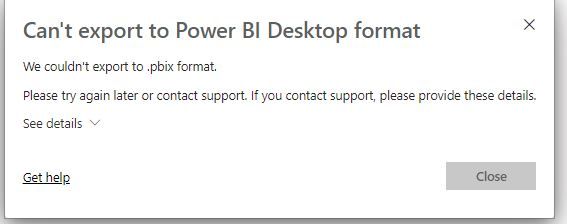
ALM toolkit works great. I do recognie that Datasets modified by using the XMLA endpoint can't be downloaded to a .pbix file, but the issue that I am having is that a report connected to that dataset once I have made modifications using the ALM toolkit also cannot be downloaded. No issues with other reports in the workspace connected to other datasets which have not been modified using ALM. Any help would be appreciated. Has anyone come across this issue and found a solution?
Hi @Marcin ,
How did you connect to the model? As the post here: it currently doesn't work with the local Power BI Desktop AS instance. When we open up the XMLA endpoint on Power BI (soon), it will work with the Power BI service in the first version.
Hi @v-frfei-msft ,
I tried to connect to my local PowerBI desktop file model.
Thank you for information.
Share feedback directly with Fabric product managers, participate in targeted research studies and influence the Fabric roadmap.
Check out the February 2026 Power BI update to learn about new features.
| User | Count |
|---|---|
| 62 | |
| 54 | |
| 40 | |
| 17 | |
| 15 |
| User | Count |
|---|---|
| 94 | |
| 83 | |
| 33 | |
| 32 | |
| 24 |