Don't miss your chance to take the Fabric Data Engineer (DP-600) exam for FREE! Find out how by attending the DP-600 session on April 23rd (pacific time), live or on-demand.
Learn moreNext up in the FabCon + SQLCon recap series: The roadmap for Microsoft SQL and Maximizing Developer experiences in Fabric. All sessions are available on-demand after the live show. Register now
Hello everyone, hope someone can help me on this.
I'm adding an ALLEXCEPT function to calculate a percentage of a column. It does what I want except for the Date dimension.
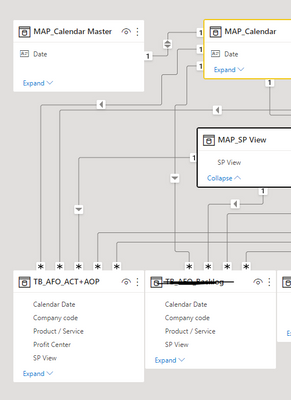
Relationships are those. MAP Calendar Master contains all days, MAP Calendar and TB only contains 1 day each month.
I'm really struggling to figure out whats happening but even trying to use random columns from all the 3 tables related or even disabling MAP Calendar Master relationship it does not work...
Thank you a lot!¡
Solved! Go to Solution.
Even putting it as you said I couldn't achieve what I want. But I found another way to do it. I used the ALLSELECTED() function like this:
The only limitation is that you must use only a single table to filter, in this case TB AFO ACT+AOP. You can use the RELATED() for this issue.
Hi, @t055169b ;
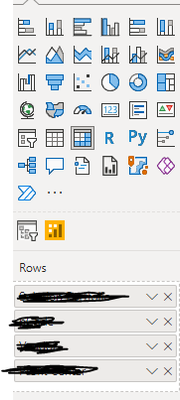
Because there is no date column in your picture, the grouping of measures is dynamic, there is no date column, how to group for date columns?
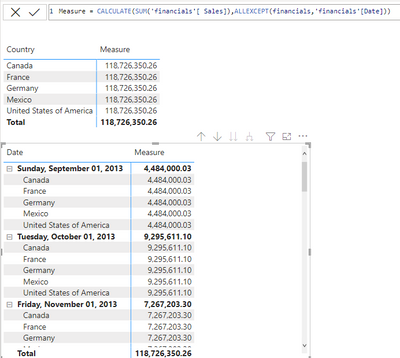
I'll give a simple example of the comparison between putting a date in the matrix versus not putting a date.
If the above one can't help you get the desired result, please provide some sample data in your tables (exclude sensitive data) with Text format and your expected result with backend logic and special examples. It is better if you can share a simplified pbix file. You can refer the following link to upload the file to the community. Thank you.
How to upload PBI in Community
Best Regards,
Community Support Team _ Yalan Wu
If this post helps, then please consider Accept it as the solution to help the other members find it more quickly.
Even putting it as you said I couldn't achieve what I want. But I found another way to do it. I used the ALLSELECTED() function like this:
The only limitation is that you must use only a single table to filter, in this case TB AFO ACT+AOP. You can use the RELATED() for this issue.
If you have recently started exploring Fabric, we'd love to hear how it's going. Your feedback can help with product improvements.
A new Power BI DataViz World Championship is coming this June! Don't miss out on submitting your entry.
| User | Count |
|---|---|
| 46 | |
| 43 | |
| 39 | |
| 19 | |
| 15 |
| User | Count |
|---|---|
| 68 | |
| 67 | |
| 31 | |
| 27 | |
| 24 |