


We've captured the moments from FabCon & SQLCon that everyone is talking about, and we are bringing them to the community, live and on-demand. Starts on April 14th. Register now
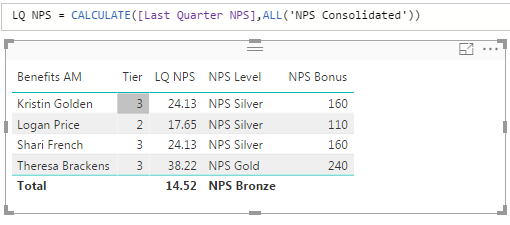
I have this table with this data:
On a different dashboard I've done the exact same thing and for the LQ NPS column it returns the overall score rather than the score of each individual person. So for this it should say 14.52 for everyone. I'm not sure where to pinpoint why this would be behaving differently?
Solved! Go to Solution.
Hi @v-huizhn-msft I made a small change to the formula to get it to work. Here is it what it now looks like:
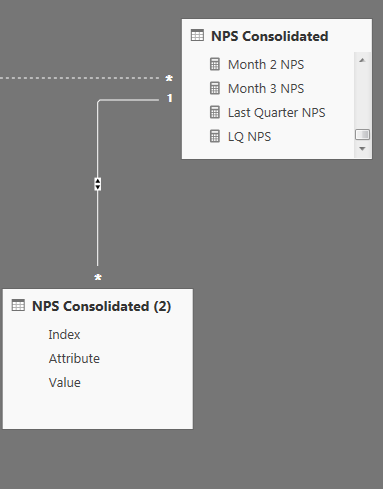
So inside my ALL, I'm referencing the table where everybody's names are consolidated. In my original 'NPS Consolidated' table, people can appear as a Flex or Cobra manager, but they tend to be the same person. I made an additional table called 'NPS Consolidated (2)' specifically for hosting the names of these managers so we can see all records together whether they are Flex or Cobra managers:
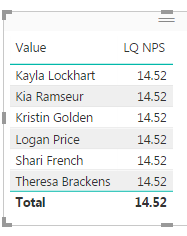
So the [LQ NPS] formula comes from my 'NPS Consolidated' table, but I was attempting to use the [Value] column from 'NPS Consolidated (2)' to display my results, thinking it would automatically pick up the ALL function since the 2 tables are related. Once I referenced the table where the names are actually consolidated together rather than where the formula is hosted, it worked fine:
Hi @Anonymous,
Do you mind share your .pbix file for troubleshooting the cause of not working? It's hard to reproduce your scenario without data.
Best Regards,
Angelia
Hi @v-huizhn-msft I've since then figured out the issue to my problem. Thanks for reaching out!
Hi @Anonymous.
Congratulations, you resolve your issue by yourself, welcome to share your workaround,or you'b better mark your reply as answer. So more people benefit from here.
Best Regards,
Angelia
Hi @v-huizhn-msft I made a small change to the formula to get it to work. Here is it what it now looks like:
So inside my ALL, I'm referencing the table where everybody's names are consolidated. In my original 'NPS Consolidated' table, people can appear as a Flex or Cobra manager, but they tend to be the same person. I made an additional table called 'NPS Consolidated (2)' specifically for hosting the names of these managers so we can see all records together whether they are Flex or Cobra managers:
So the [LQ NPS] formula comes from my 'NPS Consolidated' table, but I was attempting to use the [Value] column from 'NPS Consolidated (2)' to display my results, thinking it would automatically pick up the ALL function since the 2 tables are related. Once I referenced the table where the names are actually consolidated together rather than where the formula is hosted, it worked fine:
If you have recently started exploring Fabric, we'd love to hear how it's going. Your feedback can help with product improvements.
A new Power BI DataViz World Championship is coming this June! Don't miss out on submitting your entry.
Share feedback directly with Fabric product managers, participate in targeted research studies and influence the Fabric roadmap.
| User | Count |
|---|---|
| 53 | |
| 38 | |
| 33 | |
| 17 | |
| 17 |
| User | Count |
|---|---|
| 67 | |
| 62 | |
| 38 | |
| 34 | |
| 22 |