cancel
Showing results for 
Search instead for 
Did you mean: 

The Power BI Data Visualization World Championships is back! Get ahead of the game and start preparing now! Learn more

Reply
ali02
Frequent Visitor

ABC analysis with Slicer filter

Hi everyone,


So I have been wroking on ABC segmentation and did manage to create one. Now everytime if I need to filter my class, I have to go back again to the formula and change it. For e.g,


ABC Class = SWITCH (TRUE (),[Cumulated %]<= 0.8, "A",[Cumulated %] <= 0.95, "B","C")


Above is my DAX formula. So everytime I need to go back to the formula to change my Cumulated% value i.e. 0.8 to 0.75 for A.

I want to create a slicer filter where I can change the values right on the visuals and that would change my ABC class. I have not found anything on the internet regarding this. Any help would be highly appreciated.

1 ACCEPTED SOLUTION
Anonymous
Not applicable

Hi @ali02,


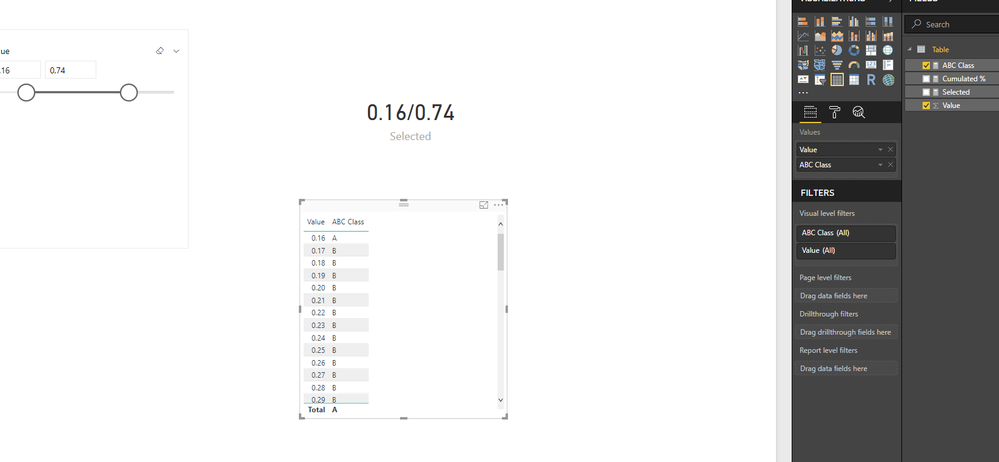
You can add new table as the source of slicer, then use result as the variables of original formula.


Sample:

Source table:

Table = GENERATESERIES(0,1,0.01)


Measure formulas:

Selected = 
var _min= MINX(ALLSELECTED('Table'),[Value])
var _max=MAXX(ALLSELECTED('Table'),[Value])
return
_min&"/"&_max


ABC Class =
VAR _min =
    MINX ( ALLSELECTED ( 'Table' ), [Value] )
VAR _max =
    MAXX ( ALLSELECTED ( 'Table' ), [Value] )
RETURN
    SWITCH ( TRUE (), [Cumulated %] <= _min, "A", [Cumulated %] <= _max, "B", "C" )

6.PNG


Regards,

Xiaoxin Sheng

View solution in original post

3 REPLIES 3
Greg_Deckler
Community Champion
Community Champion

What you want is to go to the Modeling tab and click on New Parameter.


Follow on LinkedIn
@ me in replies or I'll lose your thread!!!
Instead of a Kudo, please vote for this idea
Become an expert!: Enterprise DNA
External Tools: MSHGQM
YouTube Channel!: Microsoft Hates Greg
Latest book!:
DAX For Humans

DAX is easy, CALCULATE makes DAX hard...

Even if I do create a New Parameter, I still need to make sure that if I change my parameter values, my cumulative values changes as well as ABC Class.  


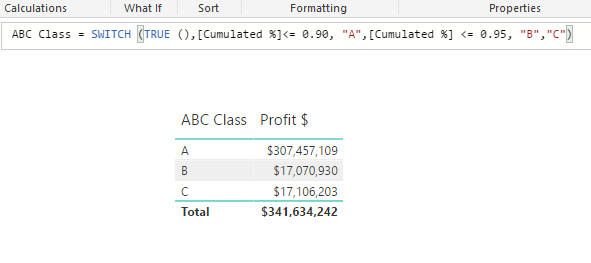
These are my initial conditions.

 pic1.PNG


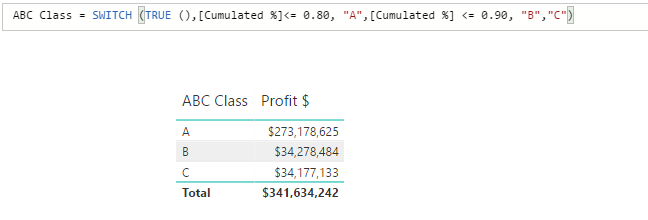
These are what I want if I change my parameters or create a slicer and filtering it. But I am not able to create something that will give me these values. I have to go back to the formula everytime to change the conditions. I want to create filter so that the user can easily change the value.


pic2.PNGpic3.PNG


Anonymous
Not applicable

Hi @ali02,


You can add new table as the source of slicer, then use result as the variables of original formula.


Sample:

Source table:

Table = GENERATESERIES(0,1,0.01)


Measure formulas:

Selected = 
var _min= MINX(ALLSELECTED('Table'),[Value])
var _max=MAXX(ALLSELECTED('Table'),[Value])
return
_min&"/"&_max


ABC Class =
VAR _min =
    MINX ( ALLSELECTED ( 'Table' ), [Value] )
VAR _max =
    MAXX ( ALLSELECTED ( 'Table' ), [Value] )
RETURN
    SWITCH ( TRUE (), [Cumulated %] <= _min, "A", [Cumulated %] <= _max, "B", "C" )

6.PNG


Regards,

Xiaoxin Sheng

Helpful resources

Announcements
November Power BI Update Carousel

Power BI Monthly Update - November 2025

Check out the November 2025 Power BI update to learn about new features.

Fabric Data Days Carousel

Fabric Data Days

Advance your Data & AI career with 50 days of live learning, contests, hands-on challenges, study groups & certifications and more!

FabCon Atlanta 2026 carousel

FabCon Atlanta 2026

Join us at FabCon Atlanta, March 16-20, for the ultimate Fabric, Power BI, AI and SQL community-led event. Save $200 with code FABCOMM.

Top Kudoed Authors