cancel
Showing results for 
Search instead for 
Did you mean: 

The Power BI Data Visualization World Championships is back! Get ahead of the game and start preparing now! Learn more

Reply
Sveina
Frequent Visitor

A measure that OFFSET a value in a measure

Hi,


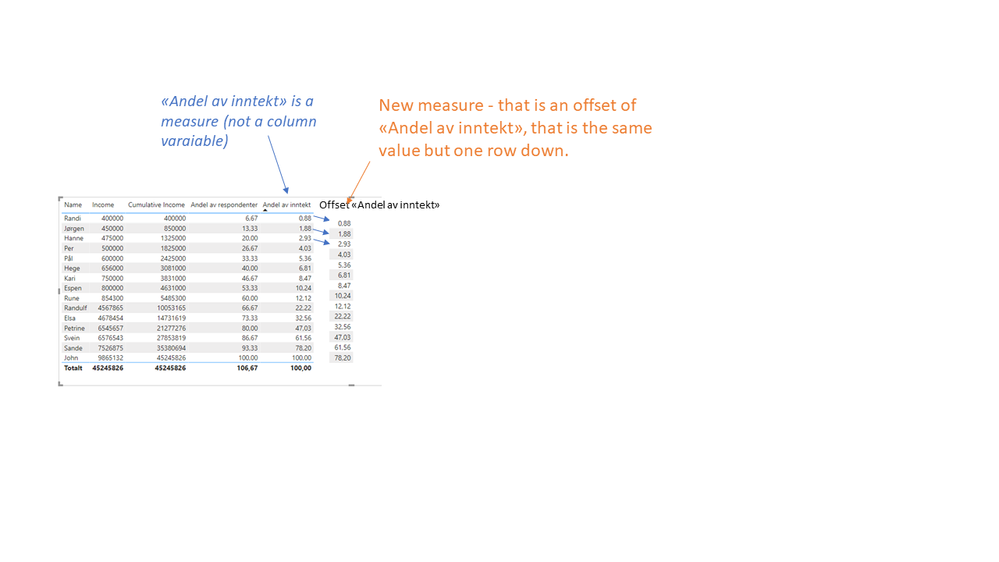
Is it possible to create a measure, that is an offset of a previous measure? 

I am trying to just move the same result one row down in my matrice. And I want it to be dynamic, so when slicers is applied it will still work. See picture below.


Any suggestions @amitchandak ...?
Thanks in advance 🙂
Offset in a measure.png

1 ACCEPTED SOLUTION
amitchandak
Super User
Super User

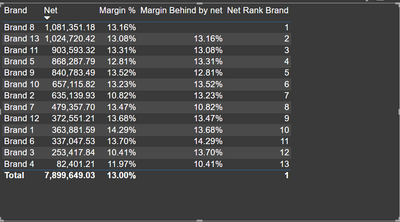
@Sveina , Try like, Magin %  by Net , trail by 1 . For more details check file attached and video link below


Margin Behind by net = if([Net Rank Brand]<>1,  CALCULATE([Margin %], WINDOW([Net Rank Brand]-1,ABS,[Net Rank Brand]-1,ABS,SUMMARIZE(ALLSELECTED('Item'[Brand]), 'Item'[Brand], "_net",[Net]),ORDERBY([_net],DESC))) , BLANK())


You will not get GT in this case 


Rank is


Net Rank Brand = rankx(ALLSELECTED('Item'[Brand]),[Net],,DESC,Dense)


amitchandak_0-1674660781344.png


I modified the approch used in this video

Power BI Window function- Pareto Analysis, 80% of sales, Order by on Measure: https://www.youtube.com/watch?v=UVxiLc_AzSs

Share with Power BI Enthusiasts: Full Power BI Video (20 Hours) YouTube
Microsoft Fabric Series 60+ Videos YouTube
Microsoft Fabric Hindi End to End YouTube

View solution in original post

2 REPLIES 2
amitchandak
Super User
Super User

@Sveina , Try like, Magin %  by Net , trail by 1 . For more details check file attached and video link below


Margin Behind by net = if([Net Rank Brand]<>1,  CALCULATE([Margin %], WINDOW([Net Rank Brand]-1,ABS,[Net Rank Brand]-1,ABS,SUMMARIZE(ALLSELECTED('Item'[Brand]), 'Item'[Brand], "_net",[Net]),ORDERBY([_net],DESC))) , BLANK())


You will not get GT in this case 


Rank is


Net Rank Brand = rankx(ALLSELECTED('Item'[Brand]),[Net],,DESC,Dense)


amitchandak_0-1674660781344.png


I modified the approch used in this video

Power BI Window function- Pareto Analysis, 80% of sales, Order by on Measure: https://www.youtube.com/watch?v=UVxiLc_AzSs

Share with Power BI Enthusiasts: Full Power BI Video (20 Hours) YouTube
Microsoft Fabric Series 60+ Videos YouTube
Microsoft Fabric Hindi End to End YouTube

Hi @amitchandak 


Thanks a lot for your help. Appreciate it a lot.


This actually works fine after I downloaded a newer version of PowerBI. I had a litte problem since your measure of Margin % was different from mine. I used a cumulatice % and that didnt work.

But what I did was to use your formula to offset the income variable, or "Net" in your example, one row down. So i just changed your forumula a bit, like this:


Offset Indeks = if([Net Rank Brand]<>1,  CALCULATE([Cumulative Income], WINDOW([Net Rank Brand]-1,ABS,[Net Rank Brand]-1,ABS,SUMMARIZE(ALLSELECTED('Item'[Brand]), 'Item'[Brand], "_net",[Net]),ORDERBY([_net],ASC))) , BLANK())


I called this measure "Offset Index", and it corresponds directly to "Margin behind by net" in your table. I just changed "Margin %" to "Cumulative income".


And then i computed a new variable "Tidligere CDF", where I use the offset function like this

Tidligere CDF = ([Offset index]/CALCULATE(SUM(DATA[Net]),ALLSELECTED()))
And magically I have a new measure that show cumulative percentage
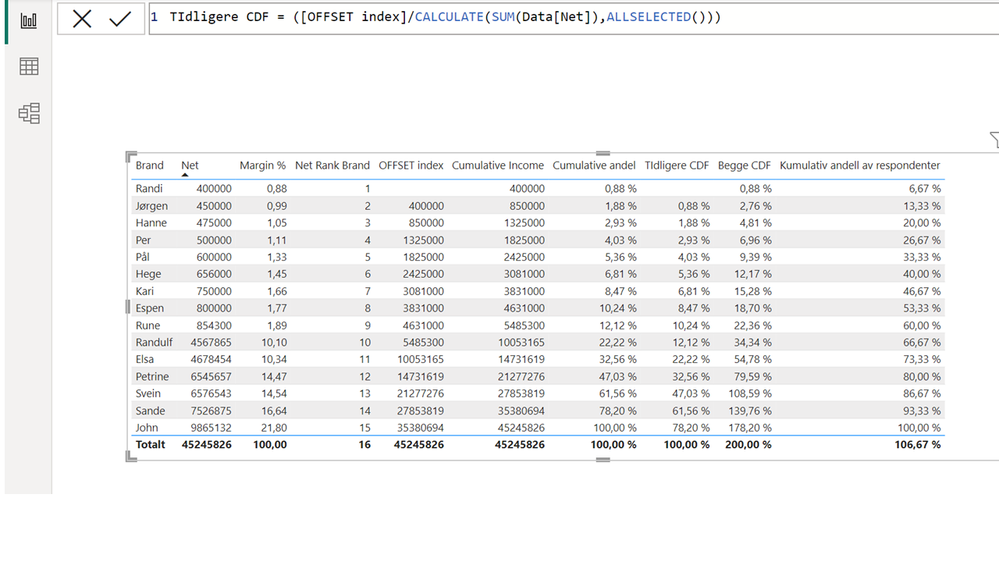
 

Reply to working offset.png


Helpful resources

Announcements
Power BI DataViz World Championships

Power BI Dataviz World Championships

The Power BI Data Visualization World Championships is back! Get ahead of the game and start preparing now!

December 2025 Power BI Update Carousel

Power BI Monthly Update - December 2025

Check out the December 2025 Power BI Holiday Recap!

FabCon Atlanta 2026 carousel

FabCon Atlanta 2026

Join us at FabCon Atlanta, March 16-20, for the ultimate Fabric, Power BI, AI and SQL community-led event. Save $200 with code FABCOMM.