This time we’re going bigger than ever. Fabric, Power BI, SQL, AI and more. We're covering it all. You won't want to miss it.
Learn moreLevel up your Power BI skills this month - build one visual each week and tell better stories with data! Get started
Hi everyone,
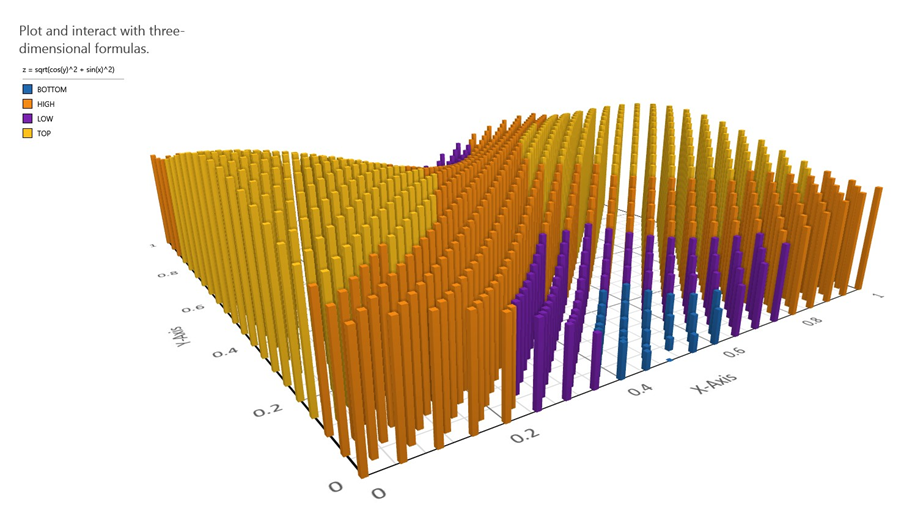
Could you help me to create a similar 3d chart like the following using Power BI? I'm a beginner!
Thanks for the help in advance!
Hi @akamari
Here is some reference for you to create this visual
https://powerbi.microsoft.com/en-us/blog/visual-awesomeness-unlocked-sanddance/
http://blog.pragmaticworks.com/power-bi-custom-visuals-sanddance
Best Regards
Maggie
Hi Maggie,
Thank you for the reply! I was looking at Sanddance! I yet couldn't find it as a solution to what I need! I also looked in other packages in Power BI. But no solution. In fact what I need is very very simple! Just to represent the data within a matrix through a 3d bar chart or a surface! Do you think you can help me further?
To be honest, it's a real mystery to me, why this platform is very weak about 3d visualization of the data, while there are really strong other points within it! I can even draw this 3d bar chart in office word!
Best regards,
Ali.
Seems like you would want to look at the Sanddance custom visual
Check out the April 2026 Power BI update to learn about new features.
Sign up to receive a private message when registration opens and key events begin.
If you have recently started exploring Fabric, we'd love to hear how it's going. Your feedback can help with product improvements.
| User | Count |
|---|---|
| 37 | |
| 28 | |
| 28 | |
| 19 | |
| 18 |
| User | Count |
|---|---|
| 66 | |
| 36 | |
| 29 | |
| 25 | |
| 24 |