cancel
Showing results for 
Search instead for 
Did you mean: 

View all the Fabric Data Days sessions on demand. View schedule

Reply
HKIndia
Helper I
Helper I

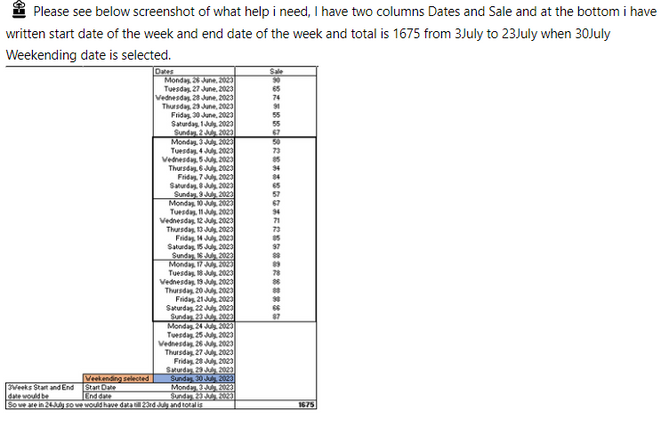
3 weeks start and end date except current week based on weekending slicer

Hi All,

Please help..!


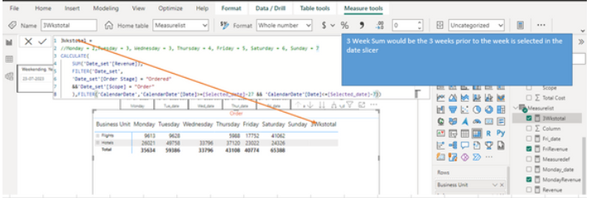
Need help with calculating "last3WeeksTotal" based on the selected Weekending date in the slicer. The formula I provided is showing blank results:


I have applied below DAX but it showing blank result :- 

3Wkstotal =
CALCULATE(
    SUM('Date_set'[Revenue]),
    FILTER('Date_set',
    'Date_set'[Order Stage] = "Ordered"
    &&'Date_set'[Scope] = "Order"
    ),FILTER('CalendarDate','CalendarDate'[Date]>=[Selected_date]-27 && 'CalendarDate'[Date]<=[Selected_date]-7))


Report link below:

https://www.dropbox.com/s/6jvwyryae34ormg/3Weeks%20Total%20issue.pbix?dl=0 

HKIndia_0-1690266652728.png


HKIndia_1-1690266712433.png


Any suggestions or corrections are welcome!


1 ACCEPTED SOLUTION
Ahmedx
Super User
Super User

pls try this


3Wkstotal = 
 VAR _dateselected = [Selected_date]
 VAR _Results =//Monday = 2,Tuesday = 3, Wednesday = 3, Thursday = 4, Friday = 5, Saturday = 6, Sunday = 7 
CALCULATE(
    SUM('Date_set'[Revenue]),
    ('Date_set'[Order Stage] ,
    'Date_set'[Scope])   in {( "Ordered","Order")}, REMOVEFILTERS(CalendarDate),   DATESBETWEEN('CalendarDate'[Date], _dateselected-27,_dateselected-7))
 RETURN
_Results
-----------------or --------------
3Wkstotal = 
 VAR _dateselected = [Selected_date]
 VAR _Results =//Monday = 2,Tuesday = 3, Wednesday = 3, Thursday = 4, Friday = 5, Saturday = 6, Sunday = 7 
CALCULATE(
    SUM('Date_set'[Revenue]),
    ('Date_set'[Order Stage] ,
    'Date_set'[Scope])   in {( "Ordered","Order")},   DATESBETWEEN('CalendarDate'[Date], _dateselected-27,_dateselected-7))
 RETURN
_Results


View solution in original post

4 REPLIES 4
Ahmedx
Super User
Super User

pls try this


3Wkstotal = 
 VAR _dateselected = [Selected_date]
 VAR _Results =//Monday = 2,Tuesday = 3, Wednesday = 3, Thursday = 4, Friday = 5, Saturday = 6, Sunday = 7 
CALCULATE(
    SUM('Date_set'[Revenue]),
    ('Date_set'[Order Stage] ,
    'Date_set'[Scope])   in {( "Ordered","Order")}, REMOVEFILTERS(CalendarDate),   DATESBETWEEN('CalendarDate'[Date], _dateselected-27,_dateselected-7))
 RETURN
_Results
-----------------or --------------
3Wkstotal = 
 VAR _dateselected = [Selected_date]
 VAR _Results =//Monday = 2,Tuesday = 3, Wednesday = 3, Thursday = 4, Friday = 5, Saturday = 6, Sunday = 7 
CALCULATE(
    SUM('Date_set'[Revenue]),
    ('Date_set'[Order Stage] ,
    'Date_set'[Scope])   in {( "Ordered","Order")},   DATESBETWEEN('CalendarDate'[Date], _dateselected-27,_dateselected-7))
 RETURN
_Results


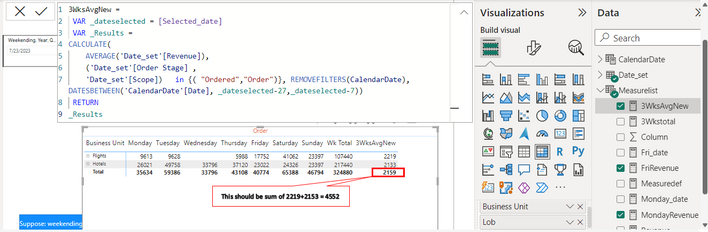
@Ahmedx  Thank you so much, I am about to accept this as solution however i have just a little query, we are summing revenue currentrly right, but if I want to apply average function. it shows wrong result.


HKIndia_1-1690301148697.png


How we can achive 4552 when we use Average funtion instead of sum. Please suggest.


it's complicated, but try writing another measure like this

fexed =
var _tbl =
SUMMARIZE('Date_set','Date_set'[Business Unit])

RETURN
SUMX(_tbl,[3WksAvgNew])

Thi @Ahmedx  Thank you for replying!


But it is showing blank after applying this measure.! as It seems too comlicated. Thanks for trying!

Helpful resources

Announcements
November Power BI Update Carousel

Power BI Monthly Update - November 2025

Check out the November 2025 Power BI update to learn about new features.

Fabric Data Days Carousel

Fabric Data Days

Advance your Data & AI career with 50 days of live learning, contests, hands-on challenges, study groups & certifications and more!

FabCon Atlanta 2026 carousel

FabCon Atlanta 2026

Join us at FabCon Atlanta, March 16-20, for the ultimate Fabric, Power BI, AI and SQL community-led event. Save $200 with code FABCOMM.

Top Solution Authors
Top Kudoed Authors