Get certified for free when you join Fabric Data Days 2026 and dive into Fabric, Power BI, SQL, AI, and other essential data skills.
Join nowJuly 7 - July 17 | Round 2 of the Power BI Dataviz World Championships. Don't miss your chance! Learn more
Greetings Power BI Ninjas!
Your expertise is needed. I have a calculated column, RuntimeHours, which convered seconds to hours. I also have a date table with connected relationship.
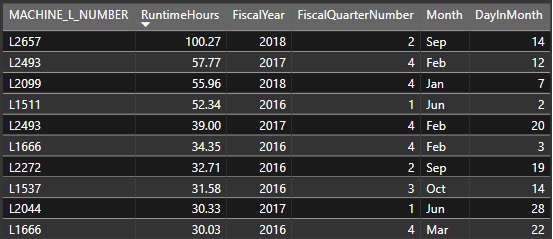
PROBLEM: I am struggling to get my data to be correct. From the sample screenshot below, RuntimeHours are > 24hrs. We obviously know that this is incorrect because there are only 24 hours in a day.
SOLUTION NEEDED: Help to get the runtime hours to calculate true to the date references:
- Day = 24hrs or less
- Month = 730hrs or less
- Quarter = 2190hrs or less
- Year = 8760hrs or less
FYI, the Calendar table references are as follows:
- DayInMonth = DAY('Calendar'[Date]) -> WHOLE NUMBER data type
- Month = FORMAT('Calendar'[Date], "MMM") -> TEXT data type
- FiscalQuarterNumber = (IF ('Calendar'[CalendarMonthNumber] < 4, 4, 'Calendar'[QuarterNumber] -1)) -> WHOLE NUMBER data type
- FiscalYear = IF('Calendar'[CalendarMonthNumber] < 4, 'Calendar'[Year] -1, 'Calendar'[Year]) -> WHOLE NUMBER data type
FYI, the RuntimeHours reference are as follows:
- RuntimeHours = (([RuntimeSeconds] / 60) / 60) -> Decimal Number -> meaning 812seconds = 0.23 hours
Any assistance to get this data correct will be greatly appreciated! THANK YOU!!
Hi @Anonymous
Where is the seconds value you want to convert to hours? What is the code for [RuntimeSeconds]? Is it a measure or a column?
Is 'RuntimeHours' supposed to be a measure? If so, where and how will you use it?
@AlB Thank you for your response. RuntimeSeconds is the raw data so it is a column and I created a calculated column to convert the seconds to hours (RuntimeHours). RuntimeHours was created as a calculated column.
I am not sure on how to create RuntmeHours as a measure. The current calculated column is as follows
RuntimeHours = (([RuntimeSeconds] / 60), 60)
Any ideas on how I should proceed?
@Anonymous,
Make sure the data in [RuntimeSeconds] are correct. You may use DAX Studio to capture queries.
Join us in Barcelona for FabCon and SQLCon, the Fabric, Power BI, SQL, and AI community event. Save €200 with code FABCMTY200.
Check out the July 2026 Power BI update to learn about new features.
Join Data Days 2026: 60 days of free live/on-demand sessions, challenges, study groups, and certification opportunities.
| User | Count |
|---|---|
| 30 | |
| 25 | |
| 25 | |
| 25 | |
| 16 |
| User | Count |
|---|---|
| 54 | |
| 32 | |
| 26 | |
| 23 | |
| 20 |