Join us at FabCon Atlanta from March 16 - 20, 2026, for the ultimate Fabric, Power BI, AI and SQL community-led event. Save $200 with code FABCOMM.
Register now!The Power BI Data Visualization World Championships is back! Get ahead of the game and start preparing now! Learn more
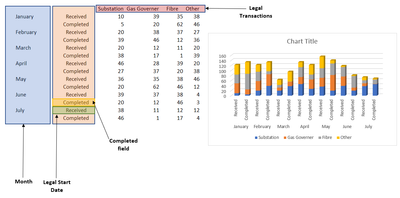
I am trying to create something similar to the below in Power BI, where I can show the difference between 'Received vs Completed' in a stacked Bar Chart.
However I would appreciate any other ideas on how to show 'Received v Completed' within Power BI.
Thank You
Solved! Go to Solution.
Hi @Anonymous
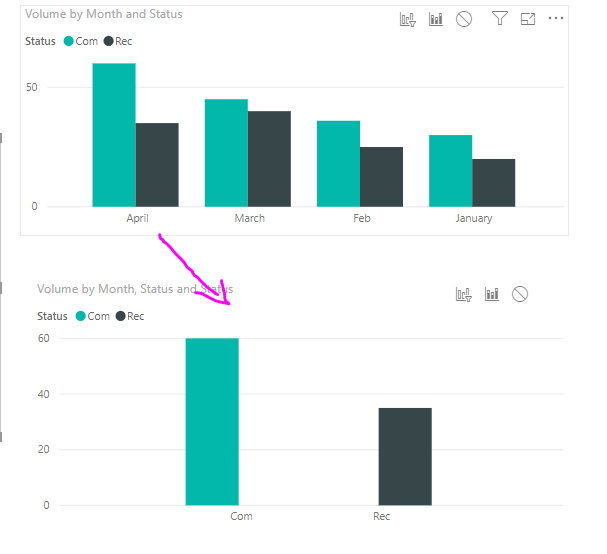
I’m not sure if you’d like to show the difference like below:
2. If you’d like to show total Rev VS total Com, drag [Status] on top, the visual shows as the first, then use drill down, get the second one.
Best regards,
Dina Ye
Hi @Anonymous
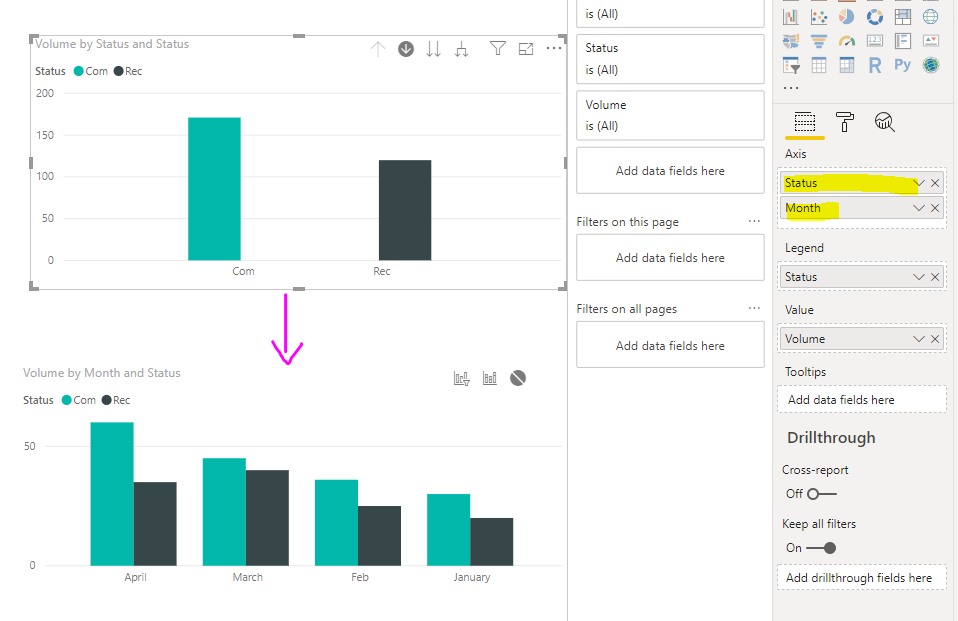
I’m not sure if you’d like to show the difference like below:
2. If you’d like to show total Rev VS total Com, drag [Status] on top, the visual shows as the first, then use drill down, get the second one.
Best regards,
Dina Ye
Hi @Anonymous
If my above post helps, could you please consider Accept it as the solution to help the other members find it more quickly. thanks!
Best regards,
Dina Ye
The Power BI Data Visualization World Championships is back! Get ahead of the game and start preparing now!
| User | Count |
|---|---|
| 38 | |
| 36 | |
| 33 | |
| 31 | |
| 28 |
| User | Count |
|---|---|
| 129 | |
| 88 | |
| 79 | |
| 68 | |
| 63 |