cancel
Showing results for 
Search instead for 
Did you mean: 

View all the Fabric Data Days sessions on demand. View schedule

Reply
NickProp28
Post Partisan
Post Partisan

2 table but differentiate with country, and filter by one slicer

Hi, Good Day to all of you.

I have 2 table (table A and table B).
Example:
Table A (Only Singapore Country)

Country     Shipment ID  Operator 

Singapore   A123               ABC

Singapore   A124               DEF

Singapore   A125               ABD


Table B (Only Chennai Country)

Country     Shipment ID  Operator 

Chennai      A546               QWE

Chennai      A678               EWQ

Chennai      A679               EQW


*Two table have same column just different by coutry, every month I will insert new data to the particular country. So I would like to separate into two table. (Understand that all include in one table will convenient, but my boss asking me to separate it).


I create a new table and link this 2 table on it (many to one)

(

TABLE = DISTINCT(
UNION(
VALUES(Chennai[Country]),
VALUES(Singapore[Coutry]
)
))
-------------------------------
So here is my question, I have my slicer and the field I put in this link table as above. So the selection have 'Chennai' and 'Singapore'.
I expect result table will be, if i select the Chennai country. It only show the Chennai data.
But the result show in this way, when i click on 'Chennai'.
 
Country     Shipment ID  Operator  

Singapore   A123               ABC

Singapore   A124               DEF

Singapore   A125               ABD

Chennai      A546               QWE

Chennai      A678               EWQ

Chennai      A679               EQW


While I click on Singapore, its show nothing but only title.


I know one of the solution is merge these two table into one, but there will become lots of rows data. (My data will be more than 150k if merge according to Country and particular month)

Other than merge table, any other solution?

Best regards.


1 ACCEPTED SOLUTION
Anonymous
Not applicable

Hi @NickProp28 ,

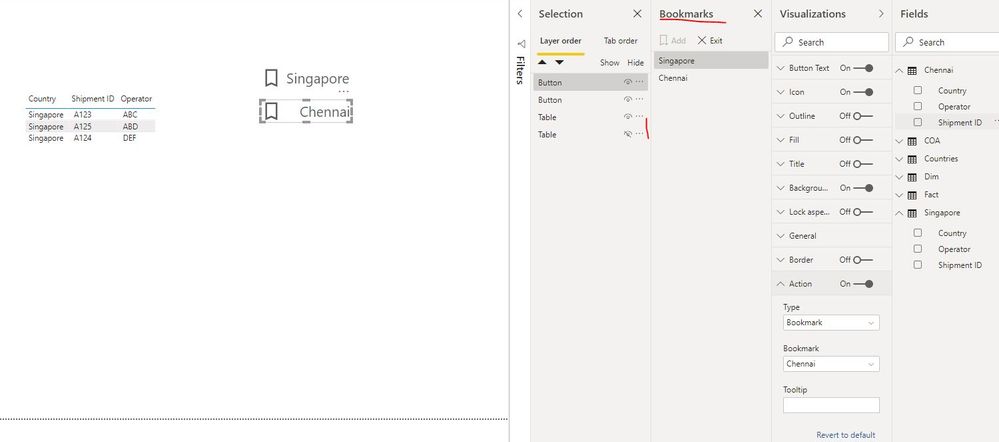
The easiest method is to merge these country tables into one table in Power Query Editor, but it seems you will not do it considering the large amount of data or other factors... Here is one workaround: create multiple visuals and bookmarks to achieve your requirement as below screen shot. However, this method will involves more tasks...

bookmarks.JPG

You can refer this blog for more details.

Best Regards

Rena

View solution in original post

2 REPLIES 2
Anonymous
Not applicable

Hi @NickProp28 ,

The easiest method is to merge these country tables into one table in Power Query Editor, but it seems you will not do it considering the large amount of data or other factors... Here is one workaround: create multiple visuals and bookmarks to achieve your requirement as below screen shot. However, this method will involves more tasks...

bookmarks.JPG

You can refer this blog for more details.

Best Regards

Rena

Dear @Anonymous ,


Thanks for any help you provide in resolving this issues.


Best regards.

Helpful resources

Announcements
November Power BI Update Carousel

Power BI Monthly Update - November 2025

Check out the November 2025 Power BI update to learn about new features.

Fabric Data Days Carousel

Fabric Data Days

Advance your Data & AI career with 50 days of live learning, contests, hands-on challenges, study groups & certifications and more!

FabCon Atlanta 2026 carousel

FabCon Atlanta 2026

Join us at FabCon Atlanta, March 16-20, for the ultimate Fabric, Power BI, AI and SQL community-led event. Save $200 with code FABCOMM.

Top Solution Authors
Top Kudoed Authors