cancel
Showing results for 
Search instead for 
Did you mean: 

The Power BI Data Visualization World Championships is back! Get ahead of the game and start preparing now! Learn more

Reply
Xavier
Regular Visitor

2 fact tables with 2 dimensions tables ... I'm turning around

Hello,

I have two dimension tables : Calendrar, Customers

I have two fact tables using this two dimensions : Fact table 1 & Fact table 2

If I created relationsships between this table, I have an inactive link (circle) : 

Calendar & Customers  --> Fact table 1 : OK 

Calendar & Custimers --> Fact table 2 : 1 link active, the other is not

Do you have a tips for me ? Should I duplicate a dimension table for example ?

Thank you very much.


1 ACCEPTED SOLUTION
jdbuchanan71
Super User
Super User

The relationship direction between 'Fact table 1' and 'Calendar' is wrong.  It should be 1:* (one to many) from 'Calendar' to 'Fact table 1'.  You should also only join to your calendar table using the date field.  Joining to fields that have things like Q1-22 or FY-2019 causes problems that you are running into.

You might have to add a real date filed to each of your Fact table.  If the period field is month-year for example, you make a field that is the first dat of the month for that year in the fact table, then join that to your calendar table.

View solution in original post

5 REPLIES 5
jdbuchanan71
Super User
Super User

The relationship direction between 'Fact table 1' and 'Calendar' is wrong.  It should be 1:* (one to many) from 'Calendar' to 'Fact table 1'.  You should also only join to your calendar table using the date field.  Joining to fields that have things like Q1-22 or FY-2019 causes problems that you are running into.

You might have to add a real date filed to each of your Fact table.  If the period field is month-year for example, you make a field that is the first dat of the month for that year in the fact table, then join that to your calendar table.

jdbuchanan71
Super User
Super User

Can you show me a picture of your model?

Xavier
Regular Visitor

I tried to ... but Power BI not allowed it : "Ambiguity between Customers & Fact table 2" 

jdbuchanan71
Super User
Super User

@Xavier 

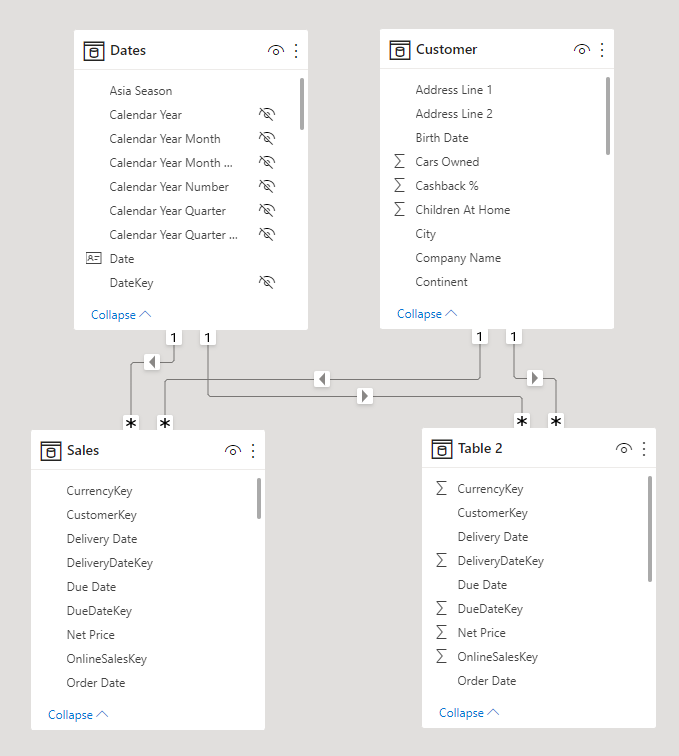
Your model view should look like this.

jdbuchanan71_0-1655212610593.png

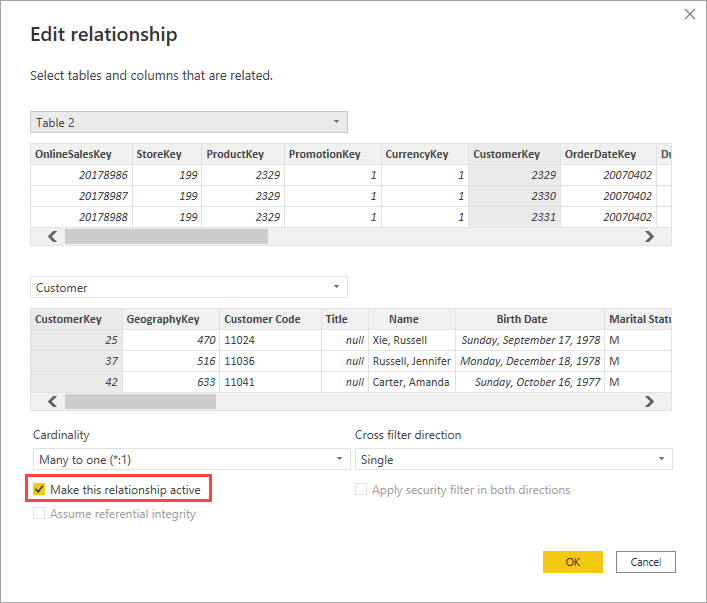
If one of the relationships is inactive you can double-click it to open the dialog to turn it on.

jdbuchanan71_1-1655212683535.png


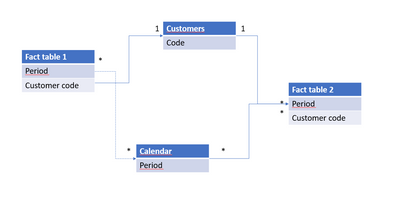
Here is the model with the inactive relationship

Xavier_0-1655222109214.png


Helpful resources

Announcements
Power BI DataViz World Championships

Power BI Dataviz World Championships

The Power BI Data Visualization World Championships is back! Get ahead of the game and start preparing now!

November Power BI Update Carousel

Power BI Monthly Update - November 2025

Check out the November 2025 Power BI update to learn about new features.

FabCon Atlanta 2026 carousel

FabCon Atlanta 2026

Join us at FabCon Atlanta, March 16-20, for the ultimate Fabric, Power BI, AI and SQL community-led event. Save $200 with code FABCOMM.