Hi Community
I have 2 tables both with different Supplier Data (1 = Finance, 2 = Performance Data).
I am trying to display spend with supplier and overall score as a table (although I also wish to display in a bubble chart).
I am unable to join the 2 sets of data as there is Ambiguity between tables (Circular reference) when I try and get both tables to reference the common tables (Date and Supplier Names)
I believe i may need to create a calculated table to acheive this, but are struggling.
They share the following tables which are causing the circular reference
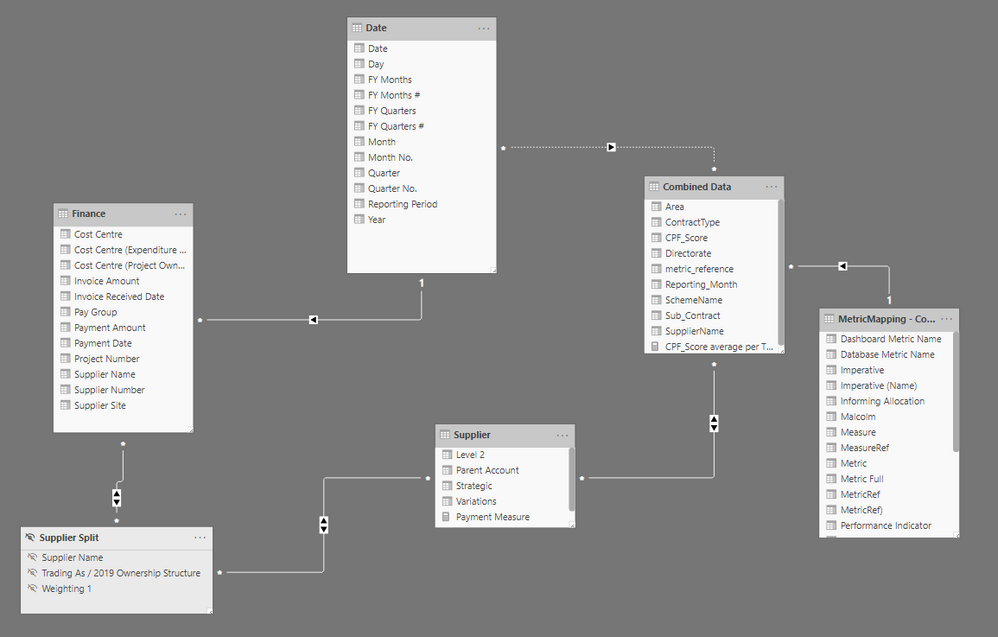

Both tables have individual measures (below)
Finance = Weighted calucaltion
Payment Measure = SUMX ( VALUES ( 'Supplier Split'[Supplier Name]),
calculate(
    sum(Finance[Payment Amount])*
        min('Supplier Split'[Weighting 1])

        )
)
Performance Data = Average Score By Group
Average of CPF_Score average per Theme (C) =
AVERAGEX(
	KEEPFILTERS(VALUES('MetricMapping - Contract Status'[Theme (C)])),
	CALCULATE(AVERAGE('Combined Data'[CPF_Score]))
)


