cancel
Showing results for 
Search instead for 
Did you mean: 

The Power BI Data Visualization World Championships is back! Get ahead of the game and start preparing now! Learn more

Reply
fjmocke
Advocate I
Advocate I

12 Month Moving Average of Measure with filter

I have tried multiple online sources to build a 12 month roling average, with no success.  The 'New Quick Measure' option also did not work for me.


I have a measure called Availability.  The code is as follows:

Availability = CALCULATE(SUM(ShiftEvents[DurationInHours]),FILTER(ShiftEvents,ShiftEvents[Level_3_Code]="T200")) 
/
CALCULATE(SUM(ShiftEvents[DurationInHours]),FILTER(ShiftEvents,ShiftEvents[Level_2_Code]="T100"))

The following two tables exist:


Shifts Table

  • ShiftDate
  • MonthDate

ShiftEvents Table

  • ShiftDate,
  • DurationInHours
  • Leve_1_Code,
  • Leve_2_Code,
  • Leve_3_Code,
  • Leve_4_Code,
  • Leve_5_Code

The underlined columns have a one to many relationship.


'ShiftEvents' table has a date column called 'ShiftDate'.  This column is linked to the 'ShiftDate' column in a a table called 'Shifts'.  The 'Shifts' table is where the 'MonthDate' column exists in order to aggregate/slice data via Month.


In summary, I need to create a measure that takes the data from Availability, and construct a 12 month moving average by using the 'MonthDate' column in the 'Shifts' table.


Any help will be appreciated!

1 ACCEPTED SOLUTION
v-yulgu-msft
Microsoft Employee
Microsoft Employee

Hi @fjmocke,


I would suggest you calculate Availability via calculated column.


In ShiftEvents Table, please add:

MonthNo = MONTH('ShiftEvents Table'[ShiftDate])

Availability col =
 (
    CALCULATE (
        SUM ( 'ShiftEvents Table'[DurationInHours] ),
        FILTER (
            ALLEXCEPT ( 'ShiftEvents Table', 'ShiftEvents Table'[MonthNo] ),
            'ShiftEvents Table'[Leve_3_Code] = "T200"
        )
    )
        / CALCULATE (
            SUM ( 'ShiftEvents Table'[DurationInHours] ),
            FILTER (
                ALLEXCEPT ( 'ShiftEvents Table', 'ShiftEvents Table'[MonthNo] ),
                'ShiftEvents Table'[Leve_2_Code] = "T100"
            )
        )
)
    / CALCULATE (
        COUNT ( 'ShiftEvents Table'[ShiftDate] ),
        ALLEXCEPT ( 'ShiftEvents Table', 'ShiftEvents Table'[MonthNo] )
    )

Then, create measure like below:

Moving average availability =
CALCULATE (
    SUM ( 'ShiftEvents Table'[Availability col] ),
    FILTER (
        ALL ( 'Shifts table' ),
        'Shifts table'[MonthDate] <= MAX ( 'Shifts table'[MonthDate] )
            && 'Shifts table'[MonthDate]
                > MAX ( 'Shifts table'[MonthDate] ) - 3
    )
)
    / 3
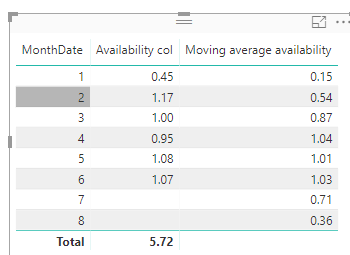
1.PNG


Regards,

Yuliana Gu

Community Support Team _ Yuliana Gu
If this post helps, then please consider Accept it as the solution to help the other members find it more quickly.

View solution in original post

1 REPLY 1
v-yulgu-msft
Microsoft Employee
Microsoft Employee

Hi @fjmocke,


I would suggest you calculate Availability via calculated column.


In ShiftEvents Table, please add:

MonthNo = MONTH('ShiftEvents Table'[ShiftDate])

Availability col =
 (
    CALCULATE (
        SUM ( 'ShiftEvents Table'[DurationInHours] ),
        FILTER (
            ALLEXCEPT ( 'ShiftEvents Table', 'ShiftEvents Table'[MonthNo] ),
            'ShiftEvents Table'[Leve_3_Code] = "T200"
        )
    )
        / CALCULATE (
            SUM ( 'ShiftEvents Table'[DurationInHours] ),
            FILTER (
                ALLEXCEPT ( 'ShiftEvents Table', 'ShiftEvents Table'[MonthNo] ),
                'ShiftEvents Table'[Leve_2_Code] = "T100"
            )
        )
)
    / CALCULATE (
        COUNT ( 'ShiftEvents Table'[ShiftDate] ),
        ALLEXCEPT ( 'ShiftEvents Table', 'ShiftEvents Table'[MonthNo] )
    )

Then, create measure like below:

Moving average availability =
CALCULATE (
    SUM ( 'ShiftEvents Table'[Availability col] ),
    FILTER (
        ALL ( 'Shifts table' ),
        'Shifts table'[MonthDate] <= MAX ( 'Shifts table'[MonthDate] )
            && 'Shifts table'[MonthDate]
                > MAX ( 'Shifts table'[MonthDate] ) - 3
    )
)
    / 3

1.PNG


Regards,

Yuliana Gu

Community Support Team _ Yuliana Gu
If this post helps, then please consider Accept it as the solution to help the other members find it more quickly.

Helpful resources

Announcements
Power BI DataViz World Championships

Power BI Dataviz World Championships

The Power BI Data Visualization World Championships is back! Get ahead of the game and start preparing now!

November Power BI Update Carousel

Power BI Monthly Update - November 2025

Check out the November 2025 Power BI update to learn about new features.

FabCon Atlanta 2026 carousel

FabCon Atlanta 2026

Join us at FabCon Atlanta, March 16-20, for the ultimate Fabric, Power BI, AI and SQL community-led event. Save $200 with code FABCOMM.